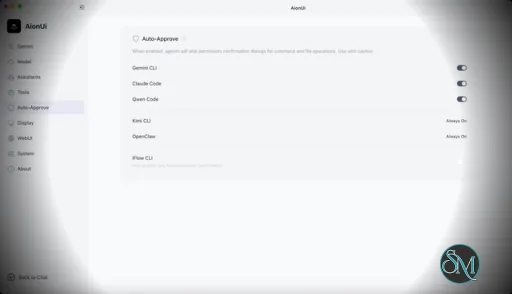
AionUi is a cross platform desktop application that transforms command line AI agents into an intuitive graphical interface. It detects locally installed AI CLI tools and presents them in a structured environment where users can manage conversations, sessions, and files more efficiently.
The software is open source, allowing users to customize and extend its functionality according to their workflow requirements.
Download AionUI v2.1.20 - Software Mirrors |
|---|
Download AionUI v2.1.20
for Windows 64bit (exe) | 254.99 MB Download AionUI v2.1.20
for Windows ARM64 (exe) | 233.13 MB | Download AionUI v2.1.20
for macOS Intel (zip) | 425.42 MB Download AionUI v2.1.20
for macOS Intel (dmg) | 416.77 MB Download AionUI v2.1.20
for macOS ARM64 (zip) | 421.48 MB Download AionUI v2.1.20
for macOS ARM64 (dmg) | 412.89 MB | Download AionUI v2.1.20
for Linux ARM64 (deb) | 364.56 MB Download AionUI v2.1.20
for Linux 64bit (deb) | 382.16 MB |
Highlights
⭐ Meet the AionUi Butler — your built-in assistant for AionUi itself
 This release bundles AionCore v0.1.31, which introduces a brand-new built-in assistant: the AionUi Butler. Instead of digging through settings menus, you can now just talk to it in plain language to manage AionUi itself — across three areas:
- Configure — create and edit assistants, attach skills, manage MCP servers and LLM providers, and change app/UI settings, all by asking.
- Diagnose — when something isn't working, the Butler can inspect your conversations, read logs, and check the health of your providers, scheduled tasks, teams, and MCP connections to tell you what went wrong.
- Remote access — ask it to put your local WebUI online and it walks you through a one-click public link (via an automatic Cloudflare tunnel) — no networking knowledge needed, no jargon. It even sets everything up and verifies the link works before handing it to you.
Just pick the AionUi Butler assistant and start chatting — it's the easiest way to set up, fix, and share your AionUi.
Smarter Update Notifications
- Updates no longer interrupt you with a blocking pop-up. New versions now appear as a quiet card in the bottom-right corner that you can dismiss or minimize and keep working.
- Downloads are smarter: repeated download requests no longer pile up, you can truly cancel a download in progress, and an already-downloaded update is remembered so you don't have to fetch it again.
Cleaner Model & Thinking Controls
- The thinking-level (thought depth) selector now lives directly inside the header model menu for ACP and Aion CLI conversations, so picking a model and its reasoning level is one tidy step instead of two separate controls.
Team Mode Reliability
- Team conversations stay in sync more reliably: queued team messages are tracked correctly, and a turn's status clears properly when a teammate finishes.
- When you upgrade a solo chat into a team, handoff messages now wait for the original conversation to finish its turn before being delivered, preventing dropped or out-of-order messages.
Codex Image Handling
- Images generated in Codex ACP conversations now display inline in tool cards and the View Steps summary, with a lightweight hover-to-download button. Oversized raw output is trimmed automatically so previews load cleanly.
Bug Fixes
- Fixed a wide empty gap that appeared above the list on the assistant management page.
What's Changed- chore(docs): update WeChat group QR code to wx-12 by @IceyLiu in https://github.com/iOfficeAI/AionUi/pull/3343
- 优化 Codex ACP 图片预览与下载 by @Jassy930 in https://github.com/iOfficeAI/AionUi/pull/2935
- fix(assistant): remove leftover gap above assistant list by @IceyLiu in https://github.com/iOfficeAI/AionUi/pull/3344
- feat(team): handle queued team runtime metadata by @piorpua in https://github.com/iOfficeAI/AionUi/pull/3349
- fix(team): wait for solo turn before handoff queue drain by @piorpua in https://github.com/iOfficeAI/AionUi/pull/3353
- feat(update): add singleton update notification by @TCP404 in https://github.com/iOfficeAI/AionUi/pull/3351
- feat(agent): combine header model thinking selector by @piorpua in https://github.com/iOfficeAI/AionUi/pull/3358
- chore: bump version to 2.1.20 by @piorpua in https://github.com/iOfficeAI/AionUi/pull/3359
Full Changelog: https://github.com/iOfficeAI/AionUi/compare/v2.1.19...v2.1.20 |
Key Features
Multi Agent Support
AionUi allows users to run multiple AI sessions simultaneously. Each session maintains its own context, enabling parallel workflows without cross interference.
Modern Chat Interface
The application provides a clean and organized chat environment. Users can scroll through conversation history, manage session tabs, and interact with AI responses in a visually structured format.
Smart File Management
AionUi includes drag and drop support, file previews, and structured file browsing. This improves productivity when working with code, documents, or AI generated content.
Multi Model Compatibility
The software supports various AI models through local or API based configurations. Users can switch between models depending on task requirements.
Session Control and Workflow Tools
Users can manage sessions independently, review outputs, and maintain organized AI workflows. This structure helps reduce clutter when working on complex tasks.
Cross Platform Availability
AionUi runs on major operating systems, ensuring accessibility for developers working in different environments.
Ease of Use
The interface is designed to simplify complex AI workflows. While some familiarity with AI tools is helpful, the graphical layout significantly reduces the learning curve compared to pure command line usage.
Navigation is intuitive, and core features are accessible without excessive configuration.
Performance and Compatibility
AionUi operates efficiently as a desktop application. Performance depends partly on the underlying AI services or APIs being used, but the interface itself remains responsive during normal use.
Compatibility with standard AI command line tools ensures flexibility for technical users.
Final Verdict
AionUi is a powerful desktop interface for managing AI command line tools in a structured and visual way. Its ability to handle multiple sessions, integrate different models, and organize workflows makes it a valuable productivity solution for advanced users.
For professionals seeking greater control and efficiency in AI driven projects, AionUi delivers a practical and modern solution.
AionUi is a free and open source desktop application that provides a modern graphical interface for command line AI tools. It is designed to simplify AI workflows by replacing terminal based interaction with a visual environment that supports multiple AI models, parallel sessions, and productivity focused features. AionUi is suitable for developers, researchers, and advanced users who want a unified way to manage AI driven tasks.
Post a Comment/Report Broken Link: