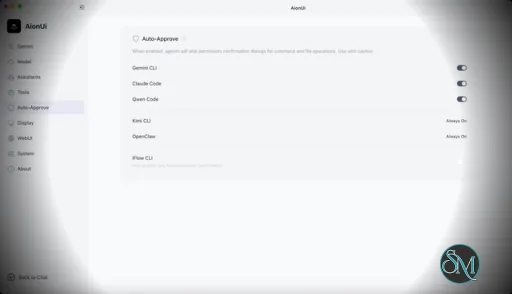
AionUi is a cross platform desktop application that transforms command line AI agents into an intuitive graphical interface. It detects locally installed AI CLI tools and presents them in a structured environment where users can manage conversations, sessions, and files more efficiently.
The software is open source, allowing users to customize and extend its functionality according to their workflow requirements.
Download AionUI v2.1.19 - Software Mirrors |
|---|
Download AionUI v2.1.19
for Windows 64bit (exe) | 254.78 MB Download AionUI v2.1.19
for Windows ARM64 (exe) | 233.09 MB | Download AionUI v2.1.19
for macOS Intel (zip) | 425.19 MB Download AionUI v2.1.19
for macOS Intel (dmg) | 416.5 MB Download AionUI v2.1.19
for macOS ARM64 (zip) | 421.27 MB Download AionUI v2.1.19
for macOS ARM64 (dmg) | 412.69 MB | Download AionUI v2.1.19
for Linux ARM64 (deb) | 364.39 MB Download AionUI v2.1.19
for Linux 64bit (deb) | 381.94 MB |
Highlights
This release sharpens team mode and assistants, and fixes Office preview on web-server deployments.
Team Mode
- Stop controls are now slot-scoped: pausing one teammate no longer cancels the whole team, and each pane's send box is gated independently.
- Team chats now prefer the assistant's identity (avatar/name) when one is set, and the team workspace display correctly prefers the persisted team workspace, falling back to the leader's only when empty.
Assistants
- Fixed assistant cron and Guid flows: cron tasks now show the right assistant avatar/name, selected skills are kept on Aionrs conversations, and assistant metadata is preserved through team creation.
- Removed leftover Star Office UI remnants from the assistant area.
Auto-Updates
- Stable auto-updates now read their metadata from the CDN instead of the GitHub API, for more reliable update checks and downloads, plus a desktop "report installation diagnostics" action next to "download latest" when an install looks broken.
Web-Server Deployment Fixes
- Office (PPT/Word/Excel/CSV) preview now works on Linux server deployments — the auto-installed officecli component requires libicu, which Debian-based images (including the runtime base) don't ship, so previews were broken until now.
- When officecli is missing or fails to install in web mode, AionUi now shows the exact server-side install command instead of pointing remote users at the wrong machine.
Voice Input
- Fixed a 2.1.18 regression where a custom OpenAI-compatible STT endpoint that can't stream returned "No speech detected" — recording now keeps going and falls back correctly when streaming fails to establish.
Other Improvements
- ACP runtime model, mode, and thought-level selectors now reflect the options the backend actually advertises, and remember your preference.
- Windows: local CLI agents launched from the desktop/start menu are now detected reliably (the GUI process PATH is hydrated from registry and shell profiles before startup).
- Disabled custom agents stay visible (greyed, with a working re-enable toggle) in Settings → Agents instead of disappearing entirely.
- The "AionUi" wordmark in the sidebar now acts as a back-to-chat / home control.
- The AI message copy row no longer flickers mid-stream — it appears once the reply finishes.
What's Changed
- fix(stt): keep recording when streaming fails before it establishes by @szafranski in https://github.com/iOfficeAI/AionUi/pull/3317
- feat(preview): server-side install guidance for officecli errors in web mode by @lornestack in https://github.com/iOfficeAI/AionUi/pull/3310
- fix(agents): keep disabled custom agents visible in settings by @szafranski in https://github.com/iOfficeAI/AionUi/pull/3319
- feat(layout): make sider wordmark a back-to-chat control in settings by @szafranski in https://github.com/iOfficeAI/AionUi/pull/3320
- fix(docker): install libicu so officecli preview works on Linux server deployments by @lornestack in https://github.com/iOfficeAI/AionUi/pull/3323
- feat(acp): add observed config option selectors by @piorpua in https://github.com/iOfficeAI/AionUi/pull/3324
- feat(update): use CDN metadata for stable auto updates by @TCP404 in https://github.com/iOfficeAI/AionUi/pull/3244
- fix(startup): hydrate windows path for cli detection by @kaizhou-lab in https://github.com/iOfficeAI/AionUi/pull/3308
- fix(assistant): remove star office ui remnants by @kaizhou-lab in https://github.com/iOfficeAI/AionUi/pull/3329
- feat(desktop): report installation integrity diagnostics by @TCP404 in https://github.com/iOfficeAI/AionUi/pull/3333
- feat(team): support slot-scoped stop controls by @piorpua in https://github.com/iOfficeAI/AionUi/pull/3334
- polish(conversation): defer AI copy row until streaming ends by @IceyLiu in https://github.com/iOfficeAI/AionUi/pull/3337
- fix: repair assistant cron and guid metadata flows by @kaizhou-lab in https://github.com/iOfficeAI/AionUi/pull/3336
- fix(team): prefer assistant avatars in team chats by @kaizhou-lab in https://github.com/iOfficeAI/AionUi/pull/3338
- fix: align team workspace display fallback by @piorpua in https://github.com/iOfficeAI/AionUi/pull/3340
- chore: bump version to 2.1.19 by @piorpua in https://github.com/iOfficeAI/AionUi/pull/3341
Full Changelog: https://github.com/iOfficeAI/AionUi/compare/v2.1.18...v2.1.19 |
Key Features
Multi Agent Support
AionUi allows users to run multiple AI sessions simultaneously. Each session maintains its own context, enabling parallel workflows without cross interference.
Modern Chat Interface
The application provides a clean and organized chat environment. Users can scroll through conversation history, manage session tabs, and interact with AI responses in a visually structured format.
Smart File Management
AionUi includes drag and drop support, file previews, and structured file browsing. This improves productivity when working with code, documents, or AI generated content.
Multi Model Compatibility
The software supports various AI models through local or API based configurations. Users can switch between models depending on task requirements.
Session Control and Workflow Tools
Users can manage sessions independently, review outputs, and maintain organized AI workflows. This structure helps reduce clutter when working on complex tasks.
Cross Platform Availability
AionUi runs on major operating systems, ensuring accessibility for developers working in different environments.
Ease of Use
The interface is designed to simplify complex AI workflows. While some familiarity with AI tools is helpful, the graphical layout significantly reduces the learning curve compared to pure command line usage.
Navigation is intuitive, and core features are accessible without excessive configuration.
Performance and Compatibility
AionUi operates efficiently as a desktop application. Performance depends partly on the underlying AI services or APIs being used, but the interface itself remains responsive during normal use.
Compatibility with standard AI command line tools ensures flexibility for technical users.
Final Verdict
AionUi is a powerful desktop interface for managing AI command line tools in a structured and visual way. Its ability to handle multiple sessions, integrate different models, and organize workflows makes it a valuable productivity solution for advanced users.
For professionals seeking greater control and efficiency in AI driven projects, AionUi delivers a practical and modern solution.
AionUi is a free and open source desktop application that provides a modern graphical interface for command line AI tools. It is designed to simplify AI workflows by replacing terminal based interaction with a visual environment that supports multiple AI models, parallel sessions, and productivity focused features. AionUi is suitable for developers, researchers, and advanced users who want a unified way to manage AI driven tasks.
Post a Comment/Report Broken Link: