Zortam Mp3 Media Studio is an all-in-one MP3 organizer and metadata editor designed to help you clean up and manage your music collection. It supports batch processing, automatic tag retrieval from online databases, and multimedia enhancements like cover art and lyrics embedding.
Whether you’re a casual listener or a serious music collector, this MP3 tagging software gives you granular control over your digital tracks.
Download Zortam Mp3 Media Studio - Software Mirrors | |
|---|---|
Key Features of Zortam Mp3 Media Studio
Automatic MP3 Tagging
One of the standout features of Zortam Mp3 Media Studio is its automatic tagging engine. The software can scan your music files, identify missing or incorrect metadata, and update tags using information from online music databases. This includes:
Artist
Title
Album
Year
Genre
Automatic tagging saves hours compared to manual editing, especially for large libraries.
Batch Tag Editing
You can edit MP3 tags in bulk, which is perfect for cleaning up entire albums at once. Batch processing lets you apply changes to thousands of files with just a few clicks.
Cover Art and Lyrics Embedding
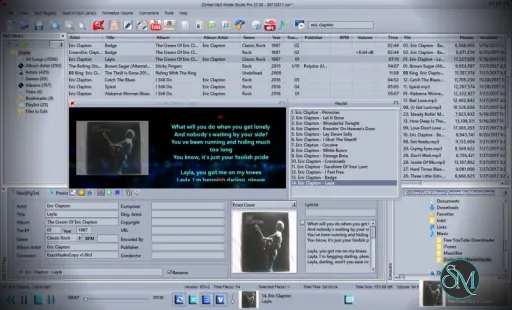
Zortam enables you to add or update cover images and embed lyrics directly into MP3 tags. This enhances playback on media players that display album art or show lyrics.
Music Library Organizer
The built-in music organizer helps you sort and view your collection by artist, album, genre, year, and more. You can also rename files based on tag information using customizable templates.
MP3 Player and Playlist Manager
Zortam Mp3 Media Studio includes a simple MP3 player and playlist manager. This lets you preview tracks while editing tags and organize playlists without opening another application.
Create ID3 Tags
Edit and create ID3v1, ID3v2, and custom tags manually. You can also fix broken or inconsistent tags to improve media player compatibility.
Performance and Usability
Zortam Mp3 Media Studio is generally responsive and handles large libraries effectively. Scanning and tagging thousands of files may take some time, but the workflow is smooth once the scan begins.
The user interface is functional and straightforward, with panels for browsing folders, editing tags, and viewing metadata. While not modern in design, it is intuitive enough for most users.
Pros and Cons
Pros
Strong automatic MP3 tagging
Batch editing for efficiency
Lyrics and cover art embedding
Music library organizer included
Works with large collections
Cons
Interface feels dated compared to modern apps
Some online tag matches may need manual correction
Limited audio playback features
Final Verdict
Zortam Mp3 Media Studio remains a reliable MP3 tagging and music organization tool. With strong automatic tagging, batch editing, and embedded cover art and lyrics features, it delivers excellent value for music fans managing large collections.
For efficient and comprehensive MP3 metadata management, Zortam Mp3 Media Studio is a tool worth considering.
This software shines for users looking to clean up music libraries, automatically tag tracks, and organize large MP3 collections without fuss.
Developer:
Zortam.com
Operating System:
Windows
Date Added:
2026-05-21T16:16:02.063Z
Categories:
Post a Comment/Report Broken Link: