ytdlp-interface has become a favorite among users who want the power of yt-dlp without the complexity of command line tools. This desktop application provides a clear and intuitive interface that brings video and audio downloading to a wider audience. Whether you want to archive streaming content, extract audio, or manage batch downloads, ytdlp-interface makes the entire workflow simple and efficient.
Download ytdlp-interface v2.19.1 |
|---|
Download ytdlp-interface v2.19.1 for Windows 64bit Download ytdlp-interface v2.19.1 for Windows 7 64bit |
ytdlp-interface v2.19.1 Release Notes:Changes
This version fixes two long standing issues caused by brain farts of my part. It turns out that the interface lag when downloading playlists was caused by the inefficient way the file progress was drawn on the progress bar (repeated calls to GetPixel and SetPixel). That's now been replaced by a single call to a much more performant GUI library function. Also, the program can now get info for all playlist URLs without having to know in advance that they point to a playlist (that requirement was due to my misunderstanding of the -J or --dump-single-json argument). |
What Makes ytdlp-interface Stand Out
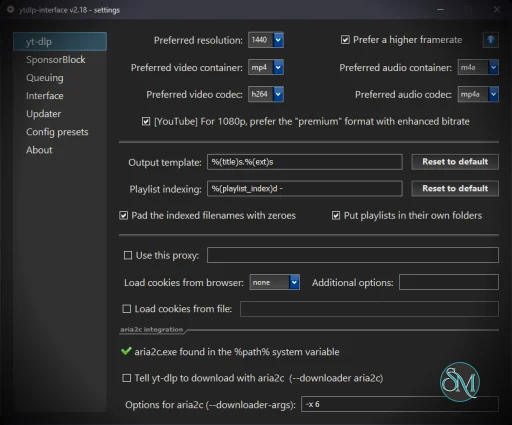
One of the biggest advantages of ytdlp-interface is that it maintains the full capability of yt-dlp while providing a layout anyone can understand. Instead of typing long commands, users can select video formats, tweak quality options, and configure output paths with a few clicks. The application supports a wide range of websites and streaming platforms thanks to the yt-dlp engine, so versatility is never an issue.
Clean and Efficient User Experience
The interface is modern, lightweight, and responsive. Everything you need is placed logically. URL input, format selection, metadata management, and custom parameters are all accessible without feeling cluttered. Even advanced features such as post processing and merging formats are handled behind the scenes in an effortless manner. This makes ytdlp-interface ideal for both beginners and experienced users who want more convenience.
Performance and Features
ytdlp-interface is designed for speed and stability. Because it uses the yt-dlp core directly, downloads benefit from the latest extraction improvements and compatibility updates. Users can access features such as:
Video and audio format selection
Automatic metadata tagging
Playlist and batch downloading
Subtitles extraction
Thumbnail embedding
Advanced post processing options
Despite its rich feature set, the program remains easy to use and does not overwhelm newcomers.
Perfect for Productivity Focused Users
Anyone who downloads online content frequently will appreciate how much time ytdlp-interface saves. Instead of bringing up the terminal or memorizing flags, users can build a customized workflow inside the app. The tool is a strong companion for media collectors, educators, researchers, and casual users wanting an easier way to manage offline content.
Final Verdict
ytdlp-interface delivers an outstanding balance of simplicity and power. It gives users the full capability of yt-dlp while removing technical barriers. For anyone who values a clean graphical interface, reliable performance, and wide website support, this tool is an excellent pick.
If you want a user friendly way to leverage the best open source video downloader engine available, ytdlp-interface is absolutely worth using.
Developer:
ErrorFlynn
Operating System:
Windows
Date Added:
2026-05-19T06:01:24.644Z
Categories:
Post a Comment/Report Broken Link: