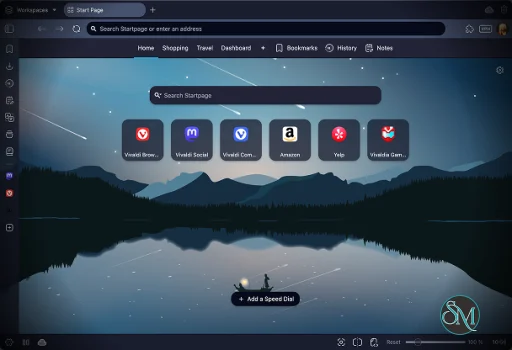
Vivaldi is a Chromium based web browser available on Windows, macOS, Linux, Android, and iOS. Since it uses Chromium, it supports most Chrome extensions while adding a large collection of built in tools and interface customization features.
Unlike many browsers that prioritize simplicity, Vivaldi embraces complexity and flexibility. Nearly every toolbar, menu, shortcut, and panel can be customized.
Vivaldi has built a loyal following among users who want more control over their browsing experience. Created by former Opera developers, Vivaldi focuses heavily on customization, productivity, and privacy rather than minimalism. It is one of the few browsers designed specifically for power users who manage dozens of tabs, multitask heavily, and want every part of the interface tailored to their workflow.
Key Features of Vivaldi
Advanced Tab Management
Vivaldi offers some of the best tab management tools available in any browser. Features like Tab Stacking, Tab Tiling, Workspaces, and Tab Hibernation help organize large numbers of tabs efficiently.Extreme Customization
Almost every part of the browser interface can be changed, including toolbar placement, themes, keyboard shortcuts, and mouse gestures. Many users consider it the most customizable mainstream browser available.Built In Productivity Tools
Vivaldi includes integrated Notes, Mail, Calendar, Feed Reader, screen capture tools, and Quick Commands without requiring extensions.Privacy Focused Features
The browser includes built in ad blocking, tracker blocking, private windows, and encrypted sync. Vivaldi also states that it does not profile users or sell browsing data.Chrome Extension Support
Because it is Chromium based, users can install most extensions from the Chrome Web Store while still benefiting from Vivaldi’s custom interface and tools.
User Experience
Vivaldi feels very different from mainstream browsers. New users may initially find the interface crowded due to the sheer number of options and built in tools.
For experienced users, however, the browser becomes extremely efficient once customized properly. Features like Quick Commands, side panels, and keyboard driven workflows significantly improve multitasking.
Community discussions often praise the workflow flexibility and customization, though some users report occasional interface inconsistencies or performance quirks.
Performance and Privacy
Vivaldi performs well overall, but its feature heavy interface can consume more memory compared to lighter browsers. Some Reddit users report higher RAM usage than Chrome or Edge, especially with many tabs open.
Privacy is stronger than many mainstream browsers, though privacy focused communities often note that browsers like Brave or hardened Firefox still offer more aggressive anti fingerprinting protections.
Pros
Exceptional customization options
Advanced tab and workspace management
Built in productivity tools
Chromium compatibility with Chrome extensions
Strong privacy oriented approach
Cons
Can feel overwhelming for beginners
Higher resource usage than some competitors
Occasional UI bugs and inconsistencies
Privacy protections not as aggressive as specialized privacy browsers
Vivaldi is ideal for power users, multitaskers, researchers, developers, and anyone who spends long hours in the browser. Users who value customization and productivity will benefit the most from its feature rich design.
Casual users who prefer a minimal interface may find simpler browsers easier to manage.
Vivaldi stands out as one of the most feature packed and customizable browsers available today. Its combination of productivity tools, privacy focused features, and deep personalization makes it an excellent choice for users who want complete control over their browsing experience.
Developer:
Vivaldi Technologies
Operating System:
Windows / macOS / Linux / Android
Date Added:
2026-05-15T16:08:17.576Z
Categories:
Post a Comment/Report Broken Link: