VidCoder is a free and open source video encoding application for Windows built on top of HandBrake.
The software is designed for converting DVDs, Blu rays, and video files into compressed digital formats such as MP4, MKV, and WebM. VidCoder focuses on simplifying advanced encoding workflows while still exposing detailed configuration options for experienced users.
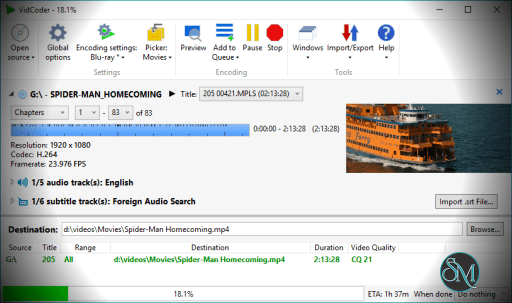
VidCoder is a powerful open source video transcoding application built for users who want an easier interface on top of the well known HandBrake encoding engine. It combines advanced compression features, batch processing, subtitle handling, and hardware acceleration into a streamlined Windows focused experience that appeals to both beginners and experienced video enthusiasts.
Key Features of VidCoder
Built on HandBrake Engine
VidCoder uses the proven HandBrake encoding backend, giving it access to reliable compression quality and broad codec support.Modern Windows Interface
Compared to HandBrake’s more technical interface, VidCoder feels cleaner and more optimized for Windows desktop workflows.Batch Encoding
Users can queue multiple video files and process them automatically, which is especially useful for large media libraries.Hardware Accelerated Encoding
VidCoder supports hardware encoding technologies such as NVIDIA NVENC, Intel Quick Sync, and AMD VCE for faster transcoding.Subtitle and Audio Controls
The software includes advanced subtitle handling, audio track selection, chapter management, and language configuration.Portable Version Available
VidCoder can run in portable mode without installation, making it useful for removable drives or temporary systems.
Download VidCoder 12.19 - Software Mirrors |
|---|
Download VidCoder 12.19 - Installer (zip) Download VidCoder 12.19 - Installer (exe) Download VidCoder 12.19 - Portable (exe) |
VidCoder 12.19 Release Notes:* Fix inability to load old queues with incompatible ChannelLayout |
User Experience
VidCoder strikes a strong balance between simplicity and advanced functionality.
Beginners can use presets for quick conversions, while experienced users can fine tune bitrate, codecs, filters, frame rates, and container settings.
The interface feels less intimidating than some professional transcoding tools, but still powerful enough for demanding encoding workflows.
Users who already understand HandBrake will adapt immediately, while newcomers usually find VidCoder easier to navigate.
Performance and Compatibility
VidCoder performs very well on modern Windows systems, especially when hardware acceleration is enabled.
Encoding speed depends heavily on CPU and GPU capabilities, source format, and chosen compression settings. The software remains efficient even for large batch processing workloads.
Since VidCoder relies on HandBrake libraries, compatibility with modern codecs and containers is excellent.
Open Source and Privacy
VidCoder is fully open source and free to use without ads, subscriptions, or bundled software. This transparency makes it attractive for users who prefer clean utility software without aggressive monetization.
The application works entirely offline and does not require cloud integration or user accounts.
Pros
Free and open source
Excellent encoding quality
Easier interface than HandBrake for many users
Hardware acceleration support
Strong batch processing features
Portable version available
No ads or subscriptions
Cons
Windows only
Advanced settings may still confuse beginners
DVD and Blu ray handling depends on source protection limitations
Less suitable for professional editing workflows
VidCoder is ideal for Windows users who regularly compress videos, archive media collections, convert recordings, or prepare content for streaming and mobile devices.
It works especially well for users who want HandBrake level encoding quality with a cleaner and more convenient desktop interface.
VidCoder is one of the best free video transcoding applications available for Windows. Its combination of strong encoding quality, open source transparency, modern interface, and hardware acceleration makes it an excellent choice for both casual media conversion and advanced compression workflows.
Developer:
RandomEngy
Operating System:
Windows
Date Added:
2026-05-20T17:16:13.325Z
Categories:
Post a Comment/Report Broken Link: