Strix is an AI powered security platform designed to help organizations detect vulnerabilities, monitor threats, and protect digital assets.
Depending on the implementation, Strix platforms typically fall into two categories:
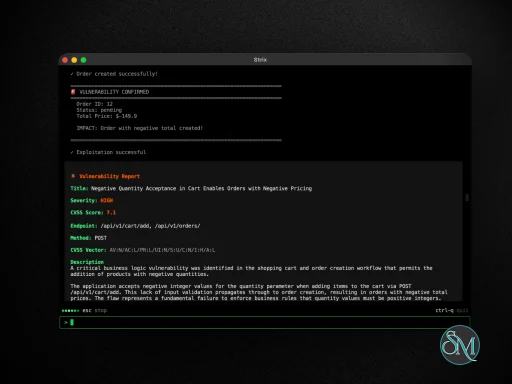
AI penetration testing tools that simulate real attackers
Digital risk protection platforms that monitor threats across the internet
These systems use artificial intelligence to analyze large amounts of data and provide actionable security insights.
Download Strix v1.0.2 - AI Penetration Testing Tools - Software Mirrors |
|---|
Download Strix for Windows Download Strix for macOS - Intel Download Strix for macOS - Silicon |
Strix v1.0.2 - AI Penetration Testing Tools Release Notes:What's Changed
|
Quick Start
Prerequisites:
Docker (running)
An LLM API key from any supported provider (OpenAI, Anthropic, Google, etc.)
Installation & First Scan
# Install Strix
curl -sSL https://strix.ai/install | bash

# Configure your AI provider
export STRIX_LLM="openai/gpt-5.4"
export LLM_API_KEY="your-api-key"

# Run your first security assessment
strix --target ./app-directory
Usage Examples
Basic Usage
# Scan a local codebase
strix --target ./app-directory

# Security review of a GitHub repository
strix --target https://github.com/org/repo

# Black-box web application assessment
strix --target https://your-app.com
Advanced Testing Scenarios
# Grey-box authenticated testing
strix --target https://your-app.com --instruction "Perform authenticated testing using credentials: user:pass"

# Multi-target testing (source code + deployed app)
strix -t https://github.com/org/app -t https://your-app.com

# Focused testing with custom instructions
strix --target api.your-app.com --instruction "Focus on business logic flaws and IDOR vulnerabilities"

# Provide detailed instructions through file (e.g., rules of engagement, scope, exclusions)
strix --target api.your-app.com --instruction-file ./instruction.md
Headless Mode
Run Strix programmatically without interactive UI using the -n/--non-interactive flag—perfect for servers and automated jobs. The CLI prints real-time vulnerability findings, and the final report before exiting. Exits with non-zero code when vulnerabilities are found.
strix -n --target https://your-app.comCI/CD (GitHub Actions)
Strix can be added to your pipeline to run a security test on pull requests with a lightweight GitHub Actions workflow:
name: strix-penetration-test

on:
  pull_request:

jobs:
  security-scan:
    runs-on: ubuntu-latest
    steps:
      - uses: actions/checkout@v6

      - name: Install Strix
        run: curl -sSL https://strix.ai/install | bash

      - name: Run Strix
        env:
          STRIX_LLM: ${{ secrets.STRIX_LLM }}
          LLM_API_KEY: ${{ secrets.LLM_API_KEY }}

        run: strix -n -t ./ --scan-mode quick
Configuration
export STRIX_LLM="openai/gpt-5.4"
export LLM_API_KEY="your-api-key"

# Optional
export LLM_API_BASE="your-api-base-url"  # if using a local model, e.g. Ollama, LMStudio
export PERPLEXITY_API_KEY="your-api-key"  # for search capabilities
export STRIX_REASONING_EFFORT="high"  # control thinking effort (default: high, quick scan: medium)
Key Features of Strix
AI Driven Penetration Testing
Some versions of Strix act like automated ethical hackers.
They can:
Scan applications for vulnerabilities
Simulate real world attack scenarios
Validate findings with proof of concept exploits
This approach reduces false positives and speeds up testing significantly.
Multi Agent Security System
Strix uses multiple AI agents working together to perform complex security tasks.
Capabilities include:
Parallel vulnerability scanning
Coordinated attack simulations
Shared intelligence between agents
This allows faster and more comprehensive testing compared to manual methods.
Digital Risk Monitoring
Another core capability is monitoring threats across external sources.
Strix can track:
Dark web activity
Data leaks and exposed credentials
Phishing domains and impersonation
Threat actor behavior
This helps organizations detect risks before they escalate.
Attack Surface Mapping
Strix continuously scans and maps an organization’s external footprint.
It identifies:
Public facing assets
Subdomains and services
Potential entry points for attackers
This provides a clear view of security exposure.
CI/CD Integration
Strix integrates with development workflows to improve security during development.
Features include:
Automated scans during code changes
Blocking vulnerabilities before deployment
Continuous monitoring of new risks
This is especially useful for DevSecOps environments.
Reporting and Insights
The platform generates detailed reports with:
Verified vulnerabilities
Risk severity levels
Suggested remediation steps
This helps teams prioritize and fix issues efficiently.
Performance and Usability
Strix is designed for technical users such as developers and security teams.
Performance highlights:
Fast automated scanning
Scalable multi agent architecture
Real time threat analysis
Usability considerations:
Requires understanding of cybersecurity concepts
Setup and configuration may be complex
Best suited for professional environments
Pros and Cons
Advantages
AI driven security automation
Reduces manual penetration testing effort
Real time threat monitoring
Integrates with development pipelines
Provides actionable security insights
Limitations
Not a replacement for human security experts
May require advanced technical knowledge
Limited visibility compared to established enterprise tools
Effectiveness depends on configuration and data quality
Who Should Use Strix
Strix is best suited for:
Cybersecurity professionals
DevSecOps teams
Organizations protecting digital assets
Developers building secure applications
It is particularly useful for teams that want to integrate AI into security workflows.
Final Verdict
Strix represents a new generation of AI powered cybersecurity tools that combine automated penetration testing with real time threat monitoring. Its ability to simulate attackers, analyze risks, and integrate into development pipelines makes it a powerful solution for modern security challenges.
For organizations looking to improve security efficiency and reduce manual workload, Strix is a forward looking and capable platform.
Developer:
OmniSecure, Inc.
Operating System:
Windows / macOS / Linux
Date Added:
2026-05-28T19:16:52.185Z
Categories:
Post a Comment/Report Broken Link: