Streambert is a cross platform Electron desktop application for streaming, downloading, and organizing movies, TV series, and anime. The software supports Windows, Linux, and macOS.
The application acts as a centralized media client rather than a browser based streaming site. It integrates multiple external content sources while providing a unified interface for discovery, playback, downloads, subtitles, and watch tracking.
Recent releases significantly expanded the project with macOS builds, anime improvements, subtitle systems, download filtering, and better media organization tools.
Streambert has rapidly become one of the most discussed open source media applications in streaming and self hosted communities. Unlike traditional media center software, Streambert combines streaming, downloading, subtitle management, and personal media tracking into a single Electron based desktop application focused on simplicity and convenience.
The project has grown quickly, gaining strong traction on GitHub and Reddit due to its modern interface, zero ads approach, and aggressive feature development cadence.
Key Features of Streambert
Modern Unified Streaming Interface
Streambert combines movie, TV, and anime browsing into one interface without relying on multiple browser tabs or ad heavy streaming websites.Integrated Download System
Users can stream or locally download supported content directly through the application. Recent updates added sorting and filtering systems for download management.Subtitle Downloader
Version 2.x introduced built in subtitle downloading and subtitle management improvements for both movies and anime content.Anime Focused Improvements
The project has invested heavily into anime workflows, including intro skipping, improved anime playback systems, and better episode organization.Personal Media Tracking
Users can maintain personal watch history, libraries, and tracking systems directly inside the app.Cross Platform Desktop Support
Recent versions now support Windows, Linux, Intel macOS, and Apple Silicon builds.Ad Free and Tracker Free Philosophy
One of Streambert’s biggest selling points is its explicit focus on zero ads and minimal tracking.
Download Streambert v.2.5.0 - Software Mirrors |
|---|
Download Streambert v.2.5.0 Download Streambert v.2.5.0 Download Streambert v.2.5.0 Download Streambert v.2.5.0 Download Streambert v.2.5.0 |
Streambert v.2.5.0 Release Notes:What's Changed
https://github.com/truelockmc/streambert/discussions/103 New Contributors
Full Changelog: https://github.com/truelockmc/streambert/compare/2.4...2.5 |
User Experience
Streambert is one of the cleaner looking open source streaming applications currently available.
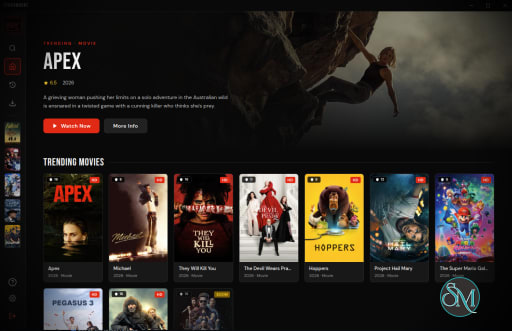
The interface feels heavily inspired by modern streaming platforms with grid layouts, media discovery pages, watchlists, trending sections, and integrated playback systems. Recent updates also introduced homepage grid improvements and cleaner navigation systems.
Community feedback has been very positive overall, especially from users frustrated with ad heavy streaming sites and fragmented media workflows. Reddit discussions frequently praise the convenience of combining streaming, downloading, subtitles, and tracking into one desktop application.
However, because the project is still evolving quickly, some users report bugs, unstable providers, broken playback sources, and occasional Electron related performance issues.
Performance and Stability
Performance is generally solid for an Electron based application, though memory usage is noticeably heavier than lightweight native media players.
Recent releases focused heavily on performance improvements, security changes, source stability fixes, and code refactoring.
The app depends heavily on third party media providers and scraping sources, meaning playback reliability can occasionally break when external providers change APIs or delivery methods. For example, developers recently marked the 2Embed source as unstable and announced plans for replacement.
This rapid maintenance cycle means the project evolves quickly, but also occasionally introduces instability between updates.
Privacy and Legal Considerations
Streambert promotes itself as tracker free and ad free, which strongly appeals to privacy conscious users.
However, the platform’s legal situation depends heavily on how users access and use content sources. The software itself functions as a media client and aggregator, but streaming or downloading copyrighted content without authorization may violate local copyright laws depending on jurisdiction. The developers themselves added legal disclaimers in recent releases.
Users should understand local regulations before using third party streaming sources.
Pros
Modern and polished interface
Completely open source
Ad free and tracker free experience
Integrated streaming and downloading
Strong anime support and subtitle systems
Active development with frequent updates
Cross platform support including macOS
Cons
Depends heavily on third party streaming sources
Playback reliability varies by provider
Electron resource usage is relatively high
Rapid development can introduce bugs
Legal status depends on user behavior and content source
Streambert is ideal for advanced media users, anime fans, self hosted enthusiasts, and users looking for a centralized desktop streaming environment without ads or fragmented browser workflows.
Users comfortable with open source ecosystems and rapidly evolving software will likely appreciate the project the most.
Streambert is one of the most promising open source streaming applications to emerge. Its combination of streaming, downloading, subtitle management, and media organization inside a clean desktop interface gives it strong appeal among modern media enthusiasts. While source reliability and legal considerations remain important factors, the project’s rapid development pace and community momentum make it one of the more interesting streaming platforms currently evolving in the open source space.
Post a Comment/Report Broken Link: