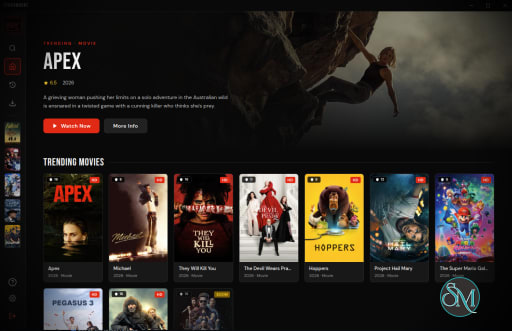
Streambert is a media downloading utility focused on retrieving online video streams, playlists, and multimedia content from supported sources.
The tool is designed around efficiency and automation, allowing users to download or process streams directly from URLs and command line workflows.
Like many modern downloader tools, Streambert is especially useful for handling streaming based media rather than traditional direct file downloads.
Although still relatively niche compared to mainstream downloaders, Streambert has gained attention among media archiving and self hosted communities for its speed and scripting friendly workflow.
Key Features of Streambert
Stream Download Support
Streambert supports downloading online media streams and playlist based video delivery systems commonly used by streaming platforms.Command Line Workflow
The application is optimized for terminal usage, making it useful for automation, scripting, and batch operations.Lightweight Design
Unlike large media suites, Streambert focuses on minimal system overhead and fast execution.Batch Processing
Users can automate multiple downloads and integrate Streambert into larger workflows or server environments.Flexible Media Handling
The software supports different output configurations and processing options depending on the stream source and format.
Download Streambert v.2.4 - Software Mirrors |
|---|
Download Streambert v.2.4 Download Streambert v.2.4 Download Streambert v.2.4 Download Streambert v.2.4 Download Streambert v.2.4 Download Streambert v.2.4 |
Streambert v.2.4 Release Notes:What's Changed
New Contributors
Full Changelog: https://github.com/truelockmc/streambert/compare/2.3...2.4 |
User Experience
Streambert is clearly targeted toward technical users rather than casual consumers.
The command line interface provides excellent flexibility, but beginners unfamiliar with terminal tools may find setup and usage intimidating compared to graphical download managers.
For advanced users, however, the lightweight workflow can feel significantly faster and more efficient than GUI based alternatives.
Performance and Compatibility
Performance is generally strong due to the tool’s lightweight architecture and focus on direct stream handling.
As with most stream downloading utilities, compatibility depends heavily on how streaming platforms implement encryption, authentication, and delivery systems. Website updates can occasionally break support for specific services until patches are released.
Command line media tools also tend to perform particularly well on Linux systems and server environments where automation matters most.
Legal and Ethical Considerations
Users should always respect copyright laws, platform terms of service, and content licensing restrictions when downloading media.
Some streaming services explicitly prohibit downloading protected content outside official offline viewing systems.
The legality of stream downloading varies depending on local regulations and intended usage.
Pros
Lightweight and fast
Strong command line automation potential
Good for scripting and batch workflows
Efficient stream handling
Minimal system resource usage
Cons
Not beginner friendly
Limited graphical interface support
Compatibility can break when platforms change
Requires technical familiarity for best results
Streambert is best suited for advanced users, Linux enthusiasts, automation focused workflows, self hosted environments, and users comfortable with command line media tools.
Casual users may prefer graphical applications with simpler setup and integrated browsing features.
Streambert delivers a fast and efficient media downloading experience for technical users who value lightweight command line workflows. While it lacks the accessibility of graphical download managers, its automation potential and streamlined design make it a solid option for advanced stream handling and media archiving tasks.
Post a Comment/Report Broken Link: