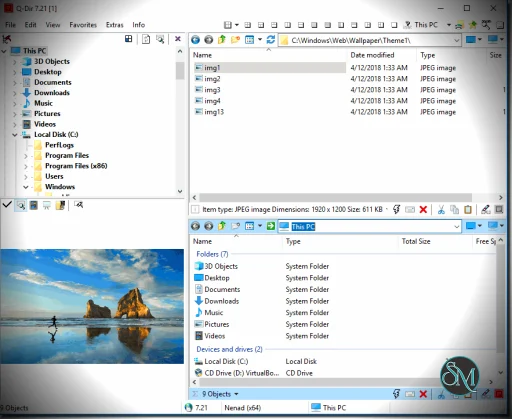
Q-Dir is a free file manager for Windows that enhances file navigation with a multi-pane interface and advanced file operations. Q-Dir stands for “Quad-Directory,” highlighting its ability to display up to four directory panes simultaneously. This makes it easier to view, compare, and manage files between folders.
Unlike Windows File Explorer, Q-Dir offers a customizable interface that increases productivity and simplifies complex file tasks.
Download Q-Dir - Software Mirrors | |
|---|---|
Key Features of Q-Dir
Multi-Pane File Browser
The standout feature of Q-Dir is its ability to show up to four panes at once. This lets you:
Compare folders side-by-side
Drag and drop files across panes
Manage multiple directories without switching windows
The multi-pane view significantly improves efficiency for organizing files.
Customizable Views
You can choose from several layout configurations, including single, dual, and quad views. Each pane supports different sorting options like name, size, date, and type.
This level of customization helps users tailor the workspace for different tasks.
Quick Navigation Tools
Q-Dir includes useful tools like:
Address bar for fast folder jumps
Favorites and shortcuts
History list
Filter bar to narrow file views
These navigation helpers make it faster to find and organize files.
File Operations and Tools
Q-Dir supports standard file operations like copy, move, rename, and delete. It also integrates well with Windows, so context menus and drag-and-drop work seamlessly. You can preview files and folders within panes, improving workflow clarity.
Portable Version Available
Q-Dir offers a portable edition that runs without installation—ideal for technicians and users who work across multiple systems.
Performance and User Experience
Q-Dir is lightweight, opens quickly, and uses minimal system resources. Even with multiple panes active, it remains responsive on both modern and older Windows machines.
The interface is functional, although not as polished as some paid alternatives. Users familiar with Windows Explorer will find the layout intuitive, and power users will appreciate the added flexibility.
Pros and Cons
Pros
Free for personal and commercial use
Multi-pane interface boosts productivity
Portable version available
Easy to learn and use
Lightweight with fast performance
Cons
Limited advanced file tools compared with premium managers
Interface design feels dated
Some features require manual configuration
Final Verdict
Q-Dir remains one of the most effective lightweight file managers for Windows in 2026. With its multi-pane interface, fast performance, and customization options, it’s a practical choice for users who want more power than Windows Explorer offers without paying for premium software.
If you want a fast, flexible, and free file manager that goes beyond the default Windows Explorer, Q-Dir is one of the best alternatives available. In this Q-Dir review, we’ll explore its features, usability, performance, pros and cons, and why it remains a favorite choice for power users, IT professionals, and anyone who wants to improve file navigation on Windows.
Q-Dir is ideal for users who need multiple panes, customizable views, and efficient file operations without unnecessary complexity.
Developer:
SoftwareOK
Operating System:
Windows
Date Added:
2026-05-11T14:01:26.897Z
Categories:
Post a Comment/Report Broken Link: