ProgDVB is a Windows based application designed for watching digital television and listening to radio channels from multiple sources including DVB-S/S2, DVB-C, DVB-T/T2, ATSC, ISDB-T, SAT>IP, and IPTV streams.
The software is available in both free and paid editions. The Pro version unlocks features like advanced recording, Picture in Picture support, scheduling, and extended device capabilities.
ProgDVB remains one of the most capable applications for watching digital television and IPTV on desktop systems. Originally built for DVB tuner hardware, the software has expanded over the years into a full multimedia platform supporting satellite TV, IPTV, internet radio, recording, streaming, and advanced broadcast features. Despite its age, it still maintains a loyal user base among DVB enthusiasts and IPTV power users.
Download ProgDVB 7.71.3 Free - Software Mirrors |
|---|
Key Features
Wide Broadcast and IPTV Support
ProgDVB supports traditional DVB hardware alongside IPTV playlists, M3U/M3U8 files, Xtream Codes, SAT>IP, and internet radio streams.Advanced Recording and Timeshift
The application includes recording, scheduled recording, and timeshift functionality using RAM or disk buffering. Users can record multiple streams simultaneously depending on hardware and IPTV source support.Electronic Program Guide Support
ProgDVB supports EPG systems including XMLTV and JTV formats, making it useful for IPTV users who want traditional TV guide layouts.Picture in Picture and Multi Stream Features
The Pro version supports Picture in Picture viewing and simultaneous channel playback or recording.Network Broadcasting
Users can stream channels across local networks using Prog Media Server integration.Multiple Interfaces
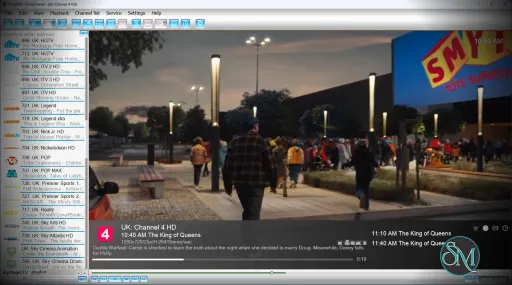
ProgDVB includes both the classic ProgDVB interface and the more modern ProgTV interface. The developer recommends ProgTV for modern Windows systems and remote friendly usage.
User Experience
This is where opinions become divided.
ProgDVB is extremely feature rich, but the interface feels dated compared to modern IPTV applications like TiviMate or newer media center platforms. Reddit discussions frequently describe the UI as functional but old fashioned, especially on high resolution monitors.
The software also has a noticeable learning curve. Advanced IPTV setup, playlist management, recording configuration, and source handling can feel overwhelming for beginners. Community users often mention that ProgDVB is incredibly powerful once configured properly, but not beginner friendly.
Performance and Stability
ProgDVB performs well with many DVB cards and IPTV streams, especially for users who need advanced recording or stream management. Some IPTV communities still consider it one of the more reliable Windows IPTV players for maintaining unstable streams.
However, stability reports are mixed. Some long term users describe it as stable and dependable, while others report freezing, audio sync problems, crashes, or outdated rendering behavior. Much of this appears tied to drivers, codecs, IPTV providers, and hardware compatibility.
Performance on Modern Systems
ProgDVB continues to receive active updates in 2026, including HDR support, Android support expansion, IPTV improvements, and UI updates.
Still, the software clearly carries legacy design choices from older Windows media applications. Compared to modern streaming apps, the interface and workflow can feel less polished.
Pros
Extremely broad DVB and IPTV support
Advanced recording and timeshift tools
EPG integration for IPTV and DVB
Supports many tuner devices and broadcast standards
Frequent updates even after many years
Powerful for advanced users and enthusiasts
Cons
Outdated and complex interface
Significant learning curve for beginners
Mixed stability depending on setup
IPTV workflow feels less modern than newer apps
Some advanced features locked behind Pro version
ProgDVB is ideal for advanced IPTV users, DVB enthusiasts, satellite TV users, HTPC builders, and users who need deep recording and broadcast control.
Casual users looking for a clean streaming experience may prefer simpler IPTV applications with more modern interfaces.
ProgDVB remains one of the most powerful digital TV and IPTV applications available for Windows. Its massive feature set, recording capabilities, and hardware support make it valuable for enthusiasts and advanced users. However, the aging interface and steep learning curve prevent it from feeling as polished or accessible as newer media applications.
Post a Comment/Report Broken Link: