PhoneRescue for iOS is a data recovery and system repair tool developed by iMobie. The software is designed to recover lost or deleted data from iPhones, iPads, and iPod touch devices.
The program can retrieve data directly from an iOS device or extract files from iTunes and iCloud backups without requiring a full device restore.
PhoneRescue supports both Windows and macOS systems and aims to provide a simple recovery process that requires minimal technical knowledge.
Key Features of PhoneRescue for iOS
Multiple Data Recovery Modes
PhoneRescue provides several recovery options depending on the situation:
Recover data directly from an iPhone or iPad
Extract data from iTunes backups
Download and recover data from iCloud backups
These options allow users to recover files even if the device itself is inaccessible.
Support for Many Data Types
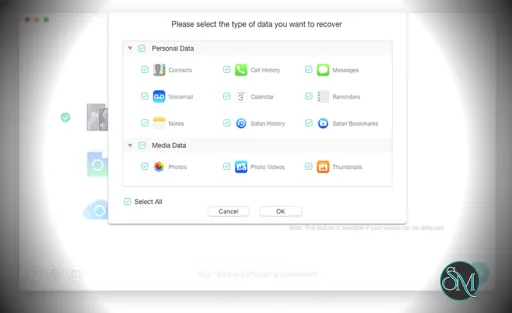
The software can recover more than 30 types of data, including:
Photos and videos
Messages and attachments
Contacts and call history
Notes and reminders
Safari bookmarks and browsing history
Music and app data
This broad support helps users restore both personal files and application data.
Selective Data Recovery
Instead of restoring an entire backup, PhoneRescue allows users to preview recoverable files and select only the items they want.
This selective recovery approach helps avoid overwriting existing data on the device.
Recover Deleted Data Without Backup
PhoneRescue uses deep scanning technology to locate deleted data that may still exist in device storage.
In many cases, users can recover deleted messages, contacts, and photos even when no backup is available.
iOS System Repair Tools
The software also includes tools that repair common iOS problems such as:
iPhone stuck on the Apple logo
Boot loops
Black screen issues
System crashes or update failures
These repair tools can often fix the device without deleting existing data.
Fast Recovery Process
According to the developer, PhoneRescue can analyze and recover thousands of files quickly. For example, it can retrieve around 3,000 photos in about five minutes under certain conditions.
High Recovery Success Rate
PhoneRescue claims to provide a recovery success rate of up to 98 percent for mistakenly deleted files under suitable conditions.
Actual results depend on factors such as whether the deleted data has been overwritten.
Performance and Usability
PhoneRescue focuses on simplicity and automation. The interface guides users through recovery scenarios, making the process accessible even for beginners.
The recovery process typically involves three steps:
Connect the iOS device
Scan for recoverable data
Preview and restore selected files
This workflow helps reduce the complexity usually associated with data recovery software.
Pros and Cons
Advantages
Supports recovery from device, iTunes, and iCloud backups
Recovers many types of iOS data
Allows selective recovery instead of full restoration
Includes tools to repair iOS system issues
Beginner friendly interface
Limitations
Recovery success depends on whether data has been overwritten
Full recovery features require a paid license
Deep scanning may take time on large devices
Some users also note that recovery software in general may have limitations due to iOS security restrictions.
Who Should Use PhoneRescue for iOS
PhoneRescue for iOS is suitable for:
Users who accidentally deleted iPhone data
People recovering files from damaged or malfunctioning devices
Users who want to extract data from iTunes or iCloud backups
Anyone needing iOS system repair tools
It is particularly useful when important photos, messages, or contacts are lost.
Final Verdict
PhoneRescue for iOS is a comprehensive data recovery solution designed for Apple mobile devices. With support for multiple recovery methods, selective file restoration, and built in iOS repair tools, it offers a flexible approach to recovering lost data.
For users facing data loss on iPhone or iPad devices, PhoneRescue provides a practical tool that combines recovery and system repair features in a single application.
Losing important data on an iPhone or iPad can happen for many reasons such as accidental deletion, system crashes, failed updates, or device damage. PhoneRescue for iOS is a specialized data recovery tool designed to help users retrieve lost files from iOS devices, backups, and system storage.
Developer:
iMobie Inc.
Operating System:
macOS
Date Added:
2026-05-06T18:01:35.948Z
Categories:
Post a Comment/Report Broken Link: