PDF Candy Desktop is an all in one PDF utility developed by Icecream Apps. The software brings many PDF processing tools into a single Windows application, allowing users to edit, convert, merge, and manage PDF documents offline.
The application is designed for users who need a flexible PDF tool without relying on cloud services. Since processing happens locally on the computer, it can be useful for handling sensitive documents or working without internet access.
Buy PDF Candy Desktop PRO With Discount - Software Mirrors |
|---|
PDF Candy Desktop 3.17 PRO - Yearly - Discount 15% Off |
Key Features of PDF Candy Desktop
PDF Editing Tools
PDF Candy Desktop includes a built in editor that allows users to modify text, images, and other elements inside a PDF document. This feature enables users to update existing files or create new PDFs from scratch.
Users can also edit metadata, rearrange pages, and add elements such as watermarks or page numbers.
File Conversion Capabilities
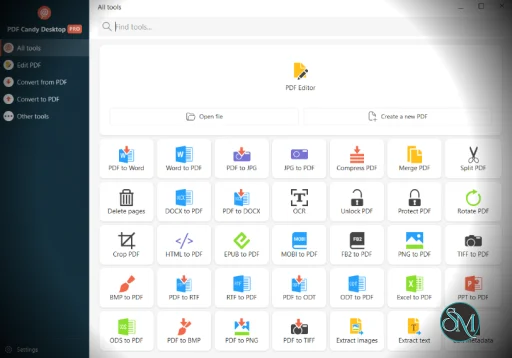
One of the strongest features of PDF Candy Desktop is its ability to convert files to and from PDF format. Supported conversions include:
PDF to Word
Word to PDF
PDF to JPG
JPG to PDF
EPUB to PDF
PDF to HTML
This wide compatibility makes the software useful for document editing, publishing, and archiving tasks.
Merge, Split, and Organize PDFs
The software provides tools for managing PDF structure, including:
Merging multiple PDF files
Splitting documents into separate files
Rearranging or deleting pages
Rotating and cropping pages
These tools help users restructure documents without needing multiple applications.
OCR Text Recognition
PDF Candy Desktop includes OCR functionality that recognizes text from scanned documents. This allows users to convert image based PDFs into editable and searchable text files.
OCR support is especially useful for digitizing printed documents or scanned reports.
Batch Processing
Batch processing allows users to process multiple documents at once. For example, several files can be converted or merged simultaneously using drag and drop operations.
This feature helps save time when working with large numbers of PDF files.
Offline Processing and Privacy
Unlike many online PDF services, PDF Candy Desktop processes files locally on the user’s computer. This offers several advantages:
No need to upload sensitive files to external servers
Faster processing for large documents
Ability to work without internet connection
Offline processing can be particularly important for businesses handling confidential data.
Performance and Usability
PDF Candy Desktop is designed with a modern interface that simplifies navigation between tools. Recent versions improved the interface design and added features such as document previews and quick access to recently opened files.
Most operations, including conversion and merging, run quickly on standard systems. Performance generally depends on document size and system resources.
Pros and Cons
Advantages
Large set of PDF tools in one application
Offline processing for better privacy
Batch processing support
OCR for scanned documents
Simple and intuitive user interface
Limitations
Some advanced features require the paid version
Licensing restrictions may apply to hardware changes in certain editions
Professional editing capabilities may be more limited than premium enterprise PDF editors
Who Should Use PDF Candy Desktop
This software is suitable for:
Students managing PDF assignments and research documents
Office workers editing and converting reports
Small businesses handling document workflows
Individuals looking for a simple alternative to complex PDF editors
Users who frequently convert or edit PDFs can benefit from having multiple tools integrated into a single program.
Final Verdict
PDF Candy Desktop is a versatile and practical PDF management tool. With editing features, document conversion, OCR support, and batch processing, it provides a well rounded solution for everyday PDF tasks.
For users who want a feature rich PDF utility that works offline and does not require complicated setup, PDF Candy Desktop is a reliable option for managing and editing documents efficiently.
Working with PDF files often requires more than simple viewing. Users frequently need to convert, edit, merge, or compress documents. PDF Candy Desktop is a comprehensive PDF management tool that provides a wide range of document processing features in a single desktop application.
Developer:
Icecream Apps Ltd
Operating System:
Windows
Date Added:
2026-05-15T16:07:57.273Z
Categories:
Post a Comment/Report Broken Link: