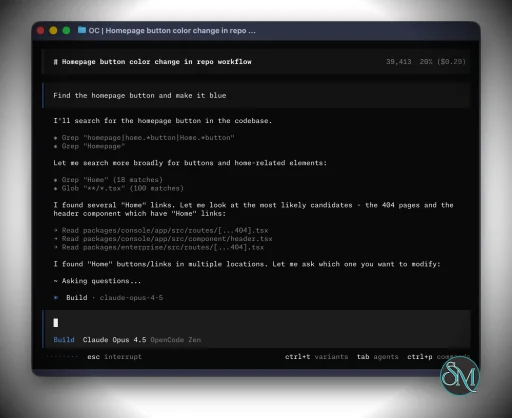
OpenCode is an open source AI coding agent that helps developers write, analyze, and improve code using natural language commands. It works through a terminal interface, desktop application, or IDE extension.
The software acts as an AI pair programmer, allowing developers to ask questions, generate code, refactor existing files, and analyze project structures directly from their development environment.
OpenCode supports multiple large language models from different providers, including models from OpenAI, Anthropic, and Google, giving developers flexibility in choosing their preferred AI backend.
Download OpenCode v1.15.6 - Software Mirrors |
|---|
Download OpenCode v1.15.6 for Windows |
Download OpenCode v1.15.6 for macOS |
Download OpenCode v1.15.6 for LinuxOpenCode Desktop Linux ARM64 (rpm) OpenCode Desktop Linux x64 (deb) OpenCode Desktop Linux ARM64 (deb) OpenCode Desktop Linux x64 (rpm) |
OpenCode v1.15.6 Release Notes:CoreImprovements
Bugfixes
TUIImprovements
Bugfixes
DesktopImprovements
Bugfixes
SDK
|
Key Features of OpenCode
AI Powered Coding Assistant
OpenCode functions as an intelligent coding assistant that can:
Generate code snippets
Explain complex functions
Suggest improvements
Help debug errors
Developers can simply describe a task in natural language, and the tool generates code or guidance accordingly.
Terminal Based Workflow
One of the defining features of OpenCode is its terminal native interface. Instead of requiring a graphical interface, developers interact with the AI directly from the command line.
This allows programmers to remain inside their normal development workflow without switching tools.
Multi Model AI Support
OpenCode supports more than 75 AI model providers and allows users to connect external services or local models.
Supported AI providers may include:
OpenAI models
Anthropic Claude
Google Gemini
Local models via tools like Ollama
This model flexibility helps prevent vendor lock in.
Project Aware Code Analysis
The tool automatically analyzes the project structure and configuration files to understand the codebase context.
This allows the AI assistant to provide more relevant suggestions based on the actual project environment.
Parallel Agent Sessions
Developers can run multiple AI agents simultaneously on the same project. For example:
One agent can refactor legacy code
Another agent can generate documentation
Another agent can help debug a problem
This multi session capability improves productivity for complex projects.
Plugin and Extension Ecosystem
OpenCode supports plugins and extensions that allow developers to customize functionality.
Plugins may add:
Language specific tooling
Code templates
Automated development workflows
Integration with editors like VS Code
This extensibility makes the tool adaptable for different development environments.
Privacy Focused Architecture
OpenCode uses a local first architecture that aims to minimize the amount of data sent to external services.
The platform emphasizes privacy by allowing developers to control how their code is processed and whether external models are used.
Performance and Usability
OpenCode is designed for developers who prefer terminal based workflows. The interface is lightweight and integrates well with existing development environments.
Because it supports multiple AI models, performance may vary depending on the selected backend model and system hardware.
For beginners unfamiliar with command line tools, there may be a learning curve.
Pros and Cons
Advantages
Open source and customizable
Works directly in the terminal or IDE
Supports many AI model providers
Project aware code assistance
Plugin ecosystem for extensibility
Privacy focused architecture
Limitations
Command line interface may be difficult for beginners
AI generated code must still be reviewed carefully
Performance depends on the selected AI model
Requires API keys for some AI providers
Who Should Use OpenCode
OpenCode is suitable for:
Software developers working in terminal environments
Open source contributors
Developers experimenting with AI assisted coding
Teams that want customizable AI development tools
Engineers who prefer privacy focused solutions
It is particularly useful for developers who want an AI coding assistant without being locked into a single AI provider.
Final Verdict
OpenCode is a powerful open source AI coding assistant that brings AI driven development directly into the terminal and code editor workflow. With multi model support, extensibility through plugins, and strong privacy controls, it offers a flexible solution for modern developers.
For programmers looking for an open and customizable AI coding assistant, OpenCode provides a strong alternative to proprietary coding tools.
Modern software development is increasingly supported by AI powered coding tools that help developers write, debug, and manage code more efficiently. OpenCode is an open source AI coding assistant designed to integrate directly into the developer workflow through the terminal, desktop applications, or code editors.
Post a Comment/Report Broken Link: