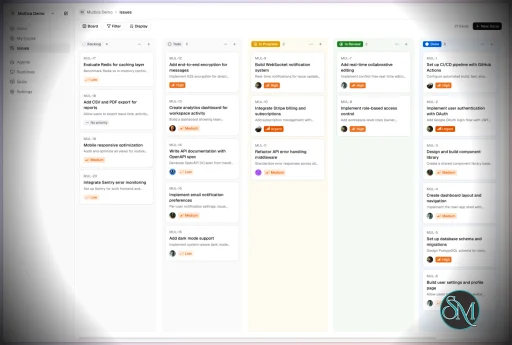
Multica is an open-source platform designed to manage and orchestrate AI agents within development workflows. Instead of running a single AI assistant, it allows multiple agents to collaborate, execute tasks, and share knowledge across projects.
It essentially acts like a control center where:
AI agents are assigned tasks
Progress is tracked in real time
Outputs and skills are reused across workflows
Multica currently supports Claude Code, Codex, OpenClaw, and OpenCode out of the box. The daemon auto-detects whichever CLIs you have installed. Since it’s open source, you can also add your own backends.
Download Multica v0.3.2 CLI - Software Mirrors |
|---|
Download Multica v0.3.2 CLI
multica-cli-0.3.2-macOS-amd64.tar.gz Download Multica v0.3.2 CLI
multica-cli-0.3.2-macOS-arm64.tar.gz Download Multica v0.3.2 CLI
multica-cli-0.3.2-linux-amd64.tar.gz Download Multica v0.3.2 CLI
multica-cli-0.3.2-linux-arm64.tar.gz Download Multica v0.3.2 CLI
multica-cli-0.3.2-windows-amd64.zip Download Multica v0.3.2 CLI
multica-cli-0.3.2-windows-arm64.zip Download Multica v0.3.2 CLI
multica-desktop-0.3.2-linux-aarch64.rpm Download Multica v0.3.2 CLI
multica-desktop-0.3.2-linux-amd64.deb Download Multica v0.3.2 CLI
multica-desktop-0.3.2-linux-arm64.AppImage Download Multica v0.3.2 CLI
multica-desktop-0.3.2-linux-arm64.deb Download Multica v0.3.2 CLI
multica-desktop-0.3.2-linux-x86_64.AppImage Download Multica v0.3.2 CLI
multica-desktop-0.3.2-linux-x86_64.rpm Download Multica v0.3.2 CLI
multica-desktop-0.3.2-mac-arm64.dmg Download Multica v0.3.2 CLI
multica-desktop-0.3.2-mac-arm64.zip Download Multica v0.3.2 CLI
multica-desktop-0.3.2-windows-arm64.exe Download Multica v0.3.2 CLI
multica-desktop-0.3.2-windows-x64.exe Download Multica v0.3.2 CLI
multica_macOS_amd64.tar.gz Download Multica v0.3.2 CLI
multica_macOS_arm64.tar.gz Download Multica v0.3.2 CLI
multica_linux_amd64.tar.gz Download Multica v0.3.2 CLI
multica_linux_arm64.tar.gz Download Multica v0.3.2 CLI
multica_windows_amd64.zip Download Multica v0.3.2 CLI
multica_windows_arm64.zip |
Multica v0.3.2 Release Notes: Changelog- 8e88156356baa07ec371ac45ef2791a5eebd3e9d Add assignee grouping for issue boards (#2693)
- d43961ed7a61c433261fb3d7ba6ebb62113a89b6 MUL-2284 fix(deps): bump Next.js to patch CVE-2026-44578 (#2690)
- e8fb0efe3db6da27b49b80559eb40effefa2ab41 MUL-2324 conditionally inject non-core rule blocks (#2771)
- fe1ccb19c93d7982874c3c3facb9394d97d03074 Revert "MUL-2324 conditionally inject non-core rule blocks (#2771)" (#2802)
- 113c4f4e9042588416dca77fad19384c8ef5bb06 docs(agent): clarify openclaw agent id vs name semantics (#2744)
- eb5c6d754738184cd89456291d6d21a265350e48 docs(self-host): document auth rate-limit env keys (#2773)
- 84d75cdd1ee79893c4371b61783a90f8935468e7 docs(self-host): reverse-proxy guidance for loopback-only ports (MUL-2360) (#2794)
- 15152c6ccd87848d9373a4aac381c3f5b44b17ca feat(auth): cache workspace membership for daemon heartbeat path (MUL-2247) (#2638)
- c328c402d80d120d8f02d156de5eca05c7d15156 feat(autopilots): webhook deliveries tab + replay button (MUL-2334) (#2784)
- 2323b7271065dd738a5e7516e482faf0ec8a13b3 feat(autopilots): webhook delivery layer + idempotency/signature/replay (MUL-2334) [PR1] (#2774)
- 9418d2a2c193f5dee3bfaf071d0df49aa3e34044 feat(autopilots): webhook triggers (server + CLI + UI + docs) MUL-2049 (#2348)
- 60bae6262298dddd001135fb3c624cd33bc65a62 feat(codex): add per-exec_command watchdog to escape dropped function_call_output (MUL-2337) (#2779)
- 431006e7d6e0f0366957320931f743e2303606d5 feat(daemon): add debug-level logs at key debug-path nodes (MUL-2304) (#2733)
- fcd13aece94f42ce26e31c85fc3d3889cf7c3abb feat(daemon): auto-update CLI when idle (MUL-2100) (#2679)
- bfe9bf3eea870a29819bea5c8c9b19b08b42c64f feat(daemon): force-stop hung agent runs via idle watchdog (MUL-2281) (#2691)
- 5f1ced867c7cafefd4d82bb99e443beb24ca1cc8 feat(editor): HTML attachments render like images (MUL-2345 v4) (#2798)
- ceb967aefae020e7bd1f7b139afe3b2eb7106f16 feat(editor): inline HTML attachment preview +
- 668cab60223e2c9b2de5ac5dc6289c925f25fdb0 feat(github): mirror PR CI checks and merge conflict status (MUL-2228) (#2632)
- 3645bdb5b61572e5db9eb8fe99d0b0fd104a5196 feat(issues): add start_date field with progressive disclosure (MUL-2274) (#2696)
- f1c9617b5e161490fda598a06c7f49276bcb1f06 feat(runtimes): Redesign runtimes machine layout (#2747)
- fab06713323357b23ab94729aba49dbc7b1fa8ab feat(skills): support multi-select bulk import in Copy from runtime (#2686)
- 46c1e2c889a0a5f9a9b8d700257ad8bc54955701 feat(squads): show member working status on squad detail page (#2768)
- 380c6b512215d4b6de861253f6f42b538a89aa68 feat(usage): add Time and Tasks to daily-trend toggle (MUL-2283) (#2709)
- 57be69517f9711ef046e753d2ca85b0bcc9259cc feat(views): progressive disclosure for issue sidebar properties (MUL-2275) (#2675)
- 3698fd85d5f0d791c19bffb7076e41e499125985 feat(views): show Total in daily token/cost chart tooltips (MUL-2282) (#2704)
- 79dd06636346a4ba62707894f107723dde6a83b7 fix env example websocket origin (#2599)
- 44d2fc1946fdbd61bd3e6bec70ee4c61a357feec fix(agent): use openclaw agent id instead of name for --agent flag (#2716)
- e50bfc88da39d5ac8a9b7699b65c99aa279a454f fix(auth): add per-IP rate limiting on public auth endpoints (#2636)
- 4c7a990a25dad5c7f6454d8019310f79d78818d7 fix(autopilot): attribute autopilot-created issue to assignee agent (MUL-2293) (#2719)
- b97cc3cb6e03082191b89fd5de9be2a98628ba45 fix(autopilots): align trash icon with action buttons in webhook trigger row (#2805)
- dfe2a57361ae2c6631b5bd2040b05db7e4916ac7 fix(autopilots): allow duplicate create_issue runs (#2789)
- 692570f41a9407fef86bcda0232086ee81d950d0 fix(autopilots): contain Delivery dialog within viewport (#2788)
- eabfb8f3d1d09e48118a3e8d10dc083dfc391f55 fix(autopilots): reject unknown {{...}} tokens in issue title template (MUL-2370) (#2799)
- d9ae891064ab2460272a605926aba9ecb4d53fe5 fix(avatar): stop bg-muted bleeding through transparent images (#2670)
- 433cd1aaf5b696189e0b052a8b79c3c56a74d4da fix(codex): bump default exec_command stuck timeout to 3 minutes (#2786)
- 9bd17058f82d58c72830000062c97454180d0d4c fix(daemon): bump idle watchdog default 5m → 30m (MUL-2300) (#2728)
- ffba2607aa9def984f382a747736990d8cc91ab1 fix(daemon): default auto-update off for self-host instances (MUL-2381) (#2807)
- a4a18605eb460a5bb98bda4f52fe06dad308cd2b fix(desktop): handle Cmd/Ctrl +/-/0 zoom in main process (MUL-2354) (#2791)
- e6cf5a6eca7767ff9c971475b965a232cf2b932b fix(editor): highlight HTML source view + drop misplaced Copy on attachments (#2808)
- d42fbcb794364eaced1a0893176218776f4d8789 fix(editor): sync ContentEditor when defaultValue changes externally (#2765)
- 58a76f6d968c220647f628089faa62078420f0d9 fix(execenv): trim default runtime brief command list (MUL-2322) (#2769)
- d8635ad58009c05f75486bec5e0aa55a397408c1 fix(issues): prevent duplicate active issue creation (MUL-2225) (#2602)
- e00b94b0f9f012ed53ad3383de09efb1afacea78 fix(realtime): invalidate per-issue token usage on task events (MUL-2298) (#2723)
- 1796ef6dffc49350fc0672df2010eb19db0ca85f fix(runtimes): prefer Local machine as default selection (MUL-2359) (#2792)
- 7c3dab695f5f9a9e2b59d62622a99b8d36dc293d fix(runtimes): stop surfacing agent CLI version branding in machine subtitle (#2752)
- d04b00b32e3bd497bd38aa667f37140c335899df fix(security): bind all services to loopback in docker-compose files (#2759)
- c78bfbcf179305765fa403143adcea89c5e500ff fix(skills): keep skill title input transparent in dark mode (#2710)
- 8cc48b1176939d062350faec39fa01605784933f fix(ui): vertically center SelectItem content (#2782)
- f64d182fd1156211ec67d5eb757cab26c76dabd8 fix(views): narrow agent/squad create dialogs from max-w-5xl to max-w-4xl (#2688)
- 0079a734304f29c80fd6f72aac9f332eab868f7f fix(views): narrow agent/squad create dialogs to max-w-2xl (#2706)
- 20c2f45b4a8aae7dd4c34ce4a87166a4bc8189fa fix(views): surface backend error messages on mutation failures (MUL-2317) (#2772)
- 2d501322e9c3e35b8e99908597912e33b5b32fa9 fix: Squads page unable to scroll (#2764)
- 66212312374a5ee13081098d5aa0fb1c8eec769b fix: improve search ranking and snippet support (MUL-2329)
- e8d4b9a0a2bdc6e90ca9e5d61bea33c5f774e56f revert: drop exec_command watchdog (#2779, #2786) (MUL-2337) (#2803)
|
Key Features
1. AI Agents as Teammates
Multica treats AI agents like real contributors. You can assign tasks, monitor progress, and manage their work similar to human developers.
2. Multi-Agent Orchestration
Instead of relying on a single AI model, Multica coordinates multiple agents working together on complex tasks, improving efficiency and scalability.
3. Skill Reuse and Compounding
One of its most innovative features is skill accumulation. Agents can reuse previously learned solutions, reducing redundancy and improving performance over time.
4. Real-Time Workflow Tracking
You get a unified dashboard where you can:
This makes it suitable for structured development environments.
5. CLI and Web Interface
Multica provides both:
It supports local and cloud-based environments, offering flexibility in deployment.
6. Open Source and Flexible
Being open source, Multica allows:
This makes it appealing for teams that want control over their AI infrastructure.
Performance and Use Cases
Multica is designed for advanced workflows rather than casual use. It performs best in environments where multiple AI agents are needed to collaborate.
Typical use cases include:
AI-assisted software development
Automation pipelines
Multi-step research and analysis
DevOps and engineering workflows
Its ability to coordinate agents makes it especially useful for complex tasks that go beyond simple prompts.
Quick Install
curl -fsSL https://raw.githubusercontent.com/multica-ai/multica/main/scripts/install.sh | bash
Installs the Multica CLI on macOS and Linux. Works with Homebrew or downloads the binary directly.
Windows (PowerShell):
irm https://raw.githubusercontent.com/multica-ai/multica/main/scripts/install.ps1 | iex
Then configure, authenticate, and start the daemon in one command:
multica setup # Connect to Multica Cloud, log in, start daemon
Self-hosting? Add --with-server to deploy a full Multica server on your machine:
curl -fsSL https://raw.githubusercontent.com/multica-ai/multica/main/scripts/install.sh | bash -s -- --with-server
multica setup self-host
Requires Docker. See the Self-Hosting Guide for details.
Getting Started
1. Set up and start the daemon
multica setup # Configure, authenticate, and start the daemon
The daemon runs in the background and auto-detects agent CLIs (claude, codex, openclaw, opencode) on your PATH.
2. Verify your runtime
Open your workspace in the Multica web app. Navigate to Settings → Runtimes — you should see your machine listed as an active Runtime.
What is a Runtime? A Runtime is a compute environment that can execute agent tasks. It can be your local machine (via the daemon) or a cloud instance. Each runtime reports which agent CLIs are available, so Multica knows where to route work.
3. Create an agent
Go to Settings → Agents and click New Agent. Pick the runtime you just connected and choose a provider (Claude Code, Codex, OpenClaw, or OpenCode). Give your agent a name — this is how it will appear on the board, in comments, and in assignments.
4. Assign your first task
Create an issue from the board (or via multica issue create), then assign it to your new agent. The agent will automatically pick up the task, execute it on your runtime, and report progress — just like a human teammate.
User Experience
The concept behind Multica is powerful, but it comes with complexity.
Requires understanding of AI agents and workflows
Setup may involve configuring runtimes and integrations
More suited for developers than beginners
However, once configured, it provides a highly structured and scalable system.
Pros and Cons
Pros
Open source and highly customizable
Supports multi-agent collaboration
Reusable skill system improves efficiency
Real-time workflow tracking
Flexible deployment options
Cons
Still early-stage and evolving
Setup complexity is high
Requires technical knowledge
Not suitable for simple AI tasks
Who Should Use Multica
Multica is ideal for:
Developers working with AI agents
Teams building automated workflows
Companies experimenting with agent-based systems
Advanced users exploring AI orchestration
It is not designed for casual users who just need a simple chatbot.
Final Verdict
Multica represents the next step in AI tooling, moving from single assistants to collaborative AI systems. While still evolving, it introduces a powerful concept that could shape how teams use AI in development.
Multica is a promising platform for advanced users who want to build scalable, multi-agent AI workflows with full control and flexibility.
If you are exploring multi-agent AI systems or building automated development workflows, Multica is an emerging tool worth paying attention to. It introduces a new way to treat AI agents not just as tools, but as collaborative team members working alongside developers.
Post a Comment/Report Broken Link: