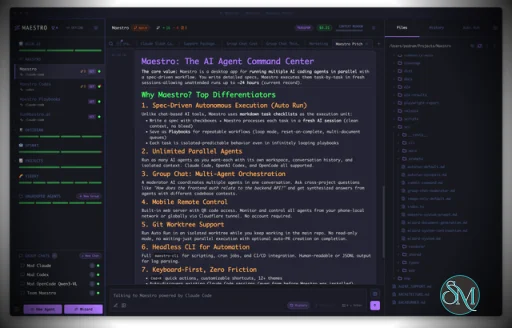
Maestro is a cross platform desktop application built to orchestrate multiple AI agents with isolated contexts. Each agent operates independently while still being managed under a unified command center. This allows users to execute complex workflows, parallel tasks, and long running processes efficiently.
The tool is open source and actively developed, targeting users who work with AI assisted development, research, automation, and experimentation.
Download Maestro v0.15.4-RC - AI Agent Command Center - Software Mirrors |
|---|
Download maestro-0.15.4-RC-aarch64.rpm | 102.59 MB Download maestro-0.15.4-RC-amd64.deb | 106.83 MB Download maestro-0.15.4-RC-arm64-mac.dmg | 178.85 MB Download maestro-0.15.4-RC-arm64-mac.zip | 169.86 MB Download maestro-0.15.4-RC-arm64.AppImage | 183.06 MB Download maestro-0.15.4-RC-arm64.deb | 128.79 MB Download maestro-0.15.4-RC-x64-mac.dmg | 185.19 MB Download maestro-0.15.4-RC-x64-mac.zip | 176.21 MB Download maestro-0.15.4-RC-x86_64.AppImage | 183 MB Download maestro-0.15.4-RC-x86_64.rpm | 107.48 MB Download Maestro-Portable-0.15.4-RC-x64.exe | 140.23 MB Download Maestro-Setup-0.15.4-RC-x64.exe | 140.49 MB Maestro v0.15.4-RC Release Notes:Major 0.15.x Additions🎶 Maestro Symphony — Contribute to open source with AI assistance! Browse curated issues from projects with the runmaestro.ai label, clone repos with one click, and automatically process the relevant Auto Run playbooks. Track your contributions, streaks, and stats. You're contributing CPU and tokens towards your favorite open source projects and features.🎬 Director's Notes — Aggregates history across all agents into a unified timeline with search, filters, and an activity graph. Includes an AI Overview tab that generates a structured synopsis of recent work. Off by default, gated behind a new "Encore Features" panel under settings. This is a precursor to an eventual plugin system, allowing for extensions and customizations without bloating the core app. 🏷️ Conductor Profile — Available under Settings > General. Provide a short description on how Maestro agents should interface with you. 🧠 Three-State Thinking Toggle — The thinking toggle now cycles through three modes: off, on, and sticky. Sticky mode keeps thinking content visible after the response completes. Cycle with CMD/CTRL+SHIFT+K. 🤖 Factory.ai Droid Support — Added support for the Factory.ai droid agent. Full session management and output parsing integration. Changes in v0.15.4
Full Changelog: https://github.com/RunMaestro/Maestro/compare/v0.15.3...v0.15.4 What's Changed
New Contributors
|
Key Features
Maestro allows users to run multiple AI agents in parallel while keeping their context, state, and execution separated. This enables large tasks to be broken down and handled simultaneously.
The Auto Run and Playbook system lets users define workflows that execute steps automatically. These workflows can loop, batch tasks, or run unattended, making them suitable for long or repetitive operations.
Maestro supports group chat coordination where multiple agents collaborate within a single task. The tool handles routing and coordination to produce unified results.
Remote monitoring and control features allow users to observe and manage agent activity even when away from the main workstation.
A built in command line interface enables headless execution and scripting, allowing Maestro to integrate into broader automation workflows.
Ease of Use
Maestro is designed for users with technical experience. While it is not a beginner focused tool, its interface is structured for efficiency, especially for users familiar with development tools and multitasking environments.
Once configured, workflows are repeatable and easy to manage.
Performance and Compatibility
Maestro runs on Windows, macOS, and Linux. Performance scales based on system resources and the number of agents running concurrently. The application remains responsive even during complex orchestration tasks when used on modern hardware.
Because Maestro coordinates agents rather than performing heavy computation itself, overall performance largely depends on external AI services and configurations.
Pros and Cons
Advantages include powerful multi agent orchestration, parallel execution, automation through playbooks, command line support, and open source flexibility.
Limitations include a learning curve for new users, reliance on external AI models for functionality, and a focus on advanced workflows rather than simple chat usage.
Final Verdict
Maestro is a capable and thoughtfully designed orchestration tool for managing AI agents at scale. Its focus on parallel workflows, automation, and centralized control makes it a strong choice for advanced users working with AI assisted tasks.
For those who need structured AI agent orchestration rather than simple interaction, Maestro delivers a reliable and efficient solution.
Maestro is an open source agent orchestration tool that provides a centralized desktop environment for managing and running multiple AI agents and workflows simultaneously. It is designed for developers and advanced users who need structured coordination, parallel execution, and automation across AI driven tasks.
Maestro focuses on improving productivity when working with multiple agents by offering orchestration, monitoring, and workflow control from a single interface.
Developer:
Pedram Amini
Operating System:
Windows / macOS / Linux
Date Added:
2026-05-13T08:46:16.348Z
Categories:
Post a Comment/Report Broken Link: