Kudu is a cross platform system maintenance and optimization tool developed by Advent Development. It focuses on providing essential utilities for cleaning unnecessary files, managing system performance, and maintaining overall system health.
Unlike many heavy system optimization suites, Kudu emphasizes simplicity, speed, and low resource usage, making it suitable for a wide range of devices.
Download Kudu v1.43.0 - Free System Maintenance Tools - Software Mirrors |
|---|
Download Kudu for Windows (exe) Download Kudu for Linux (AppImage) Download Kudu for macOS Intel (dmg) |
Kudu v1.43.0 - Free System Maintenance Tools Release Notes:Features
VirusTotal Scan Results
|
Key Features
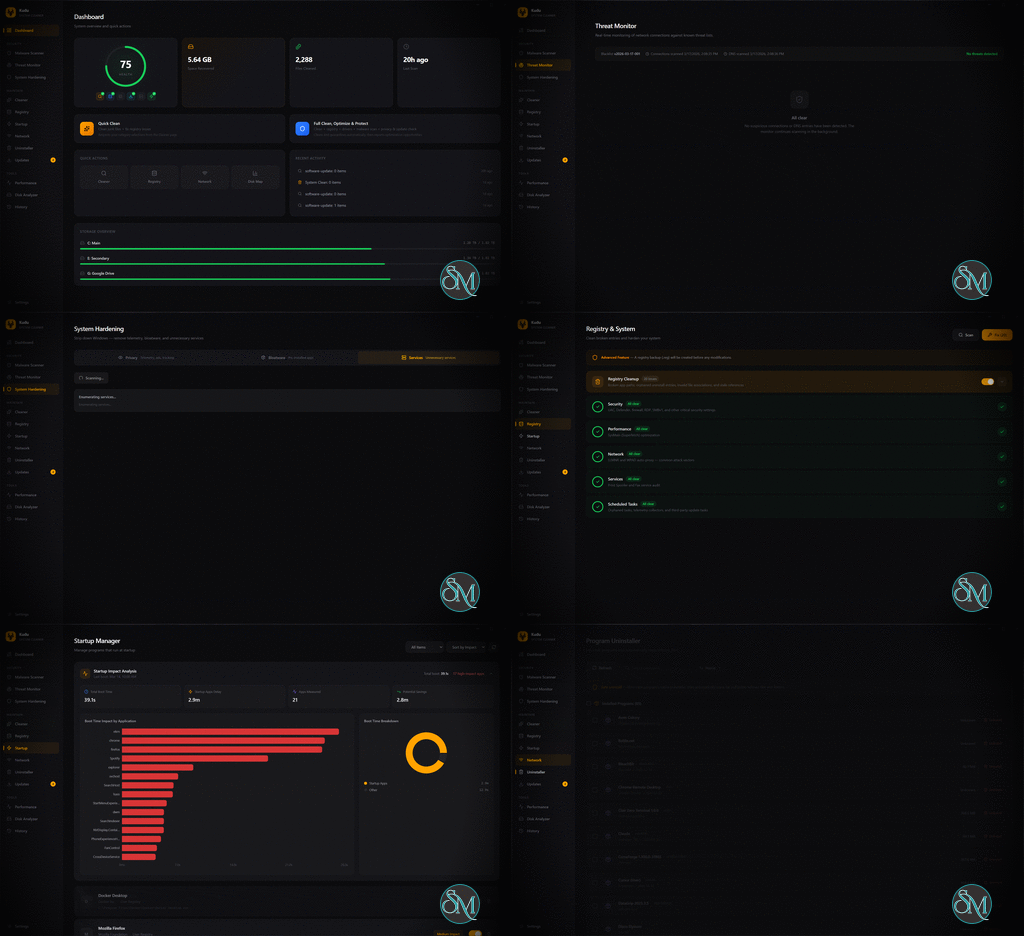
System Cleanup
Kudu includes tools for removing unnecessary files that accumulate over time, such as:
Temporary files
Cache data
Log files
Residual application data
Cleaning these files helps free up disk space and improve system performance.
Startup and Process Management
The software allows users to monitor and control system processes and startup programs.
Users can:
Disable unnecessary startup applications
Identify resource intensive processes
Improve system boot speed
This helps optimize overall system responsiveness.
Cross Platform Compatibility
Kudu supports multiple operating systems, including:
Windows
macOS
Linux
This makes it a convenient solution for users managing different systems or working in mixed environments.
Lightweight Performance
One of Kudu’s main advantages is its lightweight design.
Benefits include:
Fast scanning and cleanup
Low CPU and memory usage
Smooth operation on older systems
This makes it suitable for both modern and low specification devices.
Privacy Cleanup
Kudu can remove traces of user activity, including:
Browser cache and history
Temporary internet files
Application usage traces
This helps protect user privacy and reduce unnecessary data storage.
Command Line Friendly
Kudu is designed to work efficiently in command line environments, making it suitable for:
Automation scripts
Advanced system management
Developer workflows
This flexibility is useful for technical users who prefer terminal based tools.
Performance and Usability
Kudu delivers fast and efficient performance due to its lightweight architecture. Tasks such as scanning and cleanup are completed quickly without significantly impacting system resources.
The interface is simple and functional, though it may feel minimal compared to more feature rich tools. Users familiar with command line environments will benefit the most from its design.
Pros and Cons
Advantages
Lightweight and fast performance
Cross platform support
Simple and easy to use
Suitable for automation and scripting
Low resource consumption
Limitations
Limited advanced features
Minimal graphical interface
Not ideal for beginners
Smaller ecosystem compared to established tools
Who Should Use Kudu
Kudu is best suited for:
Users who want a lightweight system maintenance tool
Developers and technical users
People managing multiple operating systems
Users with older or low performance devices
It is particularly useful for basic system maintenance tasks rather than advanced system tuning.
Final Verdict
Kudu is a simple and efficient system maintenance tool designed for users who value speed, minimalism, and cross platform compatibility. While it may not offer the advanced features found in premium optimization suites, it provides essential tools for keeping systems clean and responsive.
For users looking for a lightweight alternative to heavier maintenance software, Kudu is a practical and effective choice.
System maintenance tools are essential for keeping computers clean, fast, and stable across different operating systems. Kudu is a lightweight system maintenance utility designed to provide basic cleanup, optimization, and performance improvements for Windows, macOS, and Linux environments.
Developer:
Advent Development, Inc.
Operating System:
Windows / macOS / Linux
Date Added:
2026-05-29T16:02:03.381Z
Categories:
Post a Comment/Report Broken Link: