IsMyLcdOK is a small, free utility that displays solid color screens to help you identify dead, stuck, or defective pixels on LCD and LED displays.
It does not require installation, making it ideal for quick diagnostics on multiple devices or when using a USB drive.
Download IsMyLcdOK - Software Mirrors |
|---|
Download IsMyLcdOK for Windows 64bit |
Key Features of IsMyLcdOK
1. Dead Pixel Detection
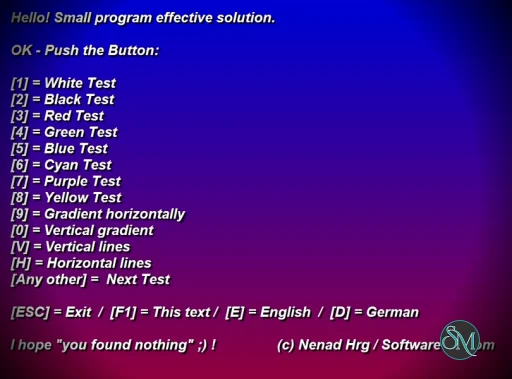
The software cycles through full-screen colors like red, green, blue, white, and black. This makes it easy to spot pixels that are not behaving correctly.
2. Extremely Lightweight
The program is very small in size and uses minimal system resources. It launches instantly and runs smoothly on almost any system.
3. Portable Usage
No installation is required. You can run it directly from a folder, USB drive, or external storage.
4. Multiple Test Modes
Users can switch between colors manually or automatically, allowing flexible testing depending on preference.
5. Multi-Monitor Support
It works across multiple displays, making it useful for users with dual or triple monitor setups.
Performance and Reliability
IsMyLcdOK performs exactly as expected. It is fast, stable, and does not include unnecessary features that could slow it down.
Because it focuses only on pixel testing, it avoids complexity and delivers reliable results every time.
User Interface and Experience
The interface is very simple and minimal. Controls are basic, and most actions can be performed using keyboard shortcuts.
There is no learning curve, making it suitable for both beginners and experienced users.
Pros and Cons
Pros
Completely free
No installation required
Very lightweight and fast
Easy to use
Effective for detecting dead or stuck pixels
Cons
Limited functionality beyond pixel testing
Interface is very basic
No advanced diagnostic tools
Who Should Use IsMyLcdOK
IsMyLcdOK is ideal for:
Checking new monitors for defects
Troubleshooting display issues
Quick diagnostics without installing software
Technicians and IT users
It is especially useful right after buying a new screen to ensure there are no dead pixels.
Final Verdict
IsMyLcdOK is a simple but highly effective utility that does exactly what it promises. It is not packed with features, but for pixel testing, it is one of the best tools available.
If you need a fast and reliable way to check your screen for pixel issues, IsMyLcdOK is a must-have lightweight tool.
If you want a quick way to test your monitor for dead or stuck pixels, IsMyLcdOK is one of the easiest tools you can use. It is lightweight, portable, and designed to do one job extremely well: help you detect screen defects in seconds.
Developer:
SoftwareOK
Operating System:
Windows
Date Added:
2026-05-20T09:02:13.768Z
Categories:
Post a Comment/Report Broken Link: