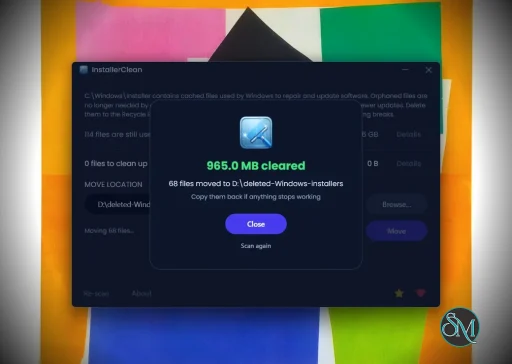
InstallerClean is a small Windows tool that helps detect and remove leftover files, folders, and registry entries created by installed software. It is built for users who want to keep their system clean without manually digging through directories.
InstallerClean is a focused utility designed to clean up files and traces that remain after uninstalling programs. While many uninstallers remove the main application, leftover data often stays behind. InstallerClean aims to fix that with a simple and lightweight approach.
The application is typically portable, meaning it can run without installation and does not add extra load to your system.
Download InstallerClean v1.8.2 - Software Mirrors |
|---|
Download InstallerClean v1.8.2
InstallerClean-portable.exe | 135 MB Download InstallerClean v1.8.2
InstallerClean-setup.exe | 90.15 MB Download InstallerClean v1.8.2
InstallerClean-slim.exe | 1.97 MB |
InstallerClean v1.8.2 Release Notes: What's changed
Fixes
- Missing-from-disk banner no longer fires for a benign case. A registered patch marked superseded whose file was already removed (by an older cleaner or a manual sweep) used to count into the same banner as a genuinely missing non-removable package. The banner text described the latter and was misleading for the former, so a machine that had been cleaned before could see a permanent banner suggesting the system was broken when it was fine.
- CLI single-instance mutex now releases on the acquiring thread. The CLI was releasing its mutex from a thread-pool thread after the first await;
Mutex.ReleaseMutex throws from any thread other than the one that owned it, so the process exited with an unhandled exception and the next launch hit the abandoned-mutex recovery path.
- Cancelling mid-Move or mid-Delete no longer surfaces an ObjectDisposedException. Closing the window during the operation now cancels the worker through the normal OperationCanceledException path; before, the worker hit ObjectDisposedException at its next checkpoint and the partial state landed in crash.log.
- CLI
/m honours the system-folder guard. A stale Scheduled Task argument carrying /m C:\Windows\System32\Spool previously bypassed the inside-system-folder gate. Now both the command-line argument and the settings-loaded fallback go through the same checks.
- CLI stdout never echoes framework-raised UnauthorizedAccessException messages. The two production throw sites with resx-sourced safe-to-display text opt in via a new sentinel exception type; everything else falls through to the generic type-name + crash-log path.
- CLI mutex-block message now shaped for sysadmin tools. Previously printed the GUI dialog body ("InstallerClean is already running."); now names the contending parties (GUI or another CLI run) and points at exit code 75.
Accessibility
- Higher contrast on the orphans-list Reason column. The column that distinguishes Orphaned from Superseded is no longer the lowest text tier on the most semantically critical cell.
- Orphans list announces with column headers. Now a ListView + GridView (matching the registered-files window) so screen readers announce each row as column-headed cells rather than a single cell of run-together values.
- Alt+D access key on the completion-overlay Done button. A motor-impaired user driving by access keys can now dismiss every confirm dialog including the post-Move/Delete summary.
- Result-log noun aligned across surfaces. The Send-summary button was already called "summary"; the screen-reader Automation.Name, the failure status, and the success status now match.
- About window buttons carry distinct automation names so a JAWS user navigating by element list with About open over Main can tell the rows apart.
- SubtleLink underlines on keyboard focus matching its existing hover behaviour. The About window's MIT licence link now surfaces the same visual cue to a tabbing keyboard user that a mouse hover does.
CLI documentation
- README short notes that
taskkill /pid bypasses graceful cancel (the next run picks up the abandoned mutex), and that Group Policy denying UAC elevation surfaces as Windows error 740 to the parent shell. Same notes ported to README.fr and README.zh-CN.
Translator-facing
- Body explanation paragraph templates the Reason values so a translator can edit the column labels in one place and have the body copy follow.
BrowserLaunchFailed resx keys renamed to the BrowserLaunch. prefix every other key uses.
Build
installerclean-cli.csproj now pins PublishReadyToRun=false matching the WPF host so a future SDK feature-band change to the default cannot silently shift the CLI binary's R2R section count.
Downloads
| File | Size | Description |
|------|------|-------------|
| InstallerClean-setup.exe | ~90 MB | Recommended. Inno Setup installer; handles uninstall via Add/Remove Programs. |
| InstallerClean-portable.exe | ~135 MB | Self-contained single executable. Copy to a USB stick, run, done. |
| InstallerClean-slim.exe | ~2 MB | Smallest download. Requires the .NET 10 Desktop Runtime. |
The setup and portable builds bundle the .NET 10 runtime so nothing else needs to be installed. The slim build is for machines that already have .NET 10 (Visual Studio installs it).
All three require administrator privileges and Windows 10 or 11.
Or via Scoop:
scoop bucket add no-faff https://github.com/no-faff/scoop-bucket
scoop install installerclean
Verify your download (SHA-256)
ca12317d91176e486586012328f027c6f44dfb13d056adfea93f134be71db9cd  InstallerClean-setup.exe
e84dc130464dfc73738678af255611b345d9382202de6195fba03b2c4ba2891a  InstallerClean-portable.exe
2ede403cf8b9d9adb0213b9cb897ddce629b1bdf56be214be562337183974944  InstallerClean-slim.exe
Hashes are also published as .sha256 sidecar files alongside each binary on this release. To verify in PowerShell:
powershell
(Get-FileHash -Algorithm SHA256 .\InstallerClean-setup.exe).Hash -eq 'ca12317d91176e486586012328f027c6f44dfb13d056adfea93f134be71db9cd'
VirusTotal
All three builds clean across every engine. Different denominators because not every engine runs on every file.
|
Key Features of InstallerClean
Leftover File Detection
InstallerClean scans your system for files and folders that remain after uninstalling applications. This helps free up disk space and reduce clutter.
Registry Cleanup
It can identify unused or orphaned registry entries related to removed programs, helping maintain system organization.
Simple Interface
The tool is designed to be straightforward. Users can scan and clean with minimal steps, making it accessible even for non technical users.
Portable Usage
InstallerClean often runs as a portable application, so you can use it on multiple systems without installation.
Fast Scanning
The scanning process is quick and does not heavily impact system performance.
User Experience
InstallerClean is easy to use, with a minimal interface that focuses on functionality. It does not overwhelm users with advanced settings, which makes it suitable for quick maintenance tasks.
However, advanced users may find it lacks deeper customization compared to more comprehensive system cleanup tools.
Performance and Compatibility
The software performs efficiently and works on most Windows systems. It is lightweight and does not consume significant resources during scanning or cleaning.
Because it targets leftover files specifically, it complements rather than replaces full system maintenance tools.
Pros
Cons
Limited advanced features
Not as comprehensive as full system cleaners
Requires careful review before deleting files
InstallerClean is ideal for users who frequently install and uninstall software and want to keep their system tidy. It is also useful for those who prefer simple tools over complex system utilities.
InstallerClean delivers a focused solution for removing leftover files after uninstallations. While it is not a full system optimizer, its simplicity and efficiency make it a valuable addition to basic PC maintenance tools.
Free
Software Informations:
Developer:no-faffOperating System:WindowsDate Added:2026-05-28T16:01:49.471Z
Categories:
System Optimization
Post a Comment/Report Broken Link: