InstallerClean is a small Windows tool that helps detect and remove leftover files, folders, and registry entries created by installed software. It is built for users who want to keep their system clean without manually digging through directories.
InstallerClean is a focused utility designed to clean up files and traces that remain after uninstalling programs. While many uninstallers remove the main application, leftover data often stays behind. InstallerClean aims to fix that with a simple and lightweight approach.
The application is typically portable, meaning it can run without installation and does not add extra load to your system.
Download InstallerClean v1.8.0 - Software Mirrors |
|---|
Download InstallerClean v1.8.0
InstallerClean-portable.exe | 62.88 MB Download InstallerClean v1.8.0
InstallerClean-setup.exe | 90.49 MB Download InstallerClean v1.8.0
InstallerClean-slim.exe | 1.94 MB |
InstallerClean v1.8.0 Release Notes: What's new
Opt-in network features
- Check for updates does the check itself. The button in About now performs the version check rather than opening the releases page in the browser. On click it issues a single HTTPS GET to the GitHub releases API, identifies as
InstallerClean/, and shows one of three localised outcomes: an inline "Up to date." status, an Update-available dialog (with a button to open the release page), or a Check-failed dialog naming the reason. 8-second timeout.
- Send summary to No Faff. After every Move, Delete or scan-with-no-orphans, the app writes a small JSON file to
%LOCALAPPDATA%\NoFaff\InstallerClean\last-run.json summarising the operation in counts and categorical labels only: schema version, app version, OS string, the four scan counts (registered, orphaned, superseded, missing-from-disk), the scan duration, the pending-reboot label, the operation kind and outcome, files processed, files failed, bytes freed, error buckets and (for moves) the destination kind. No file paths, no user names, no machine identifiers, no time-of-day. A new "Send summary" button on the completion screen opens a confirmation window showing the exact JSON the app would POST to a Netlify Edge Function I run; review it there and press Send to confirm, or Cancel to back out. The button is one-shot per session and is suppressed when the all-clear comes from a Re-scan-after-completion. Once per machine: a successful send hides the button for ever; if the first attempt fails with a transient error the next session re-prompts. Nothing fires automatically.
Accessibility and keyboard
- Triple-click in any TextBox selects all content. A class handler on
TextBox.PreviewMouseLeftButtonDownEvent registered at app startup gives the path TextBox and every read-only metadata field the standard Windows triple-click behaviour without per-field markup.
- Read-only metadata fields are keyboard-reachable. The
SelectableText style sets IsTabStop=True so a keyboard-only user can Tab to a value (Author, Title, Application, signing certificate, file size, comments) and Ctrl+C it.
- Screen-reader announcements. Dynamic status text on the scanning, operating and completion overlays is marked
LiveSetting=Polite so NVDA, Narrator and JAWS announce updates as they appear, not just on focus. The pending-reboot and missing-from-disk banners likewise announce when they become visible after a scan completes.
- Tab order in the main window respects the visual left-to-right order. The Delete-then-Move pair on the action row and the Re-scan / About / Star / Buy-me-a-cuppa run on the bottom nav no longer interleave; each
DockPanel scopes KeyboardNavigation.TabIndex locally.
- Inline link contrast bumped to meet WCAG AA on the dark surface.
Window and focus behaviour
- No focus ring on Alt+Tab return. The focused element's
FocusVisualStyle is suppressed when the window deactivates to another process and restored on the next keyboard navigation event. Logical focus survives the round trip, so the path TextBox keeps its caret position and a Ctrl+V after Alt+Tab still pastes.
- Modal dialogs hidden from the taskbar. Confirm Move, Confirm Delete, Confirm Send and Update Available no longer create a second taskbar entry on Alt+Tab.
Naming and copy
- Umbrella term "orphaned files" renamed to "unused files" across the window title, screen-reader names, Event Log entries and the app description (visible in
setup.exe properties). The per-file Reason column still distinguishes "Orphaned" (the product was uninstalled) from "Superseded" (a newer patch replaced this one).
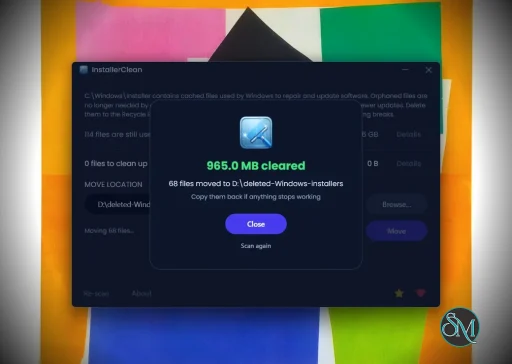
- "All clear" is now "All clean". The overlay also gains the elapsed scan duration and a count of registered products scanned, so on a fast machine the overlay reads as a real result rather than a flicker.
- "{N} cleared" is now "{N} freed". Matches the JSON schema rename below.
bytesCleared renamed to bytesFreed in the result-log schema; redundant removableCount dropped (it was always the sum of orphanedCount and supersededCount).
- "Donate" renamed to "Buy me a cuppa" on the About button. The label, its Alt+B accelerator and the tooltip all reflect the new framing.
- Alt+S and Alt+B accelerators on the Star and Buy me a cuppa buttons. A "SAY THANKS" section header sits above them so the keyboard convention reads cleanly.
- Microcopy sweep. The orphaned-files window labels its rows more accurately, the missing-from-disk banner names a count, the move-destination tooltip describes its drag-and-drop behaviour, and the result-log confirmation reassurance reads in plain tense.
CLI
- Exit code 75 for transient conditions. Returned when the GUI is already holding the single-instance mutex or when Windows Installer reports a pending transaction. A scheduled task can retry on 75 without conflating it with hard failures (1) or partial success (2).
- Mutex-block writes an Event Log entry. The Application channel records that a scheduled-task firing was skipped, under source
InstallerClean, so an RMM consumer can audit run / skip parity.
- Stdout is UTF-8. Path output and localised messages survive a redirect to file or pipe.
- "Event Log writing failed" stdout note. If any audit write fails during a run (Group Policy, channel unavailable), the CLI prints a single note on stdout at the end so a sysadmin expecting an Application-channel record knows the channel was unwritable.
Installer
- Upgrades prompt to close a running InstallerClean. The Inno Setup script ties
AppMutex to Global\InstallerClean_SingleInstance, the same name the app and CLI use, so the installer offers to close the running app rather than failing at the file-overwrite step.
- VersionInfo metadata (
VersionInfoVersion, ProductName, Company, Copyright, Description) embedded in InstallerClean-setup.exe. Right-click Properties on the setup file shows the same metadata as the app, rather than the Inno default.
Removed
- "Share what you cleared" was a browser-mediated share built mid-cycle; replaced by Send summary before the binary ever shipped.
- The "View last result log" link in About is gone now that the confirmation window shows the JSON inline.
Downloads
| File | Size | Description |
|------|------|-------------|
| InstallerClean-setup.exe | ~90 MB | Recommended. Inno Setup installer; handles uninstall via Add/Remove Programs. |
| InstallerClean-portable.exe | ~63 MB | Self-contained single executable. Copy to a USB stick, run, done. |
| InstallerClean-slim.exe | ~1.9 MB | Smallest download. Requires the .NET 10 Desktop Runtime. |
The setup and portable builds bundle the .NET 10 runtime so nothing else needs to be installed. The slim build is for machines that already have .NET 10 (Visual Studio installs it).
All three require administrator privileges and Windows 10 or 11.
Or via Scoop:
scoop bucket add no-faff https://github.com/no-faff/scoop-bucket
scoop install installerclean
Verify your download (SHA-256)
9bd47d7df727b77ada0b0ec8a1042e991a6bc414307891e0117d8102a615633e  InstallerClean-setup.exe
3c41bec4938c7665c30ded25fcfeb82b47e8e5812f9925bcd2c1b220e6aca3f3  InstallerClean-portable.exe
ae762f1d60fec843bdbf96a72ff6b4db530574c80f28573ee4ab69999e621344  InstallerClean-slim.exe
Hashes are also published as .sha256 sidecar files alongside each binary on this release. To verify in PowerShell:
powershell
(Get-FileHash -Algorithm SHA256 .\InstallerClean-setup.exe).Hash -eq '9bd47d7df727b77ada0b0ec8a1042e991a6bc414307891e0117d8102a615633e'
VirusTotal
All three builds clean across every engine. Different denominators because not every engine runs on every file.
|
Key Features of InstallerClean
Leftover File Detection
InstallerClean scans your system for files and folders that remain after uninstalling applications. This helps free up disk space and reduce clutter.
Registry Cleanup
It can identify unused or orphaned registry entries related to removed programs, helping maintain system organization.
Simple Interface
The tool is designed to be straightforward. Users can scan and clean with minimal steps, making it accessible even for non technical users.
Portable Usage
InstallerClean often runs as a portable application, so you can use it on multiple systems without installation.
Fast Scanning
The scanning process is quick and does not heavily impact system performance.
User Experience
InstallerClean is easy to use, with a minimal interface that focuses on functionality. It does not overwhelm users with advanced settings, which makes it suitable for quick maintenance tasks.
However, advanced users may find it lacks deeper customization compared to more comprehensive system cleanup tools.
Performance and Compatibility
The software performs efficiently and works on most Windows systems. It is lightweight and does not consume significant resources during scanning or cleaning.
Because it targets leftover files specifically, it complements rather than replaces full system maintenance tools.
Pros
Cons
Limited advanced features
Not as comprehensive as full system cleaners
Requires careful review before deleting files
InstallerClean is ideal for users who frequently install and uninstall software and want to keep their system tidy. It is also useful for those who prefer simple tools over complex system utilities.
InstallerClean delivers a focused solution for removing leftover files after uninstallations. While it is not a full system optimizer, its simplicity and efficiency make it a valuable addition to basic PC maintenance tools.
Free
Software Informations:
Developer:no-faffOperating System:WindowsDate Added:2026-05-12T20:01:26.130Z
Categories:
Utilities
Post a Comment/Report Broken Link: