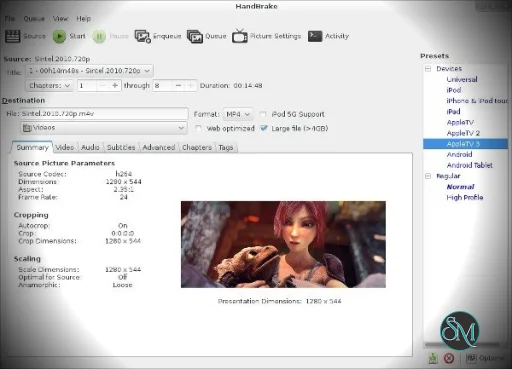
HandBrake is an open source video transcoder that converts video files into modern, widely supported formats. The software is available for Windows, macOS, and Linux, making it a cross platform solution for video processing.
Originally developed in the early 2000s, HandBrake became a popular tool for compressing large video files, converting formats, and preparing media for playback on different devices such as smartphones, tablets, and streaming platforms.
The program is completely free and maintained by an open source community.
Download HandBrake 1.11.1 - Software Mirrors |
|---|
Download HandBrake 1.11.1 for WindowsHandBrake-1.11.1-arm64-Win_GUI.exe HandBrake-1.11.1-arm64-Win_GUI.zip |
Download HandBrake 1.11.1 for macOS |
Download HandBrake 1.11.1 for Linux |
Download HandBrake 1.11.1 CLI for Windows |
Download HandBrake 1.11.1 CLI for macOS |
HandBrake 1.11.1 Release Notes:Upgrade NoticeBefore updating HandBrake, please make sure there are no pending encodes in the queue, and be sure to make a backup of any custom presets and app preferences you have, as they may not be compatible with newer versions. Windows users, please make sure to install Microsoft .NET Desktop Runtime version 10.0 Download available from Microsoft: HandBrake 1.11.1All platformsAudio
Third-party libraries
Windows
|
Key Features of HandBrake
Video Format Conversion
HandBrake can convert video from many input formats into commonly used output containers such as:
MP4
MKV
WebM
It supports modern codecs including H.264, H.265, AV1, VP9, and others, enabling efficient compression and high quality output.
Advanced Video Compression
One of HandBrake’s main strengths is its ability to compress large video files while maintaining good visual quality.
Users can adjust encoding settings such as:
Bitrate
Frame rate
Resolution
Constant quality levels
These options allow users to optimize videos for storage, streaming, or mobile playback.
Built In Presets for Devices
HandBrake includes device presets that automatically configure encoding settings for popular platforms and devices.
Examples include presets for:
Smartphones
Tablets
Streaming devices
Web optimized videos
These presets help beginners convert videos quickly without needing advanced knowledge of video encoding.
Hardware Accelerated Encoding
HandBrake can use hardware acceleration technologies such as:
Intel Quick Sync Video
NVIDIA NVENC
Apple VideoToolbox
Hardware acceleration improves encoding speed when converting large or high resolution video files.
Batch Processing and Queue System
The software supports batch processing, allowing users to queue multiple videos for conversion.
This feature is useful when processing entire video libraries or large media collections.
Subtitle and Chapter Support
HandBrake supports various subtitle formats, including:
SRT
SSA
VobSub
Closed captions
It can also preserve chapter markers from DVDs or Blu ray discs, which makes navigation easier in longer videos.
Video Filters and Adjustments
The program includes several filters that improve video quality or correct visual issues:
Deinterlacing
Denoising
Cropping and scaling
Deblocking
Color adjustments
These tools help optimize videos before final encoding.
Performance and Usability
HandBrake is known for its reliable performance and efficient compression algorithms. The software can significantly reduce video file size while maintaining strong visual quality.
However, because it offers many advanced encoding options, the interface can be overwhelming for beginners. Users often rely on presets until they become familiar with encoding settings such as bitrates and codecs.
Encoding speed depends on system hardware, video resolution, and selected compression settings.
Pros and Cons
Advantages
Completely free and open source
Available on Windows, macOS, and Linux
Powerful video compression capabilities
Supports modern codecs such as H.265 and AV1
Batch conversion support
Hardware accelerated encoding
Limitations
Learning curve for beginners due to advanced settings
Limited output container formats
Cannot bypass copy protected DVDs or Blu ray discs
Not designed for full video editing workflows
Because of these limitations, HandBrake is typically used together with video editing software rather than replacing it.
Who Should Use HandBrake
HandBrake is ideal for:
Content creators compressing videos for online platforms
Users converting videos between formats
Media enthusiasts archiving video libraries
Anyone needing to reduce large video file sizes
Developers automating video encoding using command line tools
It is especially popular among users who want advanced encoding control without paying for commercial software.
Final Verdict
HandBrake is one of the most powerful free video transcoding tools available. With support for modern codecs, hardware acceleration, batch processing, and advanced quality controls, it provides professional level video conversion capabilities at no cost.
For users who frequently convert or compress video files, HandBrake remains a reliable and efficient solution across multiple operating systems.
HandBrake is one of the most widely used free tools for converting and compressing video files. It is popular among content creators, media enthusiasts, and everyday users who need a reliable way to change video formats or reduce file sizes without sacrificing quality.
Developer:
The HandBrake Team
Operating System:
Windows / macOS / Linux
Date Added:
2026-05-29T00:02:26.406Z
Categories:
Post a Comment/Report Broken Link: