GitButler is a desktop Git client that helps developers manage multiple branches more efficiently. It introduces the concept of stacked branches, allowing developers to build features incrementally while keeping changes organized and reviewable.
The tool is designed to work alongside popular Git hosting platforms while enhancing local repository management.
Download GitButler 0.19.12 - Software Mirrors | ||
|---|---|---|
Download GitButler GitButler 0.19.12 | Download GitButler GitButler 0.19.12 Download GitButler GitButler 0.19.12 Download GitButler GitButler 0.19.12 Download GitButler GitButler 0.19.12 Download GitButler GitButler 0.19.12 Download GitButler GitButler 0.19.12 Download GitButler GitButler 0.19.12 | |
GitButler CLI install:curl -fsSL https://gitbutler.com/install.sh | sh | ||
GitButler 0.19.12 Release Notes:0.19.12
Fixes
CLI
TUI
| ||
Key Features
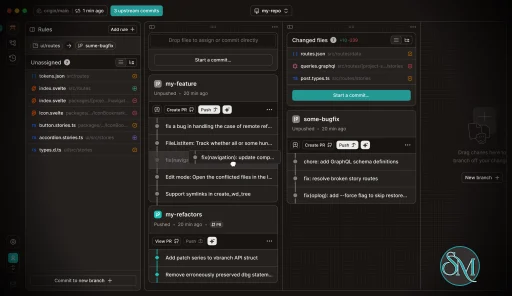
GitButler provides a visual branch management interface that clearly shows relationships between branches. This makes it easier to understand how feature branches depend on one another.
Stacked branch workflows allow developers to split large changes into smaller logical pieces. Each stack can be reviewed independently, improving collaboration and code review quality.
The interface simplifies rebasing, merging, and conflict resolution. Developers can perform complex Git operations without relying heavily on command line commands.
GitButler also enhances pull request preparation by helping structure commits and branches cleanly before pushing to a remote repository.
Ease of Use
GitButler offers a clean and modern user interface. The visual approach makes branch management more intuitive compared to command line tools.
While experienced Git users may already understand advanced workflows, GitButler helps reduce mistakes and speeds up daily tasks. New users may still need basic Git knowledge to fully understand branching concepts.
Performance and Compatibility
GitButler runs as a desktop application and integrates with existing Git repositories. It is designed to operate efficiently without significant system overhead.
Compatibility with standard Git repositories ensures that users can adopt it without changing their existing workflow or hosting provider.
Pros and Cons
Advantages include intuitive stacked branch management, strong visualization tools, simplified rebasing workflows, and improved pull request preparation.
Limitations may include learning curve for new workflow concepts and reliance on desktop application usage rather than web based management.
Final Verdict
GitButler is an innovative Git client that modernizes branch management and simplifies complex development workflows. Its stacked branch approach and visual interface make it a valuable tool for developers seeking cleaner collaboration and more efficient version control management.
For teams looking to improve Git workflow organization and code review clarity, GitButler is a strong and practical choice.
GitButler is a modern Git client designed to simplify complex branch management and improve developer workflows. It focuses on stacked branches, visual clarity, and streamlined collaboration, making it especially appealing for teams that work with feature branches and pull request based development.
Unlike traditional Git interfaces, GitButler aims to reduce friction in everyday version control operations.
Post a Comment/Report Broken Link: