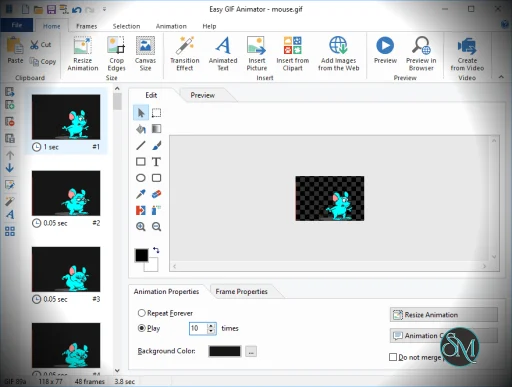
Easy GIF Animator is a Windows desktop application developed for creating and editing animated GIF images.
The software allows users to build animations from individual images, edit existing GIF files, add visual effects, optimize file sizes, and create simple web graphics without requiring professional design software.
Easy GIF Animator is a long established Windows application designed to help users create, edit, and optimize animated GIFs without requiring advanced graphic design skills. Known for its straightforward interface and beginner friendly workflow, the software remains a popular choice for creating web animations, banners, buttons, social media graphics, and lightweight promotional content.
While modern video formats and animation tools have expanded significantly, GIFs continue to be widely used across websites, messaging platforms, forums, and social media, helping Easy GIF Animator maintain its relevance.
It is primarily aimed at casual users, marketers, bloggers, web designers, and small businesses that need quick animated graphics.
Key Features of Easy GIF Animator
Animated GIF Creation
Users can create GIF animations from image sequences with full control over frame timing and playback settings.GIF Editing Tools
Existing GIF files can be modified by adding, removing, or rearranging frames.Text and Visual Effects
The software includes animated text effects, transitions, shadows, transparency settings, and basic graphic enhancements.Banner and Button Creation
Easy GIF Animator provides templates and tools for creating animated web banners, advertisements, and navigation buttons.Image Optimization
Built in optimization tools help reduce GIF file sizes while maintaining acceptable image quality.Frame Level Editing
Users can adjust individual frames, delay times, transparency settings, and animation loops.
Get Discount 20% OFF using "SWMR" Coupon code for the Blumentals Products below:
Screensaver Factory 7 Standard
Screensaver Factory 7 Professional
Screensaver Factory 7 Enterprise
Easy Button & Menu Maker 5 Personal
Easy Button & Menu Maker 5 Pro
Program Protector 4 Professional
Rapid SEO Tool 2 Standard (Discount 30% Off)
Rapid SEO Tool 2 Enterprise (Discount 30% Off)
Easy Button & Menu Maker 5 Personal (Extended)
Easy Button & Menu Maker 5 Pro (Extended)
Rapid SEO Tool 2 Professional (Discount 30% Off)
User Experience
One of Easy GIF Animator's strongest advantages is its accessibility.
The interface is designed for users with little to no animation experience. Wizards and guided workflows simplify common tasks, making it possible to create basic GIF animations within minutes.
Unlike professional animation software, the application focuses on simplicity rather than advanced creative control.
The interface feels somewhat traditional compared to modern design tools, but it remains easy to navigate and efficient for its intended purpose.
Performance and Editing Capabilities
Easy GIF Animator performs well for small to medium sized GIF projects.
Creating banners, social media graphics, logos, and lightweight animations is generally fast and straightforward. The software also handles editing existing GIFs effectively, which is useful when updating older animations without recreating them from scratch.
However, the application is not intended for complex motion graphics, video editing, or advanced animation workflows. Users requiring sophisticated effects may find its capabilities limited compared to modern creative suites.
Practical Use Cases
The software works particularly well for:
Website banners
Forum signatures
Marketing graphics
Social media GIFs
Animated logos
Simple advertising content
Educational animations
Its lightweight nature makes it attractive for users who need occasional GIF creation without investing time in larger design platforms.
Limitations
The biggest limitation is the GIF format itself.
Modern formats such as MP4, WebM, and animated WebP often provide significantly better quality and compression than traditional GIFs. As a result, some web designers have shifted away from GIF based content for performance reasons.
Additionally, Easy GIF Animator lacks many advanced features found in professional animation and video editing applications.
Pros
Easy to learn and use
Good GIF editing capabilities
Useful animation templates and effects
Lightweight and responsive
Suitable for beginners
Effective file optimization tools
Cons
Windows only
Interface feels somewhat dated
Limited advanced animation features
GIF format has efficiency limitations compared to modern alternatives
Not suitable for professional motion graphics projects
Easy GIF Animator is ideal for casual users, bloggers, marketers, web designers, educators, and small businesses that need a simple way to create and edit animated GIFs.
Users requiring advanced animation, video production, or professional motion graphics will likely need more powerful creative tools.
Easy GIF Animator remains a reliable and beginner friendly solution for creating and editing animated GIFs. Its straightforward interface, useful editing features, and efficient workflow make it a practical choice for users who want fast results without the complexity of professional animation software.
Developer:
Blumentals Solutions SIA
Operating System:
Windows
Date Added:
2026-05-30T08:36:36.000Z
Categories:
Post a Comment/Report Broken Link: