Driver Genius is a Windows utility developed for managing hardware drivers, updating outdated drivers, backing up installed drivers, and restoring drivers after system reinstalls.
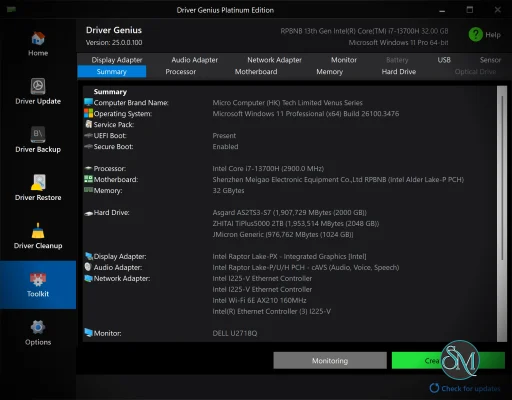
The software also includes additional maintenance tools such as hardware temperature monitoring, system cleanup, SSD optimization, and hardware information reporting.
Driver Genius targets both casual users and IT technicians who regularly manage Windows systems.
Driver Genius is a long running Windows driver management utility designed to simplify driver updates, backups, restoration, and hardware monitoring. Over the years, the software has built a reputation among PC maintenance enthusiasts and technicians for offering more than basic driver scanning by combining system cleanup, hardware diagnostics, and backup functionality into a single platform.
While Windows Update now handles drivers better than in the past, Driver Genius still attracts users who want more control over hardware drivers and system maintenance.
Key Features of Driver Genius
Driver Scanning and Updates
Driver Genius scans installed hardware and identifies outdated, missing, or incompatible drivers using its online driver database.Driver Backup and Restore
One of the software’s strongest features is the ability to back up installed drivers before reinstalling Windows or replacing hardware.Offline Driver Restoration
Users can restore backed up drivers without manually downloading each driver again after a fresh operating system installation.Hardware Monitoring
The application includes system monitoring tools for CPU temperature, GPU temperature, fan speeds, and hardware health status.System Cleanup Utilities
Driver Genius provides tools for cleaning invalid driver packages, temporary files, and unused system data.SSD and Performance Optimization
Some versions include SSD optimization and startup management features for improving Windows responsiveness.
User Experience
Driver Genius offers a polished interface compared to many older driver management tools.
Navigation is straightforward, and the software organizes tasks into driver updates, backups, system cleanup, and monitoring sections.
The driver backup workflow is especially useful for users reinstalling Windows on systems with uncommon hardware or limited internet access.
However, the software also reflects a common trend in the PC optimization category by bundling several maintenance tools together, some of which overlap with built in Windows functionality.
Driver Update Reliability
This is the most important factor for any driver management utility.
Driver Genius generally performs well at detecting outdated drivers and identifying hardware components. However, like all third party driver updater software, users should still exercise caution when installing non essential driver updates.
Modern Windows systems already receive many stable drivers directly through Windows Update and official manufacturer tools. Installing unnecessary drivers or incorrect versions can occasionally introduce instability.
The software is most useful in situations involving:
Fresh Windows installations
Missing hardware drivers
Legacy systems
Offline recovery workflows
Driver backup and migration
Performance and Resource Usage
Driver Genius runs smoothly on modern Windows systems and does not consume excessive resources during normal use.
Driver scans are relatively fast, and hardware monitoring features provide useful real time information without significant performance impact.
Background monitoring and startup components may slightly increase resource usage depending on enabled features.
Security and Practical Considerations
Users should avoid blindly updating every available driver recommendation.
Critical components such as GPU, chipset, audio, and network drivers are often best downloaded directly from official manufacturers unless specific issues exist.
Driver management tools can be convenient, but overly aggressive updating may occasionally create compatibility problems on stable systems.
Creating restore points and maintaining driver backups before large update sessions remains good practice.
Pros
Excellent driver backup and restore features
Beginner friendly interface
Useful for fresh Windows installations
Includes hardware monitoring tools
Offline driver restoration support
Broad hardware detection capabilities
Cons
Some bundled maintenance tools overlap with Windows features
Third party driver updates always carry some risk
Subscription prompts may annoy some users
Not every driver update is necessary
Advanced users may prefer manufacturer sourced drivers
Driver Genius is best suited for Windows users who frequently reinstall systems, repair PCs, manage multiple computers, or need reliable driver backup and restoration workflows.
It is especially useful for technicians and users handling older or uncommon hardware configurations.
Driver Genius remains one of the more capable Windows driver management utilities available, particularly for driver backup and restoration tasks. While modern Windows versions reduce the need for aggressive driver updating, the software still provides valuable tools for hardware maintenance, offline recovery, and system migration workflows.
Developer:
Driver Information Technology
Operating System:
Windows
Date Added:
2026-05-25T16:22:10.000Z
Categories:
Post a Comment/Report Broken Link: