Claude Desktop is Anthropic’s native Windows and macOS application for accessing Claude AI models including Haiku, Sonnet, and Opus. Unlike the browser version, the desktop app supports deeper local integration such as filesystem access, MCP server connectivity, and AI assisted workflows that interact directly with your machine.
Recent versions introduced more advanced features including parallel agent sessions, integrated terminals, file editors, workspace management, and experimental computer control capabilities.
Claude Desktop has evolved far beyond a simple chatbot client. Built by Anthropic, the desktop app now combines AI chat, coding assistance, automation tools, local file access, and agent style workflows into a single productivity platform.
For developers, researchers, writers, and advanced users, Claude Desktop is increasingly positioned as a serious alternative to browser based AI tools and even some traditional development workflows.
Download Claude Desktop 1.9255.2 - Software Mirrors |
|---|
Download Claude Desktop 1.9255.2 Windows x64 |
Key Features of Claude Desktop
Native Desktop Experience
Claude Desktop launches faster than the web interface and feels more integrated into the operating system. Quick access shortcuts and persistent background operation improve workflow efficiency.MCP Integration
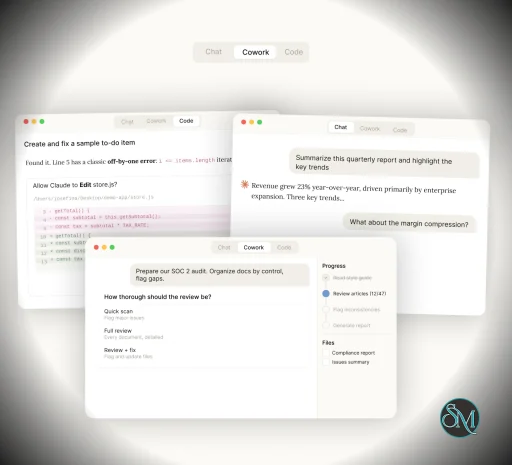
One of the biggest differentiators is support for MCP, or Model Context Protocol. This allows Claude to connect with tools like GitHub, Slack, Google Drive, local filesystems, and custom developer integrations.Claude Code and Cowork Modes
Anthropic has expanded Claude Desktop into multiple workflow modes including coding assistance, research, and multi step automation. The newer Cowork and Claude Code systems allow deeper interaction with terminals, files, and development environments.Parallel Sessions and Workspace Layouts
The redesigned interface supports multiple simultaneous sessions with draggable workspace panels, integrated previews, and side chats.Integrated Development Tools
Recent versions now include built in terminals, file editing, diff viewing, and project management capabilities aimed directly at developers.
User Experience
Claude Desktop feels significantly more ambitious than most AI desktop apps. The interface is modern and productivity focused, especially for users handling research, coding, or long running AI assisted tasks.
For developers and power users, the workflow can become extremely efficient once configured properly with MCP tools and local integrations.
However, the app is becoming increasingly complex. New users may find the growing number of modes, integrations, and automation features overwhelming at first. Community discussions also show frustration with performance regressions and instability in recent releases.
Performance and Reliability
Performance is highly dependent on workload and system configuration.
On modern hardware, Claude Desktop generally performs well during normal chat and coding tasks. However, some users report increasing UI lag, heavy resource usage, session instability, and reconnect issues after recent feature expansions.
The CLI based Claude Code workflow is frequently described by developers as more stable than the full desktop UI for intensive coding tasks.
Privacy and Security
Claude Desktop introduces both powerful capabilities and additional security considerations.
The app can access local files, execute tools, and in some cases interact directly with the operating system. Anthropic has implemented multiple safeguards and permission systems, but researchers continue to study prompt injection and tool abuse risks in MCP enabled AI systems.
Anthropic’s newer computer control features are still considered experimental and currently work best on macOS.
Pros
Extremely powerful AI workflow capabilities
Native desktop integration with local tools
Strong developer focused features
MCP ecosystem support
Parallel sessions and workspace management
Fast evolving feature set
Cons
Increasing complexity for casual users
Performance and stability issues reported by some users
Usage limits can feel restrictive on certain plans
Advanced automation introduces security concerns
Some features remain macOS focused
Claude Desktop is ideal for developers, researchers, technical writers, analysts, and advanced productivity users who want deeper AI integration than browser chat interfaces can provide.
Users looking for simple casual AI conversations may find the browser version easier and more lightweight.
Claude Desktop is becoming one of the most capable AI desktop platforms available today. Its combination of local integrations, coding tools, automation workflows, and advanced AI features makes it incredibly powerful for serious users. While stability and complexity remain ongoing challenges, the platform’s capabilities already place it among the leading AI productivity applications on desktop systems.
Developer:
Anthropic PBC
Operating System:
Windows / macOS
Date Added:
2026-05-28T03:15:35.727Z
Categories:
Post a Comment/Report Broken Link: