ChrisPC Free VideoTube Downloader is a Windows based media downloader that supports websites such as YouTube, Vimeo, Dailymotion, BBC iPlayer, and many others. The software can download videos, playlists, subtitles, live streams, and convert media into formats compatible with mobile devices and audio players.
ChrisPC Free VideoTube Downloader is a long running Windows application designed for downloading videos, playlists, and live streams from various online platforms. It offers broad format support and advanced downloading features, but user opinions remain divided due to limitations in the free version and concerns around bundled software in older installers.
The application comes in both Free and Pro editions, with the paid version unlocking advanced downloading capabilities and fewer restrictions.
Key Features of ChrisPC Free VideoTube Downloader
Wide Website Support
ChrisPC claims support for more than 30,000 video websites through its Link Finder engine, including YouTube playlists and streaming protocols such as M3U8 and MPEG-DASH.Playlist and Channel Downloads
Users can download entire YouTube playlists and channel content, which is useful for offline viewing and media archiving.Video Conversion Tools
The software supports converting downloaded files into formats like MP4, AVI, MP3, and device optimized formats for iPhone and iPad playback.Live Stream Recording
ChrisPC VideoTube Downloader can record live streams from YouTube and HLS based streaming services.Clipboard Monitoring
The app can automatically detect copied video URLs and add them to the download queue for faster workflow.
User Experience
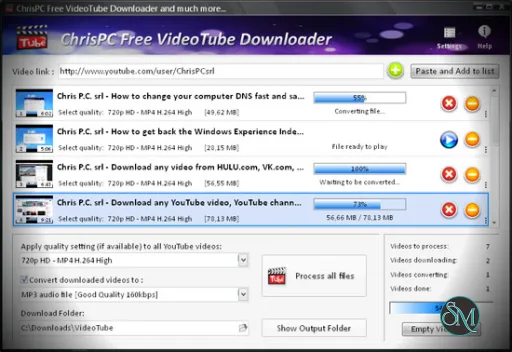
The interface is traditional and feature packed, though visually outdated compared to modern download managers. Basic downloading is straightforward, but advanced settings and multiple modes may overwhelm inexperienced users.
Community feedback is mixed. Some long term users praise the frequent updates and responsive support team, especially when websites change their streaming systems.
However, other reviews criticize the free version limitations and claim certain advertised functions require the paid edition to work effectively.
Performance and Reliability
ChrisPC VideoTube Downloader generally performs well for supported websites, particularly with playlist downloads and stream detection. The software frequently receives updates to maintain compatibility with changing video platforms.
Like many video downloaders, reliability can vary depending on website changes and YouTube updates. Reddit discussions about downloader software often recommend open source alternatives like yt-dlp for long term reliability and transparency.
Safety and Concerns
One recurring criticism involves bundled software or adware in older installers. Some users reported unwanted bundled applications during installation, though experiences vary depending on the version and download source.
As with many downloader applications, users should download only from the official website and pay close attention during installation.
Pros
Supports many websites and streaming formats
Playlist and live stream downloading
Built in conversion features
Frequent compatibility updates
Useful clipboard monitoring tools
Cons
Free version has significant limitations
Interface feels outdated
Mixed reputation regarding bundled software
Reliability depends on platform changes
Advanced options may confuse beginners
ChrisPC Free VideoTube Downloader is best suited for Windows users who want an all in one GUI based downloader with playlist and conversion features.
Users who prioritize open source transparency, lighter interfaces, or simpler workflows may prefer alternatives such as yt-dlp based GUIs, JDownloader, or other community recommended tools.
ChrisPC Free VideoTube Downloader offers a large feature set and strong website support, making it useful for downloading and converting online media. However, free version restrictions, mixed community trust, and installer concerns prevent it from ranking among the most universally recommended download tools today.
Developer:
Chris P.C. srl.
Operating System:
Windows
Date Added:
2026-05-17T03:04:18.107Z
Categories:
Post a Comment/Report Broken Link: