ChatGPT for macOS is a native desktop application developed by OpenAI that allows users to interact with ChatGPT directly from their Mac without using a browser.
The app is designed to integrate seamlessly with the macOS environment, enabling quick access to AI assistance from anywhere on the system.
It supports tasks such as writing, coding, analyzing files, and interacting with on screen content.
System Requirements
To run the app, your Mac must meet these requirements:
macOS 14 or newer
Apple Silicon processor (M1 or later)
Older Intel based Macs are not supported.
Key Features
Instant Access with Keyboard Shortcut
One of the most useful features is quick access using a global shortcut:
Press Option + Space to open ChatGPT instantly
This allows users to interact with AI without switching apps, improving workflow efficiency.
Seamless Desktop Integration
The app integrates directly with macOS, allowing users to:
Ask questions about content on screen
Work with emails, documents, and notes
Interact without opening a browser
This tight integration makes it feel like part of the operating system.
File and Screenshot Support
Users can upload and analyze files directly within the app:
Documents
Images
Screenshots
This enables tasks like summarizing content, extracting information, and debugging code efficiently.
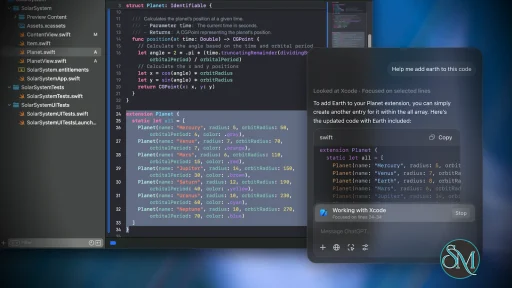
Work With Apps Feature
ChatGPT can interact with supported applications such as:
Code editors
Terminal tools
Text editing apps
It can read context from these apps to provide smarter, more relevant responses.
Coding Assistance
The macOS app is especially useful for developers:
Generate and edit code
Assist with debugging
Write scripts directly into IDE workflows
This helps speed up development tasks and reduce repetitive work.
Conversation History and Search
The app stores previous conversations, allowing users to:
Revisit past chats
Search through conversation history
Continue ongoing work
This improves productivity for long term projects.
Voice Interaction
The app previously included voice interaction features for hands free usage.
However, voice functionality in the macOS app has been phased out to focus on a more unified experience across platforms.
Performance and Usability
ChatGPT for macOS offers a clean and responsive interface that aligns with macOS design principles.
Performance highlights:
Fast launch and minimal friction
Smooth switching between chats
Efficient handling of files and inputs
Because it runs as a native app, it often feels faster and more integrated compared to the web version.
Pros and Cons
Advantages
Native macOS integration
Instant access via keyboard shortcut
Supports file and screenshot analysis
Useful for coding and productivity
Clean and modern interface
Limitations
Requires Apple Silicon Mac
Some features differ from web version
Voice mode no longer available on macOS
Depends on internet connection
Who Should Use ChatGPT for macOS
This app is ideal for:
Developers and programmers
Writers and content creators
Students and researchers
Professionals handling documents and data
Mac users who want quick AI access
It is especially useful for users who prefer desktop workflows over browser based tools.
Final Verdict
ChatGPT for macOS is a powerful desktop AI assistant that enhances productivity through deep system integration and fast accessibility. With features like global shortcuts, file analysis, and app integration, it provides a smooth and efficient AI experience on Mac.
For users working heavily on macOS, the app offers a more streamlined and responsive alternative to the web version of ChatGPT.
AI tools are becoming essential for productivity, coding, writing, and everyday tasks. ChatGPT for macOS brings the power of ChatGPT directly to desktop users with a native app designed for speed, convenience, and deep system integration.
Post a Comment/Report Broken Link: