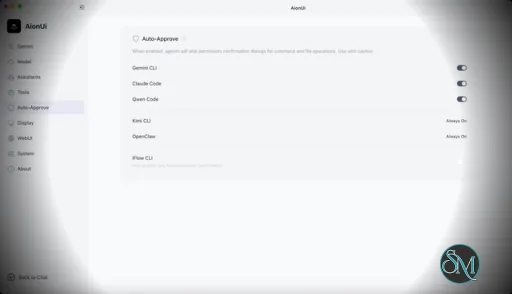
AionUi is a cross platform desktop application that transforms command line AI agents into an intuitive graphical interface. It detects locally installed AI CLI tools and presents them in a structured environment where users can manage conversations, sessions, and files more efficiently.
The software is open source, allowing users to customize and extend its functionality according to their workflow requirements.
Download AionUI v2.1.3 - Software Mirrors |
|---|
Download AionUI v2.1.3
for Windows 64bit (exe) | 187.19 MB Download AionUI v2.1.3
for Windows ARM64 (exe) | 190.87 MB | Download AionUI v2.1.3
for macOS Intel (zip) | 288.59 MB Download AionUI v2.1.3
for macOS Intel (dmg) | 287.98 MB Download AionUI v2.1.3
for macOS ARM64 (zip) | 249.96 MB Download AionUI v2.1.3
for macOS ARM64 (dmg) | 249.57 MB | Download AionUI v2.1.3
for Linux ARM64 (deb) | 208.54 MB Download AionUI v2.1.3
for Linux 64bit (deb) | 216.93 MB |
Highlights

Mobile Sendbox Redesign
- The mobile sendbox is now a single-line input with a compact
+ button that opens a bottom action sheet — model selection, permission mode, attachments, and Skills are all reachable from one place instead of being crammed into the input bar.
- Skills in the action sheet now show the conversation's loaded skills and one tap inserts
/skill-name directly into the input.
- Desktop behavior is unchanged: model and permission switching still go through the same dropdowns and propagate across team chats as before.
Reliability & Crash Fixes
- Deleted providers and assistants no longer resurrect on the next launch. Legacy
model.config migration was running every startup and silently re-inserting any provider you had removed; it now records a one-time completion flag and stops, while keeping the legacy data on disk for safe downgrades.
- The desktop window now stays open if the aioncore backend fails to start, so you can read the failure dialog (with optional diagnostic report) instead of the app vanishing on launch. WebUI/headless modes keep their fail-fast behavior.
- Quit cleanup is now serialized on Linux/desktop — backend shutdown, tray, and pet teardown happen in order before the app actually quits, fixing a class of races during shutdown.
- Native GPU crashpad fatals (
GPU process isn't usable. Goodbye) are filtered from Sentry so the dashboard isn't flooded with unrecoverable Chromium GPU crashes, while real Linux shutdown crashes still get reported.
Bug Fixes
- Pasting an image or dragging a file into the prompt no longer kicks you out of "Work in project" mode — paste/drag now preserves the selected workspace, matching the dialog upload flow.
- Streaming chat replies render more reliably when tools interrupt a response: separate text and thinking segments are preserved, the thinking timer finalizes on the next non-thinking event instead of waiting for a trailing
done, and reopening a conversation no longer restarts the thinking counter.
- Tool call records that arrive without a call ID are now dropped with a warning instead of leaking orphaned UI state into the conversation.
- Polished feedback/issue-reporting entry naming across the homepage, settings, and error alerts to consistently say "Report Issue" / "反馈问题"; removed the redundant feedback button from agent detection error alerts. Updated the English app slogan to "One desktop. Your AI agents, actually coworking."
What's Changed
- fix(config-migration): stop deleted providers/assistants from resurrecting on launch (ELECTRON-1KT) by @TCP404 in https://github.com/iOfficeAI/AionUi/pull/3018
- fix(startup): keep desktop open when backend startup fails by @piorpua in https://github.com/iOfficeAI/AionUi/pull/3030
- fix(desktop): serialize quit cleanup by @piorpua in https://github.com/iOfficeAI/AionUi/pull/3031
- chore(skill): rewrite bump-version for post-separation workflow by @piorpua in https://github.com/iOfficeAI/AionUi/pull/3032
- fix(sentry): filter native GPU crashpad fatals by @piorpua in https://github.com/iOfficeAI/AionUi/pull/3033
- chore(ui): polish feedback naming and remove error alert buttons by @IceyLiu in https://github.com/iOfficeAI/AionUi/pull/3034
- fix(tool-calls): ignore calls without call IDs by @piorpua in https://github.com/iOfficeAI/AionUi/pull/3035
- fix: preserve chat stream boundaries and thinking timers by @kaizhou-lab in https://github.com/iOfficeAI/AionUi/pull/3036
- feat(sendbox): mobile sendbox redesign with action sheet by @IceyLiu in https://github.com/iOfficeAI/AionUi/pull/3039
- fix(guid): keep workspace dir when pasting/dropping files (ELECTRON-1K6) by @TCP404 in https://github.com/iOfficeAI/AionUi/pull/3040
- chore: bump version to 2.1.3 and aioncore to v0.1.13 by @piorpua in https://github.com/iOfficeAI/AionUi/pull/3043
Full Changelog: https://github.com/iOfficeAI/AionUi/compare/v2.1.2...v2.1.3
|
Key Features
Multi Agent Support
AionUi allows users to run multiple AI sessions simultaneously. Each session maintains its own context, enabling parallel workflows without cross interference.
Modern Chat Interface
The application provides a clean and organized chat environment. Users can scroll through conversation history, manage session tabs, and interact with AI responses in a visually structured format.
Smart File Management
AionUi includes drag and drop support, file previews, and structured file browsing. This improves productivity when working with code, documents, or AI generated content.
Multi Model Compatibility
The software supports various AI models through local or API based configurations. Users can switch between models depending on task requirements.
Session Control and Workflow Tools
Users can manage sessions independently, review outputs, and maintain organized AI workflows. This structure helps reduce clutter when working on complex tasks.
Cross Platform Availability
AionUi runs on major operating systems, ensuring accessibility for developers working in different environments.
Ease of Use
The interface is designed to simplify complex AI workflows. While some familiarity with AI tools is helpful, the graphical layout significantly reduces the learning curve compared to pure command line usage.
Navigation is intuitive, and core features are accessible without excessive configuration.
Performance and Compatibility
AionUi operates efficiently as a desktop application. Performance depends partly on the underlying AI services or APIs being used, but the interface itself remains responsive during normal use.
Compatibility with standard AI command line tools ensures flexibility for technical users.
Final Verdict
AionUi is a powerful desktop interface for managing AI command line tools in a structured and visual way. Its ability to handle multiple sessions, integrate different models, and organize workflows makes it a valuable productivity solution for advanced users.
For professionals seeking greater control and efficiency in AI driven projects, AionUi delivers a practical and modern solution.
AionUi is a free and open source desktop application that provides a modern graphical interface for command line AI tools. It is designed to simplify AI workflows by replacing terminal based interaction with a visual environment that supports multiple AI models, parallel sessions, and productivity focused features. AionUi is suitable for developers, researchers, and advanced users who want a unified way to manage AI driven tasks.
Post a Comment/Report Broken Link: