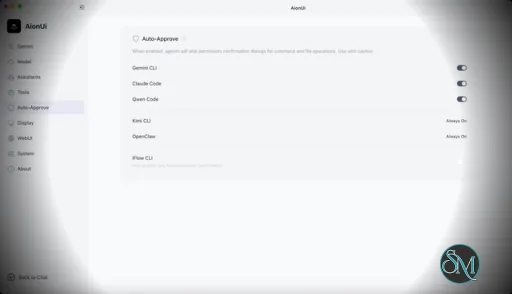
AionUi is a cross platform desktop application that transforms command line AI agents into an intuitive graphical interface. It detects locally installed AI CLI tools and presents them in a structured environment where users can manage conversations, sessions, and files more efficiently.
The software is open source, allowing users to customize and extend its functionality according to their workflow requirements.
Download AionUI v2.1.2 - Software Mirrors |
|---|
Download AionUI v2.1.2
for Windows 64bit (exe) | 187.08 MB Download AionUI v2.1.2
for Windows ARM64 (exe) | 190.63 MB | Download AionUI v2.1.2
for macOS Intel (zip) | 288.38 MB Download AionUI v2.1.2
for macOS Intel (dmg) | 287.79 MB Download AionUI v2.1.2
for macOS ARM64 (zip) | 249.85 MB Download AionUI v2.1.2
for macOS ARM64 (dmg) | 249.46 MB | Download AionUI v2.1.2
for Linux ARM64 (deb) | 208.36 MB Download AionUI v2.1.2
for Linux 64bit (deb) | 216.86 MB |
Highlights
Conversation Header & Mobile Polish

- Refreshed the conversation header on desktop: model selector moved to the right, agent logo sits next to the title editor, and team chats now show a Peoples icon. Model selectors (ACP & Aion CLI) gained a dropdown chevron so they look and feel consistent.
- Mobile experience is now noticeably more compact: tighter message bubbles (14px), shorter sendbox, ellipsis instead of marquee on the model pill, slimmer titlebar (no + button), and sidebar/history actions are always visible — no hover required.
- WebUI users now see the "Work in project" footnote on the new conversation page and can attach a workspace to fresh conversations, just like the desktop app.
Reliability & Crash Fixes
- The desktop and WebUI boot flow now stops cleanly when the aioncore backend fails to start, instead of cascading into confusing
__backendPort unset errors. A startup failure dialog with an optional diagnostic report is shown so problems are easier to triage.
- Packaged builds no longer crash from
EPIPE errors when console output is piped to closed stdout/stderr. File logging stays on so local diagnostics are unaffected.
- Backend launch failures are now captured as dedicated Sentry events with stage, port, paths, and stdout/stderr tails so we can actually see what went wrong.
Bug Fixes
- Fixed English text rendering with thin, hard-to-read weight on systems that have Inter installed — Arco's font stack is now overridden to use system fonts.
- Fixed the bottom ~8px of the Base URL input in the "Add Custom Platform" modal not accepting clicks because the toggle below was overlapping it.
- Switching conversations mid-upload now properly aborts the previous conversation's in-flight uploads, so you no longer see stray progress bars or thumbnails in the new conversation.
- Fixed a renderer crash when filtering workspace
@ mentions against malformed file entries.
- ACP conversation hydration no longer surfaces backend
Failed to fetch as an unhandled rejection; running/processing state resets cleanly when the local backend is temporarily unavailable.
- Opening a stale (deleted) conversation no longer triggers an unhandled 404 promise rejection — the renderer treats it as a missing conversation while still surfacing real backend errors.
What's Changed
- chore(docs): update WeChat group QR code to wx-9 by @IceyLiu in https://github.com/iOfficeAI/AionUi/pull/3006
- fix(guid): show workspace footnote in WebUI by @kaizhou-lab in https://github.com/iOfficeAI/AionUi/pull/3005
- fix(conversation): handle stale conversation lookups by @piorpua in https://github.com/iOfficeAI/AionUi/pull/3009
- fix(chat): handle backend fetch failures in acp hydration by @piorpua in https://github.com/iOfficeAI/AionUi/pull/3015
- fix(chat): guard workspace mention search fields by @piorpua in https://github.com/iOfficeAI/AionUi/pull/3014
- fix(startup): report backend launch failures by @piorpua in https://github.com/iOfficeAI/AionUi/pull/3020
- fix(styles): override Arco font-family to prevent Inter from rendering thin text by @ringringlin in https://github.com/iOfficeAI/AionUi/pull/3013
- fix(settings): unblock the bottom of the Base URL input in AddPlatformModal (ELECTRON-1K4) by @TCP404 in https://github.com/iOfficeAI/AionUi/pull/3017
- Handle backend startup failures by @piorpua in https://github.com/iOfficeAI/AionUi/pull/3022
- feat: conversation header polish (desktop & mobile) by @IceyLiu in https://github.com/iOfficeAI/AionUi/pull/3021
- Fix packaged console logging EPIPE crashes by @piorpua in https://github.com/iOfficeAI/AionUi/pull/3023
- fix(upload): abort in-flight uploads when switching conversations (ELECTRON-1K2) by @TCP404 in https://github.com/iOfficeAI/AionUi/pull/3019
- chore: bump version to 2.1.2 and aioncore to v0.1.11 by @piorpua in https://github.com/iOfficeAI/AionUi/pull/3025
Full Changelog: https://github.com/iOfficeAI/AionUi/compare/v2.1.1...v2.1.2
|
Key Features
Multi Agent Support
AionUi allows users to run multiple AI sessions simultaneously. Each session maintains its own context, enabling parallel workflows without cross interference.
Modern Chat Interface
The application provides a clean and organized chat environment. Users can scroll through conversation history, manage session tabs, and interact with AI responses in a visually structured format.
Smart File Management
AionUi includes drag and drop support, file previews, and structured file browsing. This improves productivity when working with code, documents, or AI generated content.
Multi Model Compatibility
The software supports various AI models through local or API based configurations. Users can switch between models depending on task requirements.
Session Control and Workflow Tools
Users can manage sessions independently, review outputs, and maintain organized AI workflows. This structure helps reduce clutter when working on complex tasks.
Cross Platform Availability
AionUi runs on major operating systems, ensuring accessibility for developers working in different environments.
Ease of Use
The interface is designed to simplify complex AI workflows. While some familiarity with AI tools is helpful, the graphical layout significantly reduces the learning curve compared to pure command line usage.
Navigation is intuitive, and core features are accessible without excessive configuration.
Performance and Compatibility
AionUi operates efficiently as a desktop application. Performance depends partly on the underlying AI services or APIs being used, but the interface itself remains responsive during normal use.
Compatibility with standard AI command line tools ensures flexibility for technical users.
Final Verdict
AionUi is a powerful desktop interface for managing AI command line tools in a structured and visual way. Its ability to handle multiple sessions, integrate different models, and organize workflows makes it a valuable productivity solution for advanced users.
For professionals seeking greater control and efficiency in AI driven projects, AionUi delivers a practical and modern solution.
AionUi is a free and open source desktop application that provides a modern graphical interface for command line AI tools. It is designed to simplify AI workflows by replacing terminal based interaction with a visual environment that supports multiple AI models, parallel sessions, and productivity focused features. AionUi is suitable for developers, researchers, and advanced users who want a unified way to manage AI driven tasks.
Post a Comment/Report Broken Link: