Multica v0.4.43

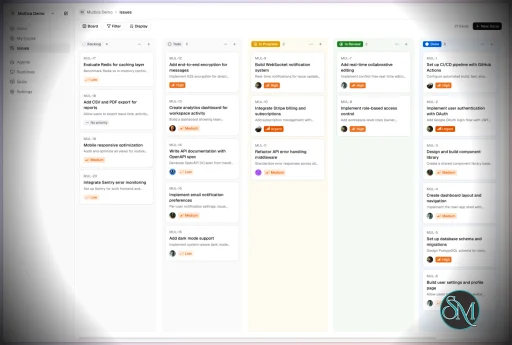
Multica is an open-source platform designed to manage and orchestrate AI agents within development workflows. Instead of running a single AI assistant, it allows multiple agents to collaborate, execute tasks, and share knowledge across projects.

It essentially acts like a control center where:

  • AI agents are assigned tasks

  • Progress is tracked in real time

  • Outputs and skills are reused across workflows

Multica currently supports Claude Code, Codex, OpenClaw, and OpenCode out of the box. The daemon auto-detects whichever CLIs you have installed. Since it’s open source, you can also add your own backends.

Download Multica v0.4.43 - Software Mirrors

Multica v0.4.43 for Windows

multica-cli-0.4.43-windows-amd64.zip | 6.96 MB

multica-cli-0.4.43-windows-arm64.zip | 6.19 MB

multica-desktop-0.4.43-windows-arm64.exe | 169.36 MB

multica-desktop-0.4.43-windows-x64.exe | 168.08 MB

multica_windows_amd64.zip | 6.96 MB

multica_windows_arm64.zip | 6.19 MB

Multica v0.4.43 for macOS

multica-cli-0.4.43-darwin-amd64.tar.gz | 6.88 MB

multica-cli-0.4.43-darwin-arm64.tar.gz | 6.34 MB

multica-desktop-0.4.43-mac-arm64.dmg | 219.46 MB

multica-desktop-0.4.43-mac-arm64.zip | 209.62 MB

multica-desktop-0.4.43-mac-x64.dmg | 228.61 MB

multica-desktop-0.4.43-mac-x64.zip | 218.73 MB

multica_darwin_amd64.tar.gz | 6.88 MB

multica_darwin_arm64.tar.gz | 6.34 MB

Multica v0.4.43 for Linux

multica-cli-0.4.43-linux-amd64.tar.gz | 6.75 MB

multica-cli-0.4.43-linux-arm64.tar.gz | 6.08 MB

multica-desktop-0.4.43-linux-aarch64.rpm | 130.41 MB

multica-desktop-0.4.43-linux-amd64.deb | 159.52 MB

multica-desktop-0.4.43-linux-arm64.AppImage | 225.09 MB

multica-desktop-0.4.43-linux-arm64.deb | 153.44 MB

multica-desktop-0.4.43-linux-x86_64.AppImage | 225.61 MB

multica-desktop-0.4.43-linux-x86_64.rpm | 136.39 MB

multica_linux_amd64.tar.gz | 6.75 MB

multica_linux_arm64.tar.gz | 6.08 MB

Multica v0.4.43 Release Notes:

Changelog

  • b36906e6d512264c008f2fe5c1262c8e21b09c20 MUL-6967 perf(inbox): derive the unread badge from the summary endpoint, not the full list (#7924)
  • 24e200dca365fb978509dd376426c6ff9c6fecc5 MUL-7000: fix(agent): record Antigravity token usage (#7961)
  • 676245af632db866dcba2afb47f5e7d99abf53b5 MUL-7034: fix(server): keep the parent workdir when an automatic retry must start fresh (#8291)
  • 116761e505a0bdf246561d2a9186310558c6db0a MUL-7072 fix(github): retire reference-only PR links (#8245)
  • 378e3bd24b1bd59a2f5dd3d8d3b76b3ef2929a03 MUL-7154: unify the global radius system (#8175)
  • c03633d64a1be0c51eb28a3048babff70af5e31a MUL-7202: fix(usage): distinguish unreported agent runs (#8241)
  • 091d3ce5de6550b6ce44de3612d9e57d9144366e MUL-7209 fix(lark): reply natively and mention the asker in ordinary groups (#8238)
  • 720bb485921030fdfe7963e77a4e2058acd2dbac MUL-7211 fix(issues): order agent run blocks by the time they show (#8239)
  • 6194a8b3a7a1d5c7ede34c5fc8bf527f3d6e04c9 MUL-7226 fix(daemon): decline Codex reuse when home preparation fails (#8236)
  • a60713570a32214ed5ee99f72debf77b6e419706 MUL-7227 perf(transcript): reuse timeline work for messages that have not changed (#8242)
  • 6af2268bd9e61d9073cd67850f46c08758077b0e MUL-7227 test(perf): measure comment typing while agent runs stream (#8276)
  • 7e1dfba124e12a7311ba213d76fb8a5da7e7b87f MUL-7233: add desktop navigation history menus (#8250)
  • 5132ac99eb07801543a45319d12333e3e20ebaad MUL-7235: show cancellation actor in run history (#8249)
  • 2c25c20da5de1c42b99da7d28d613fe8c5e6f3dc MUL-7244 test: fix the two flakes that turned main red (#8258)
  • bff833016a333a6cde7734d289b554bea6e29ee3 MUL-7245: retire unused issue description search indexes (#8255)
  • c784d539b013d9908252ff43fd4714f35bf01f1d MUL-7247: bound cancelled chat pointer lookup (#8259)
  • aac4aa3f445c63047ee1518f7e3ed7855bc54567 MUL-7248: fix agent log duration timestamps (#8271)
  • 972323d2fae78fca3eb74d307e7cbe471e4cfabe MUL-7249: protect Inbox detail pane width (#8257)
  • d40585a004a6a6b07e38a5fc1acd582422ffafe1 MUL-7250: fix(server): suppress no-op issue metadata writes (#8287)
  • 0590011318d8602cdc215f51fc2dc9f85be1519c MUL-7251: landing hero shows a provider row with the real runtime count (#8266)
  • 51803b3b3bc0c262f53b052c3a806fefcb0ab005 MUL-7259: fix(server): stop reporting a failed workspace lookup as a deleted task (#8279)
  • 67bc6686d153907b5be3cb08471fadd0b9226bf7 MUL-7260: annotate comments and descriptions (#8274)
  • 13c57810ef011bbe54e470f81b1ff5a6437b3634 MUL-7267: docs(autopilot): finish renaming the trigger principal in comments (#8307)
  • 99d879976f58d7cddc0d186b169c9f6abfb111cc MUL-7267: fix(autopilot): backfill legacy trigger creators from the autopilot creator (#8293)
  • 1500abe357c2988ff50d667132deb8eb1c2265a3 MUL-7272: fix(comments): preserve deferred worker reply handoffs (#8288)
  • b54e66529504f2ccec1719f91b2302781e8ac786 MUL-7280: ci(backend): cache race builds per commit and shard pkg/agent onto its own runner (#8302)
  • da7fc439a8d124332d9b7306ec48dc50f7f382e9 MUL-7281: support universal Redis clients and cluster mode (#8300)
  • 2441638c052e30648d92daa26d0e74298f39c33e MUL-7284: fix(daemon): keep an existing checkout's work when repo checkout runs again (#8309)
  • a922c43d6fae656b6bf882633af3d6d2cdbdf081 MUL-7286: fix(inbox): re-read inbox lists that an issue write left behind (#8312)
  • 5b9e45f21f19b2aed01250444237c48187545c94 chore(codex): add gpt-6-astra to the static fallback catalog (#8264)
  • 186499a00090a2006f32a832d27e9da8b4d48882 chore(metrics): add published OpenAI rates for gpt-6-astra (#8265)
  • b56ecbf00b78e3071d5691f7214c1657aa60fdbb chore(server): upgrade Go dependencies (#8304)
  • 7297c45810e96f12b6004c25203afd70417dad77 docs(changelog): add v0.4.43 release entry (2026-09-11) (MUL-7291) (#8315)
  • afd68a63639b3bc0d74b4f829f75d19d2d622775 docs(migrations): short maintainer-approved note on 451 backfill removal (#8240)
  • d3a435b5dd8f009329a51e729922a254382c2b2a feat(cli): expose agent conversation starters on create and update (#8224) (#8225)
  • 3dcfdaea412c3673153871cd29ea9021d174c0ee feat(issues): simplify board defaults and sorting (#8256)
  • e04465be0b3e291188b6ca7436096442f9d43dc6 feat(transcript): tell the reader when a tool output was truncated MUL-7168 (#8212)
  • 2ae2dbbb8f9ed9ffe1739ecf5abfe31a940ee50c fix(annotations): confirm notes explicitly and stabilize source markers (#8322)
  • 2fc1002636189b5da01c7be4b22b48815b3994a9 fix(inbox): preserve stale lists across issue event patches (#8311)
  • 885ef12232bf191753521a6ea617b12fc33fcc05 fix(inbox): stop the list falling behind the unread badge (#8290)
  • ada7ed164168fa6522143fc9fde69ebea99a5356 fix(issues): keep Display popover ordering controls inside the popover (MUL-7296) (#8320)
  • 007c77179b2336b19f7d7b46ca683c2c938b7bdf fix(issues): preview thinking content in inline agent logs (#8319)
  • 412be4978b80c7235e06c6f70d6ccbb3a38cbaea fix(landing): swap Gemini CLI for Antigravity in hero (#8232)
  • 1d57ec6f205234c1f5f0a2db2e7ad302e442b472 fix(realtime): remove Redis memory usage sampling (#8313)
  • 9fab6da917953c6f1a967a17beef045aff3d0ce5 fix(ui): bound dialog height so long content keeps the footer reachable (MUL-7188) (#8209)
  • d30a96154e57b306b1863a1af0dc0d3648847168 fix(web): patch Next.js CVE-2026-75604 (#8269)
  • c7fe61d2afe8a7d40e01da20949326c132c2ea51 fix: stop remounting streamed run summaries (MUL-7227) (#8260)
  • cf946dc9a67811619ebdba100ec0f4055ef7778e perf(db): index assignee frequency history (MUL-7228) (#8243)
  • 0c886a1c9e021ba652460de1c8213c8c3027ff2a perf(db): index assistant chat messages by task (MUL-7230) (#8244)
  • cd49d2b471c0225dc18e4a94794c07f6f79f5a71 perf(db): index autopilot task recovery lookup (#8247)
  • b566b5fd4e7c8409f227802571d43d46d37f2bd7 perf(inbox): ship a 200-character preview of comment notifications in the lists (#8294)
  • f539dd06cc8143fac0fe6629623cc21db1dcfd2d perf(issues): select batch stage barriers in linear time (#8217)
  • d44932089b9d58a2a2171995b1b9344672ee2a9a refactor(daemon): drop the reused-workdir prompt block now that checkout keeps work (MUL-7034) (#8316)
  • 2297c820c6b7722dda4a8d373e8a6d53e3287d82 test(channel): cover the generation trigger through Router and adapter (MUL-7234) (#8248)


Key Features

1. AI Agents as Teammates

Multica treats AI agents like real contributors. You can assign tasks, monitor progress, and manage their work similar to human developers.


2. Multi-Agent Orchestration

Instead of relying on a single AI model, Multica coordinates multiple agents working together on complex tasks, improving efficiency and scalability.


3. Skill Reuse and Compounding

One of its most innovative features is skill accumulation. Agents can reuse previously learned solutions, reducing redundancy and improving performance over time.


4. Real-Time Workflow Tracking

You get a unified dashboard where you can:

  • Track task progress

  • Monitor agent activity

  • Identify blockers and results

This makes it suitable for structured development environments.


5. CLI and Web Interface

Multica provides both:

  • A command-line interface for developers

  • A web UI for managing workflows and agents

It supports local and cloud-based environments, offering flexibility in deployment.


6. Open Source and Flexible

Being open source, Multica allows:

  • Full customization

  • Self-hosting

  • Integration with different AI models and tools

This makes it appealing for teams that want control over their AI infrastructure.


Performance and Use Cases

Multica is designed for advanced workflows rather than casual use. It performs best in environments where multiple AI agents are needed to collaborate.

Typical use cases include:

  • AI-assisted software development

  • Automation pipelines

  • Multi-step research and analysis

  • DevOps and engineering workflows

Its ability to coordinate agents makes it especially useful for complex tasks that go beyond simple prompts.

Quick Install

curl -fsSL https://raw.githubusercontent.com/multica-ai/multica/main/scripts/install.sh | bash

Installs the Multica CLI on macOS and Linux. Works with Homebrew or downloads the binary directly.

Windows (PowerShell):

irm https://raw.githubusercontent.com/multica-ai/multica/main/scripts/install.ps1 | iex

Then configure, authenticate, and start the daemon in one command:

multica setup          # Connect to Multica Cloud, log in, start daemon

Self-hosting? Add --with-server to deploy a full Multica server on your machine:

curl -fsSL https://raw.githubusercontent.com/multica-ai/multica/main/scripts/install.sh | bash -s -- --with-server
multica setup self-host

Requires Docker. See the Self-Hosting Guide for details.


Getting Started

1. Set up and start the daemon

multica setup           # Configure, authenticate, and start the daemon

The daemon runs in the background and auto-detects agent CLIs (claude, codex, openclaw, opencode) on your PATH.

2. Verify your runtime

Open your workspace in the Multica web app. Navigate to Settings → Runtimes — you should see your machine listed as an active Runtime.

What is a Runtime? A Runtime is a compute environment that can execute agent tasks. It can be your local machine (via the daemon) or a cloud instance. Each runtime reports which agent CLIs are available, so Multica knows where to route work.

3. Create an agent

Go to Settings → Agents and click New Agent. Pick the runtime you just connected and choose a provider (Claude Code, Codex, OpenClaw, or OpenCode). Give your agent a name — this is how it will appear on the board, in comments, and in assignments.

4. Assign your first task

Create an issue from the board (or via multica issue create), then assign it to your new agent. The agent will automatically pick up the task, execute it on your runtime, and report progress — just like a human teammate.


User Experience

The concept behind Multica is powerful, but it comes with complexity.

  • Requires understanding of AI agents and workflows

  • Setup may involve configuring runtimes and integrations

  • More suited for developers than beginners

However, once configured, it provides a highly structured and scalable system.


Pros and Cons

Pros

  • Open source and highly customizable

  • Supports multi-agent collaboration

  • Reusable skill system improves efficiency

  • Real-time workflow tracking

  • Flexible deployment options

Cons

  • Still early-stage and evolving

  • Setup complexity is high

  • Requires technical knowledge

  • Not suitable for simple AI tasks


Who Should Use Multica

Multica is ideal for:

  • Developers working with AI agents

  • Teams building automated workflows

  • Companies experimenting with agent-based systems

  • Advanced users exploring AI orchestration

It is not designed for casual users who just need a simple chatbot.


Final Verdict

Multica represents the next step in AI tooling, moving from single assistants to collaborative AI systems. While still evolving, it introduces a powerful concept that could shape how teams use AI in development.

Multica is a promising platform for advanced users who want to build scalable, multi-agent AI workflows with full control and flexibility.

If you are exploring multi-agent AI systems or building automated development workflows, Multica is an emerging tool worth paying attention to. It introduces a new way to treat AI agents not just as tools, but as collaborative team members working alongside developers.
Multica v0.4.43
Free
Software Informations:
Developer:

Operating System:
Windows / macOS / Linux
Date Added:
2026-09-12T11:01:25.537Z
Categories:

Post a Comment/Report Broken Link: