iLEAPP, short for iOS Logs, Events, And Plists Parser, is an open source digital forensics tool designed to analyze forensic extractions from iOS and iPadOS devices. It parses artifacts from iPhones and iPads and generates structured reports in formats including HTML, TSV, timeline, KML, and LAVA. The project currently supports iOS and iPadOS 11 through current versions.
Designed primarily for digital forensic investigators and incident response work, iLEAPP can process extracted file systems, iTunes and Finder backups, compressed archives, and individual files. It is also available with both graphical and command line interfaces.
Features
iLEAPP provides a large collection of artifact parsing modules for iOS and iPadOS forensic analysis.
Key features include:
iOS and iPadOS forensic artifact parsing
Support for iOS and iPadOS 11 through current versions
Graphical user interface
Command line interface
iTunes and Finder backup parsing
Encrypted backup support
Extracted file system analysis
ZIP, TAR, and GZIP input
Single file analysis
Raw disk image and E01 acquisition support
HTML reports
TSV output
Timeline generation
KML output
LAVA output
Custom parsing profiles
Case data support
Selective artifact modules
Custom artifact modules
Artifact path listing
Cross-platform support
Pre-built releases that do not require Python installation
The project uses individual artifact modules that can be loaded dynamically. This modular approach makes it possible to add support for new artifacts without redesigning the entire application.
Download iLEAPP v2026.4.0 - Software Mirrors |
|---|
iLEAPP v2026.4.0 for WindowsileappGUI-v2026.4.0-Windows_x86_64.zip | 62.34 MB ileappGUI-v2026.4.0-Windows_arm64.zip | 55.5 MB |
iLEAPP v2026.4.0 for macOSileappGUI-v2026.4.0-macOS_Mac_Intel.dmg | 54.5 MB ileappGUI-v2026.4.0-macOS_Apple_Silicon.dmg | 51.41 MB |
iLEAPP v2026.4.0 for LinuxileappGUI-v2026.4.0-Linux_x86_64.AppImage | 71.77 MB ileappGUI-v2026.4.0-Linux_arm64.AppImage | 73.08 MB |
iLEAPP v2026.4.0 Source Code |
iLEAPP v2026.4.0 Release Notes:iLEAPP v2026.4.0
Full Changelog: v2026.3.3...v2026.4.0 |
iLEAPP is a practical tool for investigators who need to turn raw iOS forensic data into information that can be reviewed and analyzed more easily.
Its biggest strength is the breadth of artifact parsing. Instead of manually searching through plist files, databases, logs, and other application data, iLEAPP processes known artifact locations and produces structured output. This can significantly reduce the amount of repetitive work involved in an iOS forensic examination.
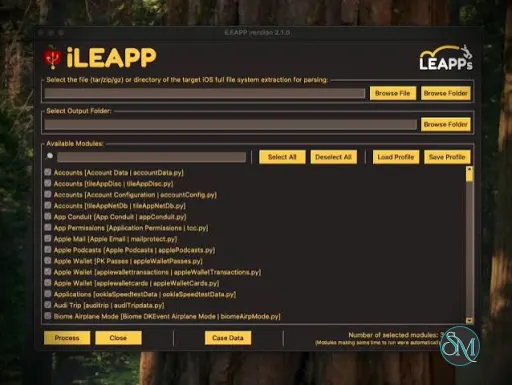
The GUI makes the application accessible to investigators who do not want to work exclusively from a terminal. You can select the input type, source path, output directory, and modules to process directly from the interface. For repeatable workflows and automation, the command line interface provides more control.
Support for iTunes and Finder backups is particularly useful because these backups are a common source of forensic data. Encrypted backups are also supported, with the GUI able to request the backup password when encryption is detected.
Another useful feature is the ability to use profiles to limit which artifact modules are processed. This can reduce unnecessary processing when an investigation is focused on a particular type of evidence.
The raw image functionality is also notable. iLEAPP can work directly with supported disk images and EnCase EWF acquisitions without requiring them to be mounted first. The tool reads only the files requested by the relevant artifact modules, which can make targeted analysis more convenient.
The main limitation is that iLEAPP is a forensic parser, not a complete forensic investigation platform. It does not replace a full forensic suite for acquisition, evidence management, advanced timeline analysis, or broader case management.
It also requires some understanding of iOS artifacts and forensic methodology. The generated reports are useful, but investigators still need to understand what individual artifacts mean and how reliable they are within the context of a case.
For professional iOS artifact analysis, however, iLEAPP provides a strong combination of automation, flexibility, and broad artifact coverage.
Performance and Compatibility
iLEAPP is available for Windows, macOS, and Linux. Pre-built releases are provided for Windows x64, macOS Intel, macOS Apple Silicon, and Linux x86_64.
The tool can process several types of forensic input, including extracted file systems, ZIP archives, TAR archives, GZIP files, iTunes and Finder backups, and individual files. Current source documentation also supports raw disk images and E01 acquisitions.
Processing time will depend on the size of the extraction, number of artifacts, storage performance, and modules selected. Large forensic extractions can naturally require substantial disk I/O and processing time.
The ability to select modules and load profiles can help reduce unnecessary processing when only specific artifacts are relevant to an investigation.
System Requirements
The easiest option is to use one of the pre-built releases, which does not require a separate Python installation.
For running iLEAPP from source, the project currently requires:
Python 3.10 through 3.14
Git
Python dependencies from
requirements.txtTkinter for the GUI on Linux
On Ubuntu and similar distributions, Tkinter can be installed through the distribution package manager.
Pre-built packages are available for:
Windows x64
macOS Intel
macOS Apple Silicon
Linux x86_64
Pros and Cons
Pros
Free and open source
Designed specifically for iOS and iPadOS forensics
Supports iOS and iPadOS 11 through current versions
Large collection of artifact modules
GUI and CLI interfaces
Supports encrypted iTunes and Finder backups
Supports multiple extraction formats
Generates several useful report formats
Supports custom parsing profiles
Cross-platform
Pre-built releases available
Supports raw disk images and E01 acquisitions
Active development and contributions from the DFIR community
Cons
Intended for forensic users rather than general users
Requires forensic knowledge to interpret results correctly
Not a complete digital forensics suite
Large extractions can require significant processing time
Artifact coverage depends on the available modules and the data present in an extraction
How to Install
The simplest installation method is to download a pre-built iLEAPP release for the operating system being used. These packages include the required application components and do not require Python to be installed separately.
Windows users can use the GUI or CLI package. macOS users can choose between Intel and Apple Silicon builds, while Linux users can use the provided AppImage.
For developers or investigators who need the latest source changes, iLEAPP can also be installed from source using Python. The project recommends creating a virtual environment and installing the dependencies from requirements.txt.
Once installed, select the appropriate input type, provide the extraction or backup path, choose an existing output directory, and start the parsing process. The resulting reports can then be reviewed using the generated HTML, TSV, timeline, KML, or LAVA output.
Frequently Asked Questions
What is iLEAPP?
iLEAPP is an open source forensic tool for parsing iOS and iPadOS logs, events, property lists, databases, and other forensic artifacts.
What does iLEAPP stand for?
iLEAPP stands for iOS Logs, Events, And Plists Parser.
Which iOS versions does iLEAPP support?
The project currently supports iOS and iPadOS 11 through current versions.
Can iLEAPP analyze iPhone backups?
Yes. iLEAPP supports iTunes and Finder backup folders, including encrypted backups.
Does iLEAPP support encrypted backups?
Yes. Encrypted iTunes and Finder backups are supported. The GUI can prompt for the backup password when encryption is detected.
Does iLEAPP have a GUI?
Yes. iLEAPP provides both a graphical interface and a command line interface.
Can iLEAPP run on Windows?
Yes. Pre-built Windows x64 GUI and CLI packages are available.
Can iLEAPP run on Linux?
Yes. A Linux x86_64 AppImage is available, and the software can also be run from source with Python.
Can iLEAPP analyze E01 forensic images?
Yes. Current versions can process raw disk images and EnCase EWF E01 acquisitions directly.
Is iLEAPP a complete forensic suite?
No. iLEAPP focuses on parsing iOS and iPadOS artifacts. It is best used as part of a broader digital forensics workflow rather than as a complete acquisition and case management platform.
Post a Comment/Report Broken Link: