Postman is an API platform that allows users to send requests, inspect responses, and automate API testing. It supports REST, GraphQL, SOAP, and gRPC APIs, making it suitable for a wide range of projects.

Postman can be used for simple request testing or for managing complex API workflows across teams.

Key Features of Postman

Postman provides a complete set of tools for working with APIs.

Main features include:

  • Create and send API requests using multiple methods

  • Support for REST, GraphQL, SOAP, and gRPC

  • Environment variables for dynamic testing

  • Collections for organizing API requests

  • Automated testing with scripts

  • API documentation generation

  • Mock servers for development and testing

  • Collaboration and sharing tools

These features help teams build and test APIs faster.

Supported Platforms

Postman is available on:

  • Windows

  • macOS

  • Linux

  • Web browser version

This cross platform availability makes it easy to use Postman on different systems and environments.

Performance and Reliability

Postman performs well for both small and large API projects. Request execution is fast, and response handling is stable even with complex payloads.

Cloud features improve collaboration, but local testing remains responsive and reliable.

Ease of Use

Postman is beginner friendly while still offering advanced features. The interface is intuitive, and users can start sending requests within minutes. Advanced users benefit from scripting, automation, and workflow management tools.

Extensive documentation and tutorials make learning easier.

Is Postman Safe to Use

Postman is safe to use when downloaded from the official website. It follows industry standard security practices. Users should be mindful when storing sensitive credentials in shared environments or cloud synced workspaces.

Environment variables help reduce exposure of sensitive data.

Pros and Cons of Postman

Pros:

  • Powerful and feature rich API tool

  • Easy to use for beginners

  • Strong collaboration features

  • Supports multiple API types

  • Cross platform availability

Cons:

  • Some advanced features require a paid plan

  • Can feel heavy for simple API testing

  • Requires account sign in for full cloud features

Despite these drawbacks, Postman remains a leading API tool.

Common Use Cases

Postman is commonly used for:

  • API development and debugging

  • Automated API testing

  • Backend and frontend integration testing

  • API documentation and sharing

  • Team collaboration on API projects

It fits well in both small teams and enterprise environments.

Final Verdict

Postman is a powerful and reliable API development platform that simplifies the entire API lifecycle. From testing and automation to documentation and collaboration, it provides everything needed to build modern APIs efficiently.

For developers and teams working heavily with APIs, Postman is an essential tool.

Postman is one of the most popular tools for API development, testing, and collaboration. It is widely used by developers, QA engineers, and product teams to design, test, and document APIs efficiently. With a user friendly interface and powerful features, Postman has become a standard tool in modern software development.
Postman 12.13.5
Free
Software Informations:
Developer:

Operating System:
Windows / macOS / Linux
Date Added:
2026-06-04T21:01:44.391Z
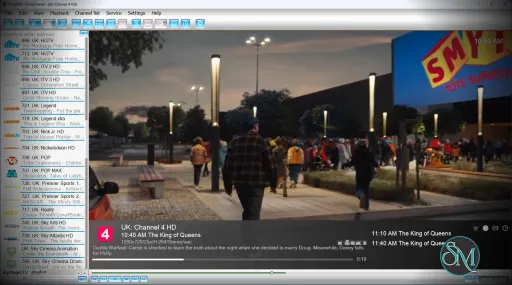
ProgDVB is a Windows based application designed for watching digital television and listening to radio channels from multiple sources including DVB-S/S2, DVB-C, DVB-T/T2, ATSC, ISDB-T, SAT>IP, and IPTV streams.

The software is available in both free and paid editions. The Pro version unlocks features like advanced recording, Picture in Picture support, scheduling, and extended device capabilities.

ProgDVB remains one of the most capable applications for watching digital television and IPTV on desktop systems. Originally built for DVB tuner hardware, the software has expanded over the years into a full multimedia platform supporting satellite TV, IPTV, internet radio, recording, streaming, and advanced broadcast features. Despite its age, it still maintains a loyal user base among DVB enthusiasts and IPTV power users.

Key Features

  • Wide Broadcast and IPTV Support
    ProgDVB supports traditional DVB hardware alongside IPTV playlists, M3U/M3U8 files, Xtream Codes, SAT>IP, and internet radio streams.

  • Advanced Recording and Timeshift
    The application includes recording, scheduled recording, and timeshift functionality using RAM or disk buffering. Users can record multiple streams simultaneously depending on hardware and IPTV source support.

  • Electronic Program Guide Support
    ProgDVB supports EPG systems including XMLTV and JTV formats, making it useful for IPTV users who want traditional TV guide layouts.

  • Picture in Picture and Multi Stream Features
    The Pro version supports Picture in Picture viewing and simultaneous channel playback or recording.

  • Network Broadcasting
    Users can stream channels across local networks using Prog Media Server integration.

  • Multiple Interfaces
    ProgDVB includes both the classic ProgDVB interface and the more modern ProgTV interface. The developer recommends ProgTV for modern Windows systems and remote friendly usage.

User Experience

This is where opinions become divided.

ProgDVB is extremely feature rich, but the interface feels dated compared to modern IPTV applications like TiviMate or newer media center platforms. Reddit discussions frequently describe the UI as functional but old fashioned, especially on high resolution monitors.

The software also has a noticeable learning curve. Advanced IPTV setup, playlist management, recording configuration, and source handling can feel overwhelming for beginners. Community users often mention that ProgDVB is incredibly powerful once configured properly, but not beginner friendly.

Performance and Stability

ProgDVB performs well with many DVB cards and IPTV streams, especially for users who need advanced recording or stream management. Some IPTV communities still consider it one of the more reliable Windows IPTV players for maintaining unstable streams.

However, stability reports are mixed. Some long term users describe it as stable and dependable, while others report freezing, audio sync problems, crashes, or outdated rendering behavior. Much of this appears tied to drivers, codecs, IPTV providers, and hardware compatibility.

Performance on Modern Systems

ProgDVB continues to receive active updates in 2026, including HDR support, Android support expansion, IPTV improvements, and UI updates.

Still, the software clearly carries legacy design choices from older Windows media applications. Compared to modern streaming apps, the interface and workflow can feel less polished.

Pros

  • Extremely broad DVB and IPTV support

  • Advanced recording and timeshift tools

  • EPG integration for IPTV and DVB

  • Supports many tuner devices and broadcast standards

  • Frequent updates even after many years

  • Powerful for advanced users and enthusiasts

Cons

  • Outdated and complex interface

  • Significant learning curve for beginners

  • Mixed stability depending on setup

  • IPTV workflow feels less modern than newer apps

  • Some advanced features locked behind Pro version

ProgDVB is ideal for advanced IPTV users, DVB enthusiasts, satellite TV users, HTPC builders, and users who need deep recording and broadcast control.

Casual users looking for a clean streaming experience may prefer simpler IPTV applications with more modern interfaces.

ProgDVB remains one of the most powerful digital TV and IPTV applications available for Windows. Its massive feature set, recording capabilities, and hardware support make it valuable for enthusiasts and advanced users. However, the aging interface and steep learning curve prevent it from feeling as polished or accessible as newer media applications.

ProgDVB 7.71.6 Free
Free
Software Informations:
Developer:

Operating System:
Windows
Date Added:
2026-06-04T20:01:44.566Z

MacX DVD Ripper Pro - A Fast, High-Quality DVD Digitizing Tool for PC Users. MacX DVD Ripper Pro is widely known among macOS users as one of the most powerful, flexible, and user-friendly DVD ripping tools on the market.

Whether you want to back up DVD collections, convert movies for mobile viewing, preserve old discs, or digitize your media library, MacX DVD Ripper Pro delivers a complete and reliable solution.

MacX DVD Ripper Pro is a full-featured DVD ripping and backup software that lets you:

  • Convert DVD movies to digital files

  • Create ISO or DVD folder backups

  • Rip protected and region-locked discs

  • Export videos for phones, tablets, TVs, and media servers

  • Preserve the original audio/video quality

It is designed for both older PCs and modern systems, using hardware acceleration and smart transcoding algorithms to achieve fast, high-quality results.

Why Use MacX DVD Ripper Pro?

  • Faster than HandBrake for DVDs
    HandBrake is excellent, but it struggles with encrypted discs and can be slow. MacX handles protected discs natively and uses stronger GPU acceleration.

  • Easy for beginners
    The interface is simple, intuitive, and clean — no need for plugins or complex profiles.

  • Ideal for backing up personal DVD libraries
    Perfect for preserving rare or old discs, organizing collections, or storing on NAS/Plex.

  • Large format library
    Let the software choose optimal settings for devices automatically.

MacX DVD Ripper Pro is one of the most reliable, high-performing DVD ripping programs available today. With fast GPU-accelerated conversion, broad format support, and the ability to handle protected DVDs, it offers everything needed to digitize and preserve your DVD library with ease.

Whether you want to watch your movies on your phone, store them on a NAS, back up old discs, or build a streaming-ready collection, MacX DVD Ripper Pro delivers a smooth, powerful, and user-friendly solution.

MacX DVD Ripper Pro V6.9.0 (Lifetime)
$59.95
Software Informations:
Developer:

Operating System:
Mac
Date Added:
2026-06-04T20:01:43.919Z

Aiseesoft Screen Recorder is a strong contender in the screen recording market, especially for users who want a balance of ease-of-use and enough power for tutorials, webinars, demonstrations, and moderate gameplay captures.

Strengths include its clean interface, reliable recording quality, useful annotation and cursor tools, and solid customer support. Weaknesses are primarily in its limited editing capabilities, trial version restrictions, and occasional audio or feature bugs.

If your needs are moderate (not top-tier gaming or cinematic production), Aiseesoft is a worthwhile choice. If you need maximum flexibility, performance, or in-depth editing, you might pair it with or choose an alternative tool.

Aiseesoft Screen Recorder 3.2.18 for Windows - Discount 20% OFF
$49.96$62.45
Software Informations:
Developer:

Operating System:
Windows
Date Added:
2026-06-04T18:45:27.063Z

Antamedia HotSpot Software is a Windows-based system designed to manage guest WiFi / hotspot access — ideal for cafés, hotels, guest-houses, educational centres, network cafés and similar. In its Standard Edition, you get a more full-featured version than a “Lite” edition (which is more basic), while still less than a “Premium/Enterprise” level. The software enables you to control Internet access, bill users, create login portals, issue vouchers/tickets, limit bandwidth/time, and brand the user experience.

Key Features & What You Get in Standard Edition

Here are some of the main features that Standard Edition typically supports (and what differentiates it from the more basic version):

  • Ability to set up branded captive portal / login pages for WiFi users (you can customize with your logo, introductory screen).

  • Support for time-based and bandwidth-based quotas: you can limit users by how long or how much data they can use. Users’ devices connect, then comply with those limits.

  • Voucher/ticket system: generate access codes or tickets for users (for pay or free access).

  • Social login or email verification: collect user data when they connect (useful for marketing/guest tracking).

  • Payment integration: letting users pay (credit card / PayPal) for premium access if you want to monetize guest WiFi.

  • Device/roaming support: Works with typical WiFi access points, wired/wireless clients; you configure your gateway/server PC and network hardware.

  • Reporting / statistics: See who used what, how long, what bandwidth, maybe payments.

  • Multi-device hardware independence: Can often work with different access points/routers.

Antamedia HotSpot Software – Standard Edition is a strong contender in the mid-range guest WiFi / hotspot management software market. It offers a solid mix of features (branding login portals, time/bandwidth quotas, voucher/ticketing, payments), works with typical hardware, and is quite friendly for small to medium venues. Its value is good, especially if you already run your infrastructure and know your network.

Antamedia HotSpot Software - Standard Edition Discount 20% OFF
$279.2$349
Software Informations:
Developer:

Operating System:
Windows
Date Added:
2026-06-04T18:01:46.590Z

WhatsApp for Android is a mobile messaging application developed by Meta Platforms that allows users to communicate using text messages, voice calls, video calls, and multimedia sharing over the internet.

The app works using a phone number instead of traditional usernames and is available on Android smartphones and tablets. WhatsApp is used by billions of people globally for daily communication.

All messages and calls on WhatsApp are protected by end to end encryption, which ensures that only the sender and recipient can read the messages.


Key Features of WhatsApp for Android

Instant Messaging

The core feature of WhatsApp is instant messaging. Users can send messages to individuals or groups in real time.

Supported message types include:

  • Text messages

  • Emojis and stickers

  • Voice messages

  • Links and shared locations

Messages are delivered through the internet, which eliminates traditional SMS charges.


Voice and Video Calls

WhatsApp allows users to make voice and video calls using mobile data or WiFi.

Features include:

  • One to one voice calls

  • One to one video calls

  • Group calls with multiple participants

  • Call scheduling and reminders

This makes WhatsApp a complete communication platform rather than just a messaging app.


Media and File Sharing

Users can easily send various types of files through WhatsApp chats.

Supported media includes:

  • Photos and videos

  • Audio files

  • Documents such as PDF or Word files

  • Contact information

This feature makes WhatsApp useful for both personal conversations and professional collaboration.


Group Chats and Communities

WhatsApp supports group chats that allow multiple participants to communicate in a single conversation.

Group features include:

  • Group administrators and permissions

  • File sharing inside groups

  • Message reactions

  • Community organization tools

These features make WhatsApp useful for families, teams, and organizations.


End to End Encryption

WhatsApp uses encryption technology to protect messages and calls. This means that even WhatsApp itself cannot read the contents of messages exchanged between users.

Encryption helps ensure privacy and security during communication.


Status Updates

The Status feature allows users to share photos, videos, or text updates that disappear after 24 hours.

Status updates are similar to social media stories and can be viewed by contacts.


Multi Device Support

WhatsApp supports multi device functionality, allowing users to access their account on multiple devices such as phones, tablets, and computers.

Users can link up to several devices without requiring the main phone to stay connected.


Privacy and Security Tools

WhatsApp includes several privacy features to help users control their data and conversations.

These features include:

  • Two factor authentication

  • Fingerprint or biometric app lock

  • Hidden or locked chats

  • Custom privacy settings for profile information

These options help protect accounts from unauthorized access.


Performance and Usability

WhatsApp for Android is designed with a simple and intuitive interface. The main interface includes tabs for chats, updates, and calls, making navigation straightforward for most users.

The application automatically syncs contacts from the phone and allows users to start conversations immediately.

Because the app relies on internet connectivity, performance depends on network quality and device hardware.


Pros and Cons

Advantages

  • Free messaging and calling through internet connection

  • End to end encrypted communication

  • Supports voice calls, video calls, and group chats

  • Easy to use interface

  • Large global user base

  • Multi device support

Limitations

  • Requires phone number registration

  • Backup data may depend on cloud services

  • Some features depend on internet connectivity

  • Large groups may generate high notification volume

Despite these limitations, WhatsApp remains one of the most widely used messaging platforms worldwide.


Who Should Use WhatsApp for Android

WhatsApp for Android is suitable for:

  • Individuals communicating with friends and family

  • Businesses interacting with customers

  • Teams collaborating through group chats

  • Users sharing media and documents

Because of its large user base and simple setup, it is one of the most accessible messaging platforms available.


Final Verdict

WhatsApp for Android is a powerful and widely adopted messaging application that combines instant messaging, voice calls, video calls, and multimedia sharing in a single platform. With strong encryption, multi device support, and a user friendly interface, it has become an essential communication tool for millions of Android users.

For anyone looking for a reliable messaging app with global connectivity, WhatsApp for Android remains one of the best choices available.

Messaging applications have become essential communication tools for both personal and professional use. WhatsApp for Android is one of the most widely used messaging apps worldwide, offering free messaging, voice calls, video calls, and media sharing through an internet connection.

WhatsApp 2.26.21.76 APK for Android
Free
Software Informations:
Developer:

Operating System:
Android
Date Added:
2026-06-04T16:01:45.238Z

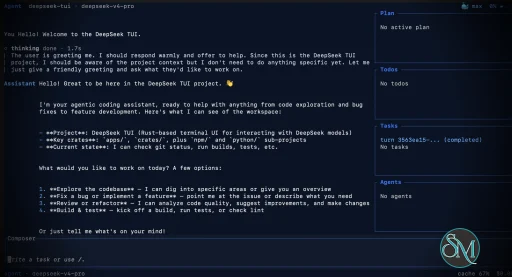
DeepSeek TUI is an open source terminal based coding agent designed for DeepSeek AI models. Unlike a simple chatbot, it can interact with your local workspace, execute shell commands, manage git operations, and assist with software development tasks directly from the command line.

The project is written in Rust and focuses on speed, low resource usage, and keyboard driven workflows. It is especially appealing for developers who spend most of their time in the terminal.

DeepSeek TUI is gaining attention among developers who prefer terminal based workflows and want direct access to AI powered coding tools without relying on heavy IDE integrations. Built around DeepSeek models, it transforms the terminal into an interactive coding assistant capable of editing files, running commands, and managing development workflows.

Download DeepSeek TUI v0.8.53 - Software Mirrors

Download DeepSeek TUI v0.8.53 Windows 64bit
codewhale-tui-windows-x64.exe | 40.92 MB

Download DeepSeek TUI v0.8.53 Windows 64bit
codewhale-windows-x64-portable.zip | 19.59 MB

Download DeepSeek TUI v0.8.53 Windows 64bit
codewhale-windows-x64.exe | 13.1 MB

Download DeepSeek TUI v0.8.53 Windows 64bit
codewhale-windows-x64.zip | 19.59 MB

Download DeepSeek TUI v0.8.53 Windows 64bit
deepseek-tui-windows-x64.exe | 223.5 kB

Download DeepSeek TUI v0.8.53 Windows 64bit
deepseek-windows-x64.exe | 226.5 kB

Download DeepSeek TUI v0.8.53 macOS arm64
codewhale-macos-arm64 | 13.83 MB

Download DeepSeek TUI v0.8.53 macOS arm64
codewhale-macos-arm64.tar.gz | 21.37 MB

Download DeepSeek TUI v0.8.53 macOS arm64
codewhale-tui-macos-arm64 | 40.01 MB

Download DeepSeek TUI v0.8.53 macOS arm64
deepseek-macos-arm64 | 461.59 kB

Download DeepSeek TUI v0.8.53 macOS arm64
deepseek-tui-macos-arm64 | 461.48 kB

Download DeepSeek TUI v0.8.53 macOS x64
codewhale-macos-x64 | 15.05 MB

Download DeepSeek TUI v0.8.53 macOS x64
codewhale-macos-x64.tar.gz | 22.33 MB

Download DeepSeek TUI v0.8.53 macOS x64
codewhale-tui-macos-x64 | 42.4 MB

Download DeepSeek TUI v0.8.53 macOS x64
deepseek-macos-x64 | 449.52 kB

Download DeepSeek TUI v0.8.53 macOS x64
deepseek-tui-macos-x64 | 449.42 kB

Download DeepSeek TUI v0.8.53 macOS arm64
codewhale-macos-arm64 | 13.83 MB

Download DeepSeek TUI v0.8.53 macOS arm64
codewhale-macos-arm64.tar.gz | 21.37 MB

Download DeepSeek TUI v0.8.53 macOS arm64
codewhale-tui-macos-arm64 | 40.01 MB

Download DeepSeek TUI v0.8.53 macOS arm64
deepseek-macos-arm64 | 461.59 kB

Download DeepSeek TUI v0.8.53 macOS arm64
deepseek-tui-macos-arm64 | 461.48 kB

Download DeepSeek TUI v0.8.53 Linux x64
codewhale-linux-x64 | 18.11 MB

Download DeepSeek TUI v0.8.53 Linux x64
codewhale-linux-x64.tar.gz | 23.9 MB

Download DeepSeek TUI v0.8.53 Linux x64
codewhale-tui-linux-x64 | 50.92 MB

Download DeepSeek TUI v0.8.53 Linux x64
deepseek-linux-x64 | 492.49 kB

Download DeepSeek TUI v0.8.53 Linux x64
deepseek-tui-linux-x64 | 492.03 kB

Download DeepSeek TUI v0.8.53 Linux arm64
codewhale-linux-arm64 | 16.63 MB

Download DeepSeek TUI v0.8.53 Linux arm64
codewhale-linux-arm64.tar.gz | 23.38 MB

Download DeepSeek TUI v0.8.53 Linux arm64
codewhale-tui-linux-arm64 | 47.14 MB

Download DeepSeek TUI v0.8.53 Linux arm64
deepseek-linux-arm64 | 533.17 kB

Download DeepSeek TUI v0.8.53 Linux arm64
deepseek-tui-linux-arm64 | 532.99 kB

DeepSeek TUI v0.8.53 Release Notes:

This release renames the project to CodeWhale. The legacy
deepseek and deepseek-tui binaries continue to ship as
compatibility-only deprecation shims during v0.8.x; they print a
one-line warning and forward to codewhale / codewhale-tui.
They will be removed in v0.9.0. The legacy npm package
deepseek-tui is deprecated and receives no further releases.
See docs/REBRAND.md for the full migration story.

Install

Recommended — npm (one command, both binaries)

bash
npm install -g codewhale
The wrapper downloads both binaries from this Release and places them in the same directory.

Docker / GHCR

bash
docker run --rm -it \
  -e DEEPSEEK_API_KEY="$DEEPSEEK_API_KEY" \
  -v ~/.deepseek:/home/codewhale/.deepseek \
  ghcr.io/hmbown/codewhale:v0.8.53
The image ships the codewhale dispatcher and codewhale-tui runtime (plus the legacy deepseek / deepseek-tui shims during the transition). The latest tag is also updated on release.

Cargo (Linux / macOS)

bash
cargo install codewhale-cli codewhale-tui --locked
Both crates are required — codewhale-cli produces the codewhale dispatcher and codewhale-tui produces the interactive runtime that the dispatcher delegates to. Installing only one binary will fail at runtime with a MISSING_COMPANION_BINARY error.

Manual download — platform archives (recommended)

Each archive below contains both the codewhale dispatcher and codewhale-tui runtime, plus an install script: | Platform | Archive | Install script | |---|---|---| | Linux x64 | codewhale-linux-x64.tar.gz | install.sh | | Linux ARM64 | codewhale-linux-arm64.tar.gz | install.sh | | Linux RISC-V | codewhale-linux-riscv64.tar.gz | install.sh | | macOS x64 | codewhale-macos-x64.tar.gz | install.sh | | macOS ARM | codewhale-macos-arm64.tar.gz | install.sh | | Windows x64 (installer) | CodeWhaleSetup.exe | NSIS setup | | Windows x64 | codewhale-windows-x64.zip | install.bat | | Windows x64 (portable) | codewhale-windows-x64-portable.zip | — | Unix (Linux / macOS):
bash
tar xzf codewhale-.tar.gz
cd codewhale-
./install.sh
Windows:
  • For the installer path, run CodeWhaleSetup.exe; it installs both binaries under %LOCALAPPDATA%\Programs\CodeWhale\bin and adds that directory to the current-user PATH.
  • Extract codewhale-windows-x64.zip
  • Run install.bat (copies to %USERPROFILE%\bin)
  • Add %USERPROFILE%\bin to your PATH
The portable Windows archive skips the install script — extract and run from any directory. The NSIS installer is currently unsigned and may trigger Windows SmartScreen until a signing certificate is wired into the release pipeline. Individual binaries are also attached below for scripting and the npm wrapper. Legacy deepseek- and deepseek-tui- assets are compatibility-only deprecation shims for v0.8.x so that existing deepseek update invocations on v0.8.40 keep working; they forward to the canonical binaries. The legacy npm package deepseek-tui is deprecated and is not republished.

Verify (recommended)

Download the checksum manifests from this Release and verify:
bash

Linux — archive bundles

sha256sum -c codewhale-bundles-sha256.txt

Linux — individual binaries

sha256sum -c codewhale-artifacts-sha256.txt

macOS

shasum -a 256 -c codewhale-bundles-sha256.txt shasum -a 256 -c codewhale-artifacts-sha256.txt
The legacy deepseek-artifacts-sha256.txt is also attached for backward compatibility and contains the same hashes as the canonical manifest.

Changelog

See CHANGELOG.md for the full notes for this release.

Contributors

  • @Hmbown for v0.8.53 release integration, Hugging Face provider routing/docs, tool-surface and project-context polish, and release stabilization.
  • @xyuai for provider persistence, scoped /logout behavior, provider picker key replacement, and MiMo auth cleanup work, ported from #2714, #2715, #2717, and #2718.
  • @RefuseOdd for configurable path_suffix support on OpenAI-compatible endpoints, harvested from #2558.
  • @cyq1017 for model-family classification work, harvested from #2525.
  • @reidliu41 for hiding shell-prompt guidance when shell execution is disabled, harvested from #2638.

Key Features of DeepSeek TUI

  • Terminal Native Workflow
    DeepSeek TUI operates entirely within the terminal, allowing developers to work without switching between browser windows or external interfaces.

  • AI Assisted Coding
    The assistant can read and edit files, generate code, explain logic, and help automate development tasks.

  • Shell Command Execution
    It supports running terminal commands directly through the interface, streamlining development workflows.

  • Git Integration
    Developers can manage repositories, review changes, and handle version control related tasks from inside the tool.

  • Multiple Work Modes
    DeepSeek TUI includes modes like Plan, Agent, and YOLO, offering different levels of automation and approval control.

  • Large Context Handling
    The tool is built around DeepSeek V4 capabilities, including support for extremely large context windows that help with understanding bigger codebases.

User Experience

DeepSeek TUI is designed for developers comfortable with terminal environments. The interface is keyboard focused and efficient, though beginners may need time to adapt.

The workflow feels closer to tools like Claude Code or Codex style assistants rather than traditional chat applications. Community feedback on Reddit and GitHub discussions highlights its speed and practical coding workflow.

Performance and Compatibility

Because it is written in Rust, DeepSeek TUI is lightweight and responsive. It supports Linux, macOS, and Windows, with installation available through npm, Cargo, or direct binaries.

Performance depends heavily on the connected DeepSeek models and API configuration, but the local interface itself remains fast and efficient.

Pros

  • Fast terminal native workflow

  • AI powered coding and automation

  • Lightweight Rust based architecture

  • Supports file editing and shell execution

  • Open source and actively developed

Cons

  • Requires familiarity with terminal workflows

  • Depends on external AI APIs

  • Advanced automation modes may feel risky for inexperienced users

DeepSeek TUI is ideal for developers, DevOps engineers, and terminal focused power users who want AI assistance integrated directly into their command line workflow. It is especially attractive for users seeking a lightweight alternative to browser based AI coding tools.

DeepSeek TUI combines AI coding assistance with the efficiency of terminal workflows. Its fast performance, flexible automation, and developer focused design make it one of the most interesting open source AI terminal tools currently gaining traction.

DeepSeek TUI v0.8.53
Free
Software Informations:
Developer:

Operating System:
Windows / macOS / Linux
Date Added:
2026-06-04T16:01:44.949Z

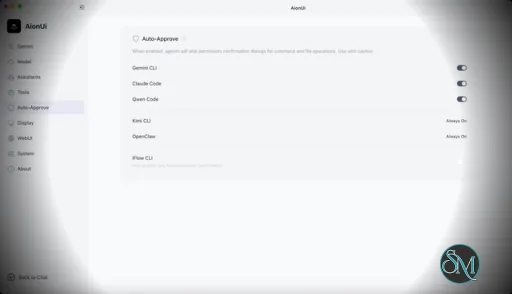
AionUi is a cross platform desktop application that transforms command line AI agents into an intuitive graphical interface. It detects locally installed AI CLI tools and presents them in a structured environment where users can manage conversations, sessions, and files more efficiently.

The software is open source, allowing users to customize and extend its functionality according to their workflow requirements.

Download AionUI v2.1.11 - Software Mirrors

Download AionUI v2.1.11
for Windows 64bit (exe) | 188.77 MB

Download AionUI v2.1.11
for Windows ARM64 (exe) | 151.85 MB

Download AionUI v2.1.11
for macOS Intel (zip) | 253.11 MB

Download AionUI v2.1.11
for macOS Intel (dmg) | 252.54 MB

Download AionUI v2.1.11
for macOS ARM64 (zip) | 254.27 MB

Download AionUI v2.1.11
for macOS ARM64 (dmg) | 253.81 MB

Download AionUI v2.1.11
for Linux ARM64 (deb) | 164.45 MB

Download AionUI v2.1.11
for Linux 64bit (deb) | 218.81 MB

What's Changed

  • ci: add managed node mirror workflow by @kaizhou-lab in https://github.com/iOfficeAI/AionUi/pull/3180
  • feat(workspace): VSCode-style file tree icons + smoother preview browsing by @lornestack in https://github.com/iOfficeAI/AionUi/pull/3181
  • feat: add managed acp artifact mirror workflow by @kaizhou-lab in https://github.com/iOfficeAI/AionUi/pull/3182
  • feat(preview): unify code view font and fix view-mode/line-height regressions by @lornestack in https://github.com/iOfficeAI/AionUi/pull/3185
  • fix(settings): apply UI scale only on slider release by @lornestack in https://github.com/iOfficeAI/AionUi/pull/3190
  • fix(web-host): use aioncore reported backend port by @piorpua in https://github.com/iOfficeAI/AionUi/pull/3193
  • feat(preview): unify code viewing & editing on CodeMirror 6 by @lornestack in https://github.com/iOfficeAI/AionUi/pull/3194
  • chore: bump version to 2.1.11 by @piorpua in https://github.com/iOfficeAI/AionUi/pull/3195
Full Changelog: https://github.com/iOfficeAI/AionUi/compare/v2.1.10...v2.1.11

Key Features

Multi Agent Support

AionUi allows users to run multiple AI sessions simultaneously. Each session maintains its own context, enabling parallel workflows without cross interference.

Modern Chat Interface

The application provides a clean and organized chat environment. Users can scroll through conversation history, manage session tabs, and interact with AI responses in a visually structured format.

Smart File Management

AionUi includes drag and drop support, file previews, and structured file browsing. This improves productivity when working with code, documents, or AI generated content.

Multi Model Compatibility

The software supports various AI models through local or API based configurations. Users can switch between models depending on task requirements.

Session Control and Workflow Tools

Users can manage sessions independently, review outputs, and maintain organized AI workflows. This structure helps reduce clutter when working on complex tasks.

Cross Platform Availability

AionUi runs on major operating systems, ensuring accessibility for developers working in different environments.

Ease of Use

The interface is designed to simplify complex AI workflows. While some familiarity with AI tools is helpful, the graphical layout significantly reduces the learning curve compared to pure command line usage.

Navigation is intuitive, and core features are accessible without excessive configuration.

Performance and Compatibility

AionUi operates efficiently as a desktop application. Performance depends partly on the underlying AI services or APIs being used, but the interface itself remains responsive during normal use.

Compatibility with standard AI command line tools ensures flexibility for technical users.

Final Verdict

AionUi is a powerful desktop interface for managing AI command line tools in a structured and visual way. Its ability to handle multiple sessions, integrate different models, and organize workflows makes it a valuable productivity solution for advanced users.

For professionals seeking greater control and efficiency in AI driven projects, AionUi delivers a practical and modern solution.

AionUi is a free and open source desktop application that provides a modern graphical interface for command line AI tools. It is designed to simplify AI workflows by replacing terminal based interaction with a visual environment that supports multiple AI models, parallel sessions, and productivity focused features. AionUi is suitable for developers, researchers, and advanced users who want a unified way to manage AI driven tasks.

AionUI v2.1.11
Free
Software Informations:
Developer:

Operating System:
Windows / macOS / Linux
Date Added:
2026-06-04T16:01:43.569Z

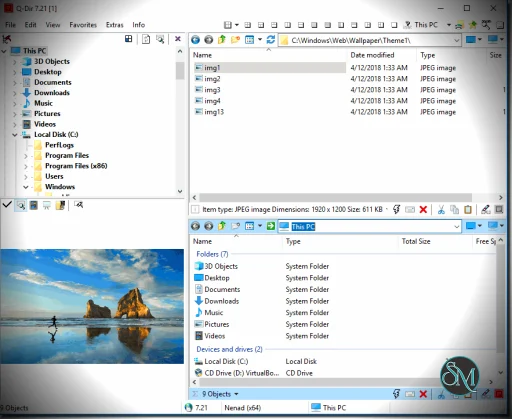
Q-Dir is a free file manager for Windows that enhances file navigation with a multi-pane interface and advanced file operations. Q-Dir stands for “Quad-Directory,” highlighting its ability to display up to four directory panes simultaneously. This makes it easier to view, compare, and manage files between folders.

Unlike Windows File Explorer, Q-Dir offers a customizable interface that increases productivity and simplifies complex file tasks.


Key Features of Q-Dir

Multi-Pane File Browser

The standout feature of Q-Dir is its ability to show up to four panes at once. This lets you:

  • Compare folders side-by-side

  • Drag and drop files across panes

  • Manage multiple directories without switching windows

The multi-pane view significantly improves efficiency for organizing files.

Customizable Views

You can choose from several layout configurations, including single, dual, and quad views. Each pane supports different sorting options like name, size, date, and type.

This level of customization helps users tailor the workspace for different tasks.

Quick Navigation Tools

Q-Dir includes useful tools like:

  • Address bar for fast folder jumps

  • Favorites and shortcuts

  • History list

  • Filter bar to narrow file views

These navigation helpers make it faster to find and organize files.

File Operations and Tools

Q-Dir supports standard file operations like copy, move, rename, and delete. It also integrates well with Windows, so context menus and drag-and-drop work seamlessly. You can preview files and folders within panes, improving workflow clarity.

Portable Version Available

Q-Dir offers a portable edition that runs without installation—ideal for technicians and users who work across multiple systems.


Performance and User Experience

Q-Dir is lightweight, opens quickly, and uses minimal system resources. Even with multiple panes active, it remains responsive on both modern and older Windows machines.

The interface is functional, although not as polished as some paid alternatives. Users familiar with Windows Explorer will find the layout intuitive, and power users will appreciate the added flexibility.


Pros and Cons

Pros

  • Free for personal and commercial use

  • Multi-pane interface boosts productivity

  • Portable version available

  • Easy to learn and use

  • Lightweight with fast performance

Cons

  • Limited advanced file tools compared with premium managers

  • Interface design feels dated

  • Some features require manual configuration


Final Verdict

Q-Dir remains one of the most effective lightweight file managers for Windows in 2026. With its multi-pane interface, fast performance, and customization options, it’s a practical choice for users who want more power than Windows Explorer offers without paying for premium software.

If you want a fast, flexible, and free file manager that goes beyond the default Windows Explorer, Q-Dir is one of the best alternatives available. In this Q-Dir review, we’ll explore its features, usability, performance, pros and cons, and why it remains a favorite choice for power users, IT professionals, and anyone who wants to improve file navigation on Windows.

Q-Dir is ideal for users who need multiple panes, customizable views, and efficient file operations without unnecessary complexity.

Q-Dir 12.67
Free
Software Informations:
Developer:

Operating System:
Windows
Date Added:
2026-06-04T14:01:47.078Z