VoiceStudio v0.5.4 Release Notes: Working engines, smoother long-form audio, and useful local integrations. CosyVoice repairs its runtime and preserves speech context with newer Transformers. Stories and audiobooks gain cleaner audio joins, better script controls, and more reliable EPUB imports. Electron setup and diagnostics make failures easier to recover from without discarding downloaded models or existing projects.
Download
Already using Electron? Install over your existing app and keep your data. If prompted, choose Install local runtime to refresh its dependencies. Moving from Tauri? Back up your data directory with the app closed, install Electron, then verify your voices and projects before removing Tauri. Follow the migration guide. Tauri v0.5.3 remains the final Tauri release; its updater cannot install Electron.
Highlights
- Repair CosyVoice generation and several engine installation paths without deleting downloaded models (#2258, #2240, #2243)
- Cleaner story and audiobook joins, script controls, and EPUB imports (#2259, #2216, #2203, #2228)
- Export local n8n speech workflows and configure Claude Code or Cursor through MCP (#2261, #2257)
- More reliable Electron setup, dictation, and actionable crash reports (#2221, #2245, #2123, #2262)
- Preserve dialogue, timing, and background audio through dubbing and subtitle imports (#2222, #2224, #2242)
Changed
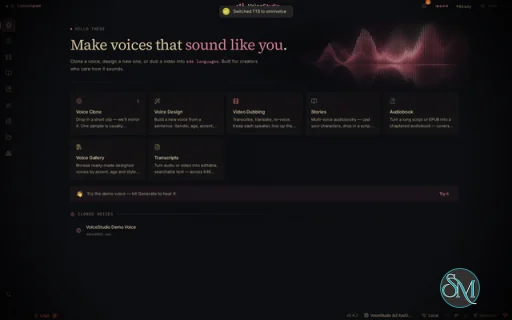
- The main sidebar (navigation, voice library, status) stays in place on Settings instead of being swapped for a separate panel; the Settings sections now sit in a column beside it (#2209) — thanks @jaketame!
- The main navigation sits directly under the sidebar header, above the voice library, so it no longer moves with the library's height (#2210) — thanks @jaketame!
Added
- Claude Code and Cursor integration pages offer MCP setup for the current backend, and duplicate catalog routes are consolidated (#2257)
- Settings → Appearance → Keep sidebar expanded: stops the sidebar shrinking to a rail when Projects, Transcribe, Tools or another workspace opens its own panel on a narrower window (#2211) — thanks @jaketame!
- Stories and Audiobook: a Clear script button empties the whole script — every line and chapter, imported or typed — in one confirmed step instead of one trash icon at a time; the cast is kept (#2203) — thanks @jaketame!
- Stories' Paste & Split can now split by Sentences, Paragraphs (the new default) or whole Chapters, so a single narrator is no longer chopped into one take per sentence (#2217) — thanks @jaketame!
Fixed
- Preserve completed generation results when worker completion races with the timeout check (#2264)
- CosyVoice repairs missing runtime dependencies and preserves speech context with newer Transformers (#2096) — thanks @martinezpl!
- Electron native-crash reports retain the faulting thread instead of losing it behind long stacks and extension lists (#2262)
- Electron setup normalizes Windows proxy addresses while preserving explicit overrides and localhost exclusions (#2114)
- Web API-reference recovery keeps the selected backend and credentials; AudioSeal embedding and detection normalize model sample rates without changing exported audio dimensions (#2252) — thanks @joseedson18jc!
- LM Studio discovery respects the selected model and dictation refinement preserves literal text while handling unsupported reasoning options (#2252) — thanks @joseedson18jc!
- CosyVoice uses matching float32 weights and inputs without CUDA, preventing a worker-thread dtype failure while preserving CUDA precision (#2096)
- Source Electron launches reuse the prepared Python runtime instead of downloading dependencies inside the startup timeout (#2184)
- Clone, Stories and Audiobook disable unsupported output-language choices for engines with a declared language list (#2104)
- Stories and Audiobook: Generate, the chapter tracker and the render status are pinned in the setup pane instead of sitting below the last line of the script, and a disabled Generate now says why (#2229) — thanks @jaketame!
- EPUB import no longer turns an unmarked teaser page, a "Works by" list, a publisher's address page or a stray footnotes page into chapters — the book's declared start and its contents decide what is front and back matter (#2228) — thanks @jaketame!
- Retry temporary media-tool installation locks and report failed cleanup instead of hiding it (#2214) — thanks @baoyu0!
- The desktop app points the backend at the
uv it already ships, so one-click engine installs stop failing preflight with "uv was not found" on a clean install — the packaged binary sits in the app's own resources directory, which is on no PATH, and a GUI launch inherits none of the shell's PATH additions either (#2221, #2215) — thanks @shivsin25 for the fix and @baoyu0 for the diagnosis!
- IndexTTS installs with Python 3.11 and repairs incompatible environments on retry without removing downloaded weights (#2098) — thanks @martinezpl!
- VoxCPM2 voice design uses its native control format, and style requests no longer inherit the reference transcript’s delivery (#2093) — thanks @nevilbutani and @martinezpl!
- Dubbing background preservation and long exports work with newer FFmpeg builds that removed the legacy filter-file option (#2236) — thanks @quan0pek!
- Stories: the book-wide reading speed moved from the bottom of the collapsed Cast card to the setup card beside voice and language, shows how many lines override it, and resets them in one click (#2230) — thanks @jaketame!
- Projects: a finished Story or Audiobook shows its title and how it was made (voice, speed, engine, length, settings) instead of a bare filename (#2233) — thanks @jaketame!
- Audiobook and Stories renders no longer sound broken between lines: each line's engine padding is trimmed and a deliberate, adjustable gap goes between lines and paragraphs instead (#2216) — thanks @jaketame!
- Repair dots.tts dependency pins and paths containing spaces, with OpenFst build guidance for source installs (#2101) — thanks @martinezpl!
- Reject unsupported synthesis languages before model loading, including named picker choices and per-item batch languages (#2219) — thanks @rollroyces!
- EPUB import narrates the book, not its print furniture: page numbers no longer glue onto words or appear as lone lines, cover/title/dedication/copyright/contents pages are skipped, and chapters are titled from the book's table of contents (#2208) — thanks @jaketame!
- Stories: a long script no longer paints over the generation progress panel and the Generate/Stop footer while an audiobook renders (#2213) — thanks @jaketame!
- Keep macOS dictation keyboard operations on the main thread to prevent paste-delivery crashes (#2123)
- Prevent reference voice cloning from silently downloading a second speech recognizer (#2116)
- Dubbing from a video's downloaded rolling captions speaks each line once while preserving intentional repeated dialogue (#2222) — thanks @kevin9327!
- Bundle Linux native helper libraries so dictation and clipboard support start without distribution-specific libxdo packages (#2196)
- Forward saved Hugging Face tokens when downloading gated model weights and dependencies (#2173) — thanks @shivsin25!
- Explain unsupported saved-profile languages consistently in Electron, web, and streaming generation (#2175) — thanks @shivsin25!
- List every installed Kokoro language and accept its displayed name, including British English (#2174) — thanks @drakeo338!
- Validate Python dependencies before reusing a desktop runtime and offer setup for incomplete environments (#2176)
- Check active model cloning support before starting voice conversion (#2147)
- Accept both valid SIGKILL diagnostics in the desktop lifecycle regression check (#2170)
- Repair CTranslate2 loading safely across ASR and translation, and retain the loaded Whisper model during CPU fallback (#2165) — thanks @guruthechosen!
- Avoid pedalboard wheels that crash on unsupported CPU instructions (#2080) — thanks @D3nii!
- Include cuDNN 8 compatibility libraries for CTranslate2 in CUDA containers (#2072) — thanks @basil-k-aji-dev!
- Preserve audio reads, writes, and reference amplitude without TorchCodec (#2083) — thanks @Moep90!
- Give isolated engines request-sized deadlines, validate timeout overrides, and distinguish hangs from crashes (#2109) (#2111) — thanks @SurefireStudios and @LMGXENON!
- Keep dubbing streams alive during quiet steps and delay model cleanup until native refinement ends (#2138) — thanks @denemon!
- Locate ffprobe beside ffmpeg without changing parent directory names (#2107) — thanks @kapelame!
- Resample MLX output chunks to the declared rate before joining them (#2106) — thanks @kapelame!
- Read database migration configuration on Chinese, Japanese, and Korean Windows (#2075) — thanks @kevin9327!
- Preserve milliseconds and carry rounded subtitle timestamps across second boundaries (#2074) — thanks @kevin9327!
- Decode UTF-16 and Windows-1252 subtitle and manuscript imports in Electron, web, and backend routes (#2073) — thanks @kevin9327!
- Preserve numeric subtitle dialogue while recognizing mixed indexed and unindexed cues (#2151) — thanks @shivsin25!
- Parse pasted WebVTT cues while separating metadata, identifiers, empty cues, and complete timing lines (#2077) — thanks @kevin9327!
- Normalize Argos language aliases without silently changing Traditional Chinese to Simplified (#2143, #2152) — thanks @gyanu2507 and @rollroyces!
- Clarify Blackwell import-crash diagnostics without blaming missing kernels (#2084) — thanks @Moep90!
- Distinguish architecture preflight rejection from independent compile-stack failures (#2085) — thanks @Moep90!
- Require the pinned Apple Silicon GGUF build to pass and document runtime preflight conditions (#2115) — thanks @LMGXENON and @martinezpl!
- Correct the Windows Rustup installation command in tooling and documentation (#2066) — thanks @Rukhaam!
- Show local setup guidance when remote native engine installation is unavailable (#2166)
- Show scrubbed native error tails and exit codes for failed dubbing extraction (#2167)
Docs
- Install with prompt targets Electron, and active scripts, CI and contributor guidance treat Tauri as archived (#2220)
- Load installed IndexTTS checkpoints when the upstream config names missing training-cluster paths, without rewriting user files (#2097) — thanks @martinezpl!
- Cloning errors name the active mlx-audio model and recommend CSM while retaining alternative engines as a fallback (#2204, #2201) — thanks @shivsin25!
- Exported WebVTT subtitles and transcriptions keep a cue like "I <3 you" or one containing
--> whole in players, instead of cutting or emptying it (#2226) — thanks @kevin9327!
- EPUB imports preserve accents and wide-character documents using their declared encoding or byte-order mark (#2191) — thanks @kevin9327!
- Video watermark exports and dubbing keyframes use the bundled FFmpeg without requiring a system install (#2192) — thanks @kevin9327!
- Restore the backend error class in auto-filed bug reports — the Electron app files through the shared report builder, which never carried it, so every report of an otherwise-generic failure was indistinguishable from the next (#2197) — thanks @shivsin25!
- A streaming generation failure carries its backend error class to the report instead of dropping it at the stream boundary (#2197) — thanks @shivsin25!
- Release cached Ascend NPU memory and recognize its dedicated VRAM when switching engines (#2194) — thanks @li-lizhe!
- Downloaded and pasted WebVTT captions read
&, < and > instead of &, < and >, in the editor and in the dub (#2223) — thanks @kevin9327!
- Source installs on Chinese, Japanese and Korean Windows read bundled data as UTF-8, preventing startup and generation failures (#2190) — thanks @kevin9327!
- MOSS-TTS-Nano installs its audio backend and offers dependency repair for older managed installs without deleting cached models (#2182, #2100) — thanks @rollroyces and @martinezpl!
- Resolve Confucius4 model assets from its clone while preserving relative configuration, cache, and reference paths, and reject missing reference clips (#2181, #2099) — thanks @rollroyces and @martinezpl!
- GPT-SoVITS can use an explicitly configured default voice and avoids server-side re-splitting that can drop clauses (#2200) — thanks @jaketame!
- Tabbing through a Dub segment's start or end time without typing no longer moves it to the nearest tenth of a second or changes its speed (#2224) — thanks @kevin9327!
- Connect GPT-SoVITS to its api_v2 endpoint, accept healthy probe responses, and require a reference clip before generation (#2180, #2102) — thanks @rollroyces, @martinezpl and @jaketame!
- A streaming generation that fails on an unsupported GPU, a Windows app-control block, or an audio-file error now says so and what to do, instead of only "Generation failed. Check the selected engine and try again." (#2195, #2177) — thanks @shivsin25!
- A failure that cannot succeed on a retry — an unsupported GPU build, a blocked file — is reported as final, so the app stops re-rendering the whole passage to reach the same error (#2195, #2177) — thanks @shivsin25!
- Importing an .srt into Stories keeps cues whose dialogue is only a number, such as a countdown (#2225) — thanks @kevin9327!
CI
- Electron packaging rehearsals install and start a fresh managed runtime on Linux, Windows and Apple Silicon before passing (#2263)
- Make the native ASR timeout regression reliable on slow runners and wait for its worker cleanup (#2202)
- Handle missing Electron signing credentials and retry packaging fixes without moving release tags (#2157)
Contributors
- @D3nii — compatibility with CPUs unsupported by newer pedalboard wheels.
- @LMGXENON — engine deadlines, timeout diagnostics, and Apple Silicon build documentation.
- @Moep90 — audio I/O fallbacks and GPU compatibility guidance.
- @Rukhaam — Windows toolchain setup guidance.
- @Shivendra-Coherent and @shivsin25 — numeric subtitle dialogue, gated downloads, and profile-language errors.
- @SurefireStudios — request-sized sidecar generation deadlines.
- @basil-k-aji-dev — cuDNN compatibility libraries in CUDA containers.
- @denemon — dubbing stream keepalives and cancellation cleanup.
- @guruthechosen — CTranslate2 repair and Whisper CPU recovery.
- @gyanu2507 and @rollroyces — Argos language normalization and regression coverage.
- @kapelame — ffprobe discovery and MLX audio resampling.
- @kevin9327 — subtitle timing, text encodings, WebVTT, and Windows database migrations.
- @drakeo338 — Kokoro supported-language reporting.
- @debpalash — integration, Electron runtime recovery, localization, regression coverage, and release maintenance.
- @jaketame — sidebar navigation, script controls, EPUB imports, long-form audio, and GPT-SoVITS compatibility.
- @joseedson18jc — API recovery, LM Studio discovery, dictation refinement, and AudioSeal sample-rate handling.
- @li-lizhe — Ascend NPU memory cleanup and device detection.
Bug reports
- Thanks to @YChhunsann, @martinezpl, @denemon, @adeelahmadsiddique, @TehSmoo, @kmsitcomputer, @raya-mansouri, @infinitete, and @kor1998 for the reports behind the fixes above.
- Thanks to @daniilganiev, @nevilbutani, @quan0pek, @baoyu0, @moonjoke001, @Splintercell89, @OtterBeWorking, and @iOSDevSK for additional setup, engine, dubbing, and dictation reports.
|
Post a Comment/Report Broken Link: