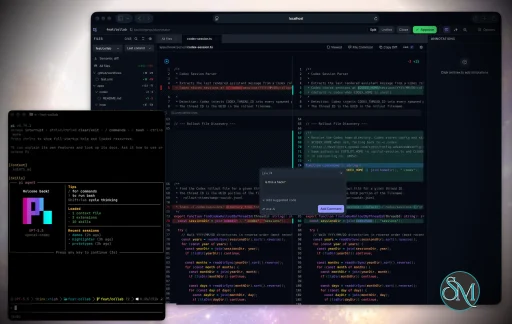
Plannotator is an open-source platform designed to review and validate plans and code generated by AI coding agents.
The platform provides a centralized interface where developers can:
Review AI-generated plans
Annotate proposed actions
Approve or reject tasks
Inspect code changes
Provide structured feedback
Improve agent outputs
Maintain human oversight
Rather than replacing developers, Plannotator aims to keep humans involved in critical decision-making during AI-assisted development.
As AI coding agents become increasingly capable, developers face a growing challenge: ensuring that AI-generated plans and code changes align with project requirements before they are executed. Plannotator addresses this problem by acting as a review layer between developers and AI coding agents.
Instead of generating code itself, Plannotator focuses on making AI-driven development more transparent and controllable. It allows teams to review, annotate, approve, reject, and refine agent-generated plans and code changes before they affect a project.
Download Plannotator v0.27.18 - Software Mirrors |
|---|
Plannotator v0.27.18 for Windowsplannotator-win32-x64.exe | 151.24 MB plannotator-win32-arm64.exe | 148.22 MB |
Plannotator v0.27.18 for macOSplannotator-paste-darwin-x64 | 65.97 MB plannotator-paste-darwin-arm64 | 60.51 MB |
Plannotator v0.27.18 for Linuxplannotator-paste-linux-x64 | 89.3 MB plannotator-paste-linux-arm64 | 89.35 MB |
Plannotator v0.27.18 Source Code |
Plannotator v0.27.18 Release Notes:Follow @plannotator on X for updatesMissed recent releases?
What's New in v0.27.18A short release with four pull requests. Model pickers now show the models your installed Claude and Codex actually offer, including Opus 5.5, Fable 5.1, and the GPT-6 family, instead of a list we typed by hand. Unsent comments on a pull request review now survive new pushes. The Claude Agent SDK behind Ask AI also moves to a newer version.Model pickers come from your installed toolsEvery model picker in Plannotator used to read from lists written into the code. Ask AI, the review agents, Guided Review, and Code Tour each had their own copy for Claude and Codex, and the copies fell behind whenever a new model shipped. Opus 5.5 and Fable 5.1 could not be picked at all, code review still defaulted to Opus 5, and the Codex pickers were missing the GPT-6 models. The pickers now ask the tools you already have. Claude's list comes from your installedclaude, and Codex's list comes from your installed codex. When you update either one, new models appear in Plannotator without a Plannotator release. The lookup runs once, the first time a picker opens, never at startup or on page load. It gives up after a few seconds and falls back to a short built-in list if the tool is missing, signed out, or broken. Ask AI and all the launchers share one list, so they can no longer disagree.
Claude entries now carry their version: Opus 5.5 (latest), Fable 5.1 (latest), Sonnet 5 (latest), Haiku 4.5 (latest). The number comes from the model each name currently runs, so it updates on its own when Claude does. Code review defaults to the latest Opus, and Codex defaults to the model Codex marks as its default. Each picker only offers the effort levels the chosen model supports, and fast mode only appears where it works.
Choices you saved before this release keep working. A saved pick that your tool no longer lists moves to the latest model in the same family, so an old Opus pick becomes the latest Opus and an old Sonnet pick stays Sonnet. A regular pick never turns into a 1M-context one. A retired Codex model moves to Codex's current default with fast mode turned off.
(#1593)
Unsent PR review comments survive new pushesDraft review comments were saved under a fingerprint of the exact diff. When a teammate pushed to the pull request, the diff changed, the fingerprint changed, and the next session could not find the comments. They stayed on disk but nothing pointed to them anymore. In PR reviews the draft is now also saved under the pull request itself (host, repository, number, and layer or full-stack view). Reopen the PR after new commits and your unsent comments come back. Each line comment remembers the code it was written on and a few lines around it. If that code is unchanged, the comment stays where it was. If it changed, the comment gets an Outdated tag in the sidebar, where you can still edit or delete it. Outdated comments are never moved to a guessed line. When you post the review, they go in the review summary with the code they were written on, not onto whatever line now sits at that number. Switching PRs, or switching between layer and full-stack view, in the same tab brings back that PR's unsent comments automatically with a short notice. Sending, approving, or closing clears the saved draft for every PR the session touched, so submitted comments do not reappear after a later push. After a push, files you had marked Viewed are unmarked, since new commits may have changed them. Local reviews are unchanged. Drafts saved before this release are still restored when the diff is unchanged, but not after a push. (#1592, part of #1590, reported by @RobertoArtiles)Additional Changes
Install / UpdatemacOS / Linux:/plugin in Claude Code, find plannotator, and click "Update now".
Pi: Update @plannotator/pi-extension to 0.27.18 and restart Pi.
OpenCode: Clear cache and restart:
What's Changed
Community@RobertoArtiles reported #1590 with an exact reproduction and a proposed design: key review drafts by what is being reviewed rather than the diff's content, and mark comments outdated instead of dropping them, the way GitHub does. This release ships that design for pull request reviews. Local reviews are still open under the same issue. Full Changelog: v0.27.17...v0.27.18 |
Key Features of Plannotator
Plan Review System
One of Plannotator's core capabilities is reviewing plans generated by AI agents before execution.
Developers can examine:
Proposed tasks
Implementation strategies
Agent reasoning
Planned file modifications
Workflow sequences
This visibility helps reduce unintended changes and costly mistakes.
Annotation Tools
The platform allows users to add comments, notes, and guidance directly to AI-generated plans.
These annotations can be used to:
Clarify requirements
Correct misunderstandings
Provide context
Guide future agent actions
AI Code Review
Plannotator extends the review process beyond planning by supporting inspection of generated code.
Developers can:
Review modifications
Analyze diffs
Leave comments
Request revisions
Validate implementation details
This workflow resembles modern pull-request review systems.
Human-in-the-Loop Workflows
A major design goal is ensuring that AI actions remain subject to human approval.
Organizations can establish review processes where important actions require validation before execution.
Open Source Foundation
Plannotator is open source, allowing teams to inspect, modify, and self-host the platform according to their needs.
This transparency is particularly valuable for organizations adopting AI-assisted software development.
User Experience
The interface is designed around review workflows rather than direct code generation.
Instead of interacting with a chatbot, users primarily:
Receive agent-generated plans
Review proposed actions
Add feedback
Approve or reject changes
Monitor execution results
The workflow feels familiar to developers accustomed to pull requests, code reviews, and project planning tools.
Productivity Benefits
As AI coding tools become more autonomous, review processes become increasingly important.
Plannotator helps organizations:
Reduce risky AI actions
Improve code quality
Increase accountability
Preserve architectural consistency
Encourage collaboration between developers and AI agents
For teams adopting AI-driven development, these safeguards can be as valuable as the coding agents themselves.
Collaboration Features
The platform supports collaborative review workflows where multiple team members can participate in evaluating AI-generated outputs.
This allows:
Peer review
Team approval processes
Shared annotations
Collective decision-making
Such features are especially useful for larger engineering teams.
Performance
Because Plannotator focuses on workflow management and review rather than model inference, performance largely depends on the connected AI agents and integrations.
The platform itself is lightweight and primarily serves as an orchestration and review layer.
Open Source Advantages
Being open source provides several benefits:
Transparent development
Self-hosting capabilities
Custom integrations
Community contributions
Vendor independence
Organizations concerned about compliance, security, or proprietary workflows may find these advantages particularly appealing.
Limitations
Plannotator is designed as a companion tool rather than a complete AI development platform.
Common limitations include:
Requires external AI coding agents
Best suited for teams already using AI-assisted development
Smaller ecosystem than mature developer platforms
Additional review steps may slow rapid prototyping
Some users may prefer fully autonomous workflows
The software delivers the most value in environments where oversight and quality control are priorities.
Pros
Improves transparency of AI-generated plans
Supports structured review workflows
Human-in-the-loop design
Useful annotation system
Open source
Self-hosting support
Familiar review experience for developers
Helps reduce AI-generated mistakes
Cons
Not a standalone coding agent
Requires integration with AI development tools
Smaller community than established developer platforms
Adds review overhead to workflows
Best suited for teams rather than casual users
Who Should Use Plannotator?
Plannotator is ideal for:
Software development teams
Engineering managers
AI-assisted development workflows
Organizations adopting coding agents
Open-source projects
Teams prioritizing code quality and governance
It is particularly valuable for environments where AI-generated code requires oversight before reaching production systems.
Plannotator fills an increasingly important role in the AI development ecosystem by providing visibility and control over AI-generated plans and code changes. Its focus on human oversight, structured reviews, and collaborative workflows makes it a useful companion for modern coding agents. While it is not a replacement for AI coding tools themselves, it offers a practical solution for teams seeking greater confidence and accountability in AI-assisted software development.
Developer:
backnotprop
Operating System:
Windows / macOS / Linux
Date Added:
2026-09-22T23:04:07.906Z
Categories:
Post a Comment/Report Broken Link: