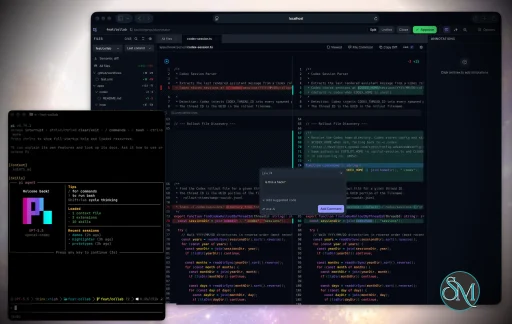
Plannotator is an open-source platform designed to review and validate plans and code generated by AI coding agents.
The platform provides a centralized interface where developers can:
Review AI-generated plans
Annotate proposed actions
Approve or reject tasks
Inspect code changes
Provide structured feedback
Improve agent outputs
Maintain human oversight
Rather than replacing developers, Plannotator aims to keep humans involved in critical decision-making during AI-assisted development.
As AI coding agents become increasingly capable, developers face a growing challenge: ensuring that AI-generated plans and code changes align with project requirements before they are executed. Plannotator addresses this problem by acting as a review layer between developers and AI coding agents.
Instead of generating code itself, Plannotator focuses on making AI-driven development more transparent and controllable. It allows teams to review, annotate, approve, reject, and refine agent-generated plans and code changes before they affect a project.
Download Plannotator v0.27.15 - Software Mirrors |
|---|
Plannotator v0.27.15 for Windowsplannotator-paste-win32-arm64.exe | 90.2 MB plannotator-paste-win32-x64.exe | 93.23 MB |
Plannotator v0.27.15 for macOSplannotator-darwin-arm64 | 117.29 MB plannotator-darwin-x64 | 122.31 MB |
Plannotator v0.27.15 for Linuxplannotator-linux-arm64 | 145.67 MB plannotator-linux-x64 | 145.63 MB |
Plannotator v0.27.15 for Other |
Plannotator v0.27.15 Release Notes:Follow @plannotator on X for updatesMissed recent releases?
What's New in v0.27.15Twenty-six pull requests, three of them from outside contributors and two of those first contributions. Most of the work is on the HTML annotate surface: pinpoint comments now carry a description of the element they point at, the page gets the whole viewport by default, links between local HTML files stay inside the session, and a folder review can finally see every comment it has collected. The rest is correctness work on annotation restore, on the Codex Stop hook, on the OpenCode 2 notice ordering, and on the x64 release binaries. Four behavior changes are worth reading before you update: HTML annotate sessions now open with the floating tools hidden, the plan diff opens in Classic view again, an emoji on a GitHub alert's first line becomes that alert's icon, and Codex 0.114 through 0.116 users now get plan review on Stop where they previously got nothing.Plannotator TUI and Herdr AnnotateA one-time panel now announces Plannotator's two terminal tools. Plannotator TUI is a standalone terminal client: annotate Markdown in the terminal (select, comment, looks good, delete), review a folder, or annotate one of your agent's recent replies, then hand the review to your agent as numbered feedback. Herdr Annotate is a Plannotator plugin for Herdr: comment on any terminal text, review Markdown documents and agent replies inside Herdr, and send the feedback straight back to the agent. Its document review runs Plannotator TUI. The panel shows a looping demo of the real client, one headline, one sentence, and a row of actions. It appears once per browser across plan review, annotate, and code review, then never again. There are no install commands or feature lists in it; the repo pages carry those. It is also suppressed in sessions that have no server behind them, so the public share portal never shows it. The repos are plannotator-tui and herdr-annotate.Pinpoint comments describe the element to the agentPinpointing an element in a raw HTML or live app session used to export either a placeholder quote (Feedback on: "[element: Navigation]") or the element's flattened text. The bridge already knew the element's selector, tag, and text, but nothing in the export read them, so an agent receiving the feedback could not tell which element the comment was about.
Each pinpoint now captures a bounded description of the element at click time: tag, id, author-written classes, an ancestor path, ARIA role and accessible name, an allowlisted set of attributes, the rendered text, a collapsed HTML skeleton, the child count, the viewport box, the nearest landmark and heading, a component hint from data-component or data-testid, and in live app sessions the route and page title. The export prints that skeleton as a fenced block under the comment with the selector, path, role, name, attributes, and box beneath it, so the agent can find the element in the source.
The capture is deliberately narrow. Form values, inline on* handlers, style, script and template contents, and full innerHTML are never read. URLs in captured attributes lose their query and fragment, both absolute and relative, so a checkout link carrying a session token is not written into a draft or an exported comment. Everything is re-validated and re-capped when it crosses back out of the iframe, and the whole record is hard-capped at 2 KiB per comment, so a 400-row list costs the same bytes as a button. Annotations without the field export exactly as they did before.
HTML annotate: the page gets the viewport, and the chords are realThree changes to the raw HTML surface, all from owner feedback while using it. Tools are hidden on open. An annotated HTML page owns the full viewport now, with no floating chrome over it on a fresh session. The header eye shows them, and so does the newMod+Shift+X chord. A reviewer who explicitly shows the tools keeps them next session, and the control that brings them back lives in the header, so a hidden state can never strand you. One consequence to know: the version diff's "Show changes" control lives in that floating cluster, so on a fresh session it is behind the eye.
Mod+Shift+A is a documented toggle. It was already wired as one in the app, but the shortcut registry and the docs described it as a re-arm only, which left "Escape dropped me to Interact, how do I get back?" unanswered. It is now described and tested as the toggle it is, and the bridge mirrors both chords from inside the sandboxed iframe, so they work whichever document has focus.
The header controls explain themselves. Back, Refresh, the eye, and the pen now carry tooltips with a description line and their keyboard shortcut instead of a bare title string.
Links between local HTML files open as linked documentsA srcdoc document has no URL of its own, so it inherits the parent page's. A plain#anchor did it.
Link clicks are now intercepted in the bridge and resolved in the parent. A relative or nested sibling opens as a linked document in place, with its annotations kept per document. An in-page fragment scrolls within the current document. A server-absolute path resolves against the directory the session opened from. A sibling markdown file opens as a markdown document. An off-origin link opens in a new tab with noopener. A file that cannot be annotated gets a toast and no navigation, and javascript:, data:, mailto: and file: are dropped. Live app sessions are untouched.
The way back is a new header control, leftmost of the group, named after the document it returns to. It claims no keyboard chord, because Alt+Left and the browser's own Back belong to you. The compact touch shell gets the same action in its Options menu. Link clicks no longer pop the sidebar open on HTML documents, since a full-screen page owns the viewport and the sidebar is not where the way back lives anymore.
All files view in the annotations panelIn a folder session the annotations panel only ever showed the open file's comments. Reviewing across several documents, there was no way to see the whole review, and a file with nothing on it showed "No annotations yet" beside a small count of comments elsewhere that you could not read. The panel header now carries aThis file | All files toggle, shown whenever feedback exists outside the open document. All files groups comments by document, open document first and the rest by path, each group collapsible and labelled relative to the session root. The groups render the same annotation cards the single-document timeline renders, so quote, comment, type, images, replies, Edit and Delete all work across files, and a cross-file delete is reflected in what gets submitted. Clicking a card navigates to that document and selects the comment there.
The default rule is the frustration this exists for: your saved preference wins, except that a document with no feedback of its own, while other documents have some, opens on All files. Arriving by clicking a card in the All files list keeps you on All files. A plan review session with linked documents open contributes the plan's own comments as a group too, labelled (this plan).
GitHub alert titles, and the annotation restore work that followedA GitHub alert whose first body line is a bold-only line now renders that line as the alert's title on the icon row, in place of the type word. An emoji on that line becomes the alert's icon, which is the behavior change to know about:> [!TIP] followed by > 💡 Browser quirks now shows the lightbulb and the title rather than the default tip icon and a bold paragraph. The type word stays in the accessible name, so a screen reader still hears "Tip: Browser quirks". An alert with no title line renders exactly as before. Hosts embedding the UI can supply their own icon set through a new alertIconRenderer seam; Plannotator bundles none.
That change removed a paragraph from the rendered alert, and the annotation layer addresses blocks by position. A draft saved before the upgrade could resolve onto the wrong element, so restore verification was turned on for plan review and annotate: a restore whose painted text does not match the annotation's own quote is dropped and retried by text search, and only reported when the rescue also fails. That guard then turned out to be too strict, and the next two releases of work fixed what it broke and what it had been hiding.
Restore verification compared the stored quote against the painted text with whitespace collapsed to a single space, but a selection string carries a blank line between blocks and the painted marks are concatenated with nothing between them. Every annotation spanning two paragraphs, a heading and its paragraph, or two list items came back from a reload with no highlight at all, under a misleading toast about edited text. Whitespace-only differences are now accepted, and content drift is still rejected. Two more shapes were failing closed for their own reasons: a drag starting inside excluded chrome, such as an alert's visually hidden type word, painted only its tail, so the start of a range is now snapped onto the first annotatable position it covers; and list markers are select-none, so a selection spanning two list items resolved onto text the bullet had joined, which the verification then rejected.
The other half of this is that an annotation that genuinely cannot be re-anchored is now visible on markdown surfaces the way it already was on HTML: the comment stays in the panel, still exports, and carries an Unanchored chip so you know its highlight is gone rather than wondering where it went.
Comment box caret alignment on Windows and LinuxThe comment composer paints its visible text with a mirror layer over a transparent textarea, and only the caret still comes from the textarea itself. When the textarea grew tall enough to sprout a classic vertical scrollbar, the kind Windows and Linux use, which consumes layout width, the textarea's lines wrapped earlier than the mirror's. From the first line whose wrap point differed, the caret was drawn away from the character it belonged to. macOS and iOS overlay scrollbars take no layout width, which is why nobody on a Mac ever saw it. The overlay's right padding now tracks the measured scrollbar width, re-measured when a resize adds or drops the scrollbar rather than only on keystrokes. Where the measured width is zero, the code writes no inline style at all, so macOS, iOS, and every touch surface render a byte-identical DOM to before.Classic is the plan diff default againThe plan diff opens in Classic view, the block-level view with old above new. The word-level Rendered view is still there next to Raw. This applies to every surface that renders the plan diff, including the annotate version diff, since they share one mode setting.OpenCode 2: feedback no longer lands behind the session noticeOn OpenCode v2,/plannotator-last printed "Plannotator session ready: dispose() terminal, so a notice that outlives its command cannot re-open an event subscription on the host with no owner left to close it. OpenCode 1 is untouched throughout.
Codex: Stop plan review stays in the current turnThe Codex Stop hook could scrape the most recentturn_id field only landed in 0.117, so on 0.114 through 0.116 plan review silently stopped: no UI, no message, exit 0. Those versions do write turn markers into the rollout, so when the payload carries no turn_id at all the hook now resolves the turn from the rollout's own last id-carrying marker and runs the unchanged machinery on it. Codex builds that do send turn_id behave byte for byte as before. A blank turn id is still refused rather than treated as absent, and a rollout with no turn marker at all still fails closed.
The deny-and-resubmit de-duplication needed the same treatment. It anchored on a Pi: PLANNOTATOR_BROWSER script paths work on macOSOn macOS the Pi extension always ranopen -a $PLANNOTATOR_BROWSER , treating the value as an application bundle. Pointing it at a script or an executable failed with a LaunchServices error that the detached spawn swallowed, so the extension reported that the review had opened while nothing did. Pi now mirrors the branch the plannotator binary already had: a value containing a slash that does not end in .app is executed directly with the URL as its argument, and application names and .app paths keep going through open -a.
x64 release binaries run on older CPUsThe v0.27.14 Linux x64 CLI exited with SIGILL on an Ivy Bridge Xeon E3-1220 V2, because the default Bun x64 target assumes instructions those CPUs do not have. The Linux and Windows x64 CLI and paste service binaries are now compiled with Bun's baseline x64 target, which Bun recommends for pre-2013 hardware. A bounded QEMU Nehalem gate was added to the existing Linux release smoke job, checking CLI--help, an exact --version match, and paste service startup, so a non-baseline binary fails the release rather than reaching someone's machine. Asset names, checksums, provenance attestations, the installers, the Bun pin, and every other platform target are unchanged.
Additional Changes
Install / UpdatemacOS / Linux:/plugin in Claude Code, find plannotator, and click "Update now".
Pi: Update @plannotator/pi-extension to 0.27.15 and restart Pi.
OpenCode: Clear cache and restart:
What's Changed
New Contributors
Contributors@rNoz returns with the Codex Stop turn scoping in #1169, the fix that stops a decided plan from being re-opened by a later turn. It is his tenth merged pull request on the project, and the two follow-ups in this release both build directly on the machinery it introduced. He also helped diagnose the Pi browser failure on @punk-dev-robot's issue. @punk-dev-robot reported the silentPLANNOTATOR_BROWSER failure on macOS in #1391 and then fixed it in #1429, matching the branch the main binary already had rather than inventing a second behavior. First contribution.
@ybtam found that the official Linux x64 binary would not start on an Ivy Bridge Xeon, tracked it to the Bun compile target, and shipped the baseline build with a QEMU Nehalem gate in #1514 so the failure cannot ship again. First contribution.
The reports and proposals that shaped this release:
|
Key Features of Plannotator
Plan Review System
One of Plannotator's core capabilities is reviewing plans generated by AI agents before execution.
Developers can examine:
Proposed tasks
Implementation strategies
Agent reasoning
Planned file modifications
Workflow sequences
This visibility helps reduce unintended changes and costly mistakes.
Annotation Tools
The platform allows users to add comments, notes, and guidance directly to AI-generated plans.
These annotations can be used to:
Clarify requirements
Correct misunderstandings
Provide context
Guide future agent actions
AI Code Review
Plannotator extends the review process beyond planning by supporting inspection of generated code.
Developers can:
Review modifications
Analyze diffs
Leave comments
Request revisions
Validate implementation details
This workflow resembles modern pull-request review systems.
Human-in-the-Loop Workflows
A major design goal is ensuring that AI actions remain subject to human approval.
Organizations can establish review processes where important actions require validation before execution.
Open Source Foundation
Plannotator is open source, allowing teams to inspect, modify, and self-host the platform according to their needs.
This transparency is particularly valuable for organizations adopting AI-assisted software development.
User Experience
The interface is designed around review workflows rather than direct code generation.
Instead of interacting with a chatbot, users primarily:
Receive agent-generated plans
Review proposed actions
Add feedback
Approve or reject changes
Monitor execution results
The workflow feels familiar to developers accustomed to pull requests, code reviews, and project planning tools.
Productivity Benefits
As AI coding tools become more autonomous, review processes become increasingly important.
Plannotator helps organizations:
Reduce risky AI actions
Improve code quality
Increase accountability
Preserve architectural consistency
Encourage collaboration between developers and AI agents
For teams adopting AI-driven development, these safeguards can be as valuable as the coding agents themselves.
Collaboration Features
The platform supports collaborative review workflows where multiple team members can participate in evaluating AI-generated outputs.
This allows:
Peer review
Team approval processes
Shared annotations
Collective decision-making
Such features are especially useful for larger engineering teams.
Performance
Because Plannotator focuses on workflow management and review rather than model inference, performance largely depends on the connected AI agents and integrations.
The platform itself is lightweight and primarily serves as an orchestration and review layer.
Open Source Advantages
Being open source provides several benefits:
Transparent development
Self-hosting capabilities
Custom integrations
Community contributions
Vendor independence
Organizations concerned about compliance, security, or proprietary workflows may find these advantages particularly appealing.
Limitations
Plannotator is designed as a companion tool rather than a complete AI development platform.
Common limitations include:
Requires external AI coding agents
Best suited for teams already using AI-assisted development
Smaller ecosystem than mature developer platforms
Additional review steps may slow rapid prototyping
Some users may prefer fully autonomous workflows
The software delivers the most value in environments where oversight and quality control are priorities.
Pros
Improves transparency of AI-generated plans
Supports structured review workflows
Human-in-the-loop design
Useful annotation system
Open source
Self-hosting support
Familiar review experience for developers
Helps reduce AI-generated mistakes
Cons
Not a standalone coding agent
Requires integration with AI development tools
Smaller community than established developer platforms
Adds review overhead to workflows
Best suited for teams rather than casual users
Who Should Use Plannotator?
Plannotator is ideal for:
Software development teams
Engineering managers
AI-assisted development workflows
Organizations adopting coding agents
Open-source projects
Teams prioritizing code quality and governance
It is particularly valuable for environments where AI-generated code requires oversight before reaching production systems.
Plannotator fills an increasingly important role in the AI development ecosystem by providing visibility and control over AI-generated plans and code changes. Its focus on human oversight, structured reviews, and collaborative workflows makes it a useful companion for modern coding agents. While it is not a replacement for AI coding tools themselves, it offers a practical solution for teams seeking greater confidence and accountability in AI-assisted software development.
Developer:
backnotprop
Operating System:
Windows / macOS / Linux
Date Added:
2026-09-15T23:04:00.251Z
Categories:
Post a Comment/Report Broken Link: