PipePipe is an open-source Android application for browsing and watching YouTube and other supported video services. It is based on NewPipe but has developed independently, with additional features focused on playback, filtering, downloading, account access, and support for multiple video platforms.
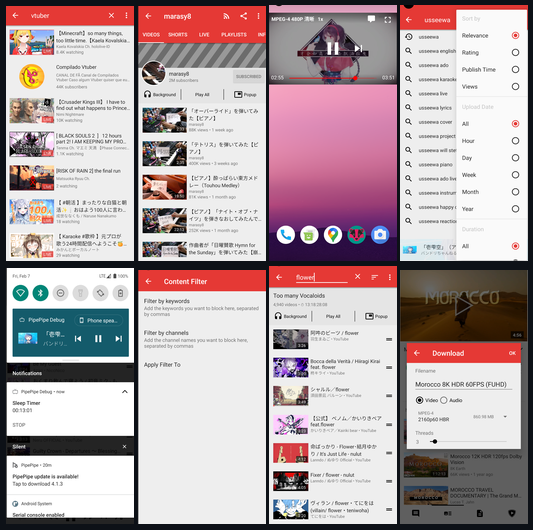
The application is designed as an alternative Android client rather than an official YouTube application. It provides features such as background playback, SponsorBlock integration, advanced content filters, video downloads, and support for services including YouTube, BiliBili, and NicoNico.
Features
PipePipe includes a broad collection of playback and content-management features.
YouTube browsing and playback
BiliBili support
NicoNico support
Background audio playback
Video downloads
Playlist downloads
Local playlists
SponsorBlock integration
Return YouTube Dislike support
Advanced search filters
Keyword filtering
Channel filtering
Shorts blocking
Paid-content filtering
Live chat and danmaku-style overlays
AV1 and VP9 playback
Playback speed controls
Full-screen gestures
Pinch-to-zoom
Sleep timer
Subtitle support
Auto-translated captions when supported
Channel video sorting
Search within channels
Multiple video quality options
Account login for supported scenarios
Local history and subscriptions
PipePipe also provides controls for blocking unwanted channels or keywords and can filter content from feeds and search results.
Recent development has added configurable gestures, higher default video resolutions, live-stream quality selection, improved TV controls, and additional support for BiliBili and NicoNico content.
Download PipePipe v5.4.0 - Software Mirrors |
|---|
PipePipe v5.4.0 for AndroidPipePipe_5.4.0-x86_64-release.apk | 31.38 MB PipePipe_5.4.0-x86-release.apk | 30.88 MB |
PipePipe v5.4.0 Source Code |
PipePipe v5.4.0 Release Notes:New Features
Bug Fixes
If you're enjoying PipePipe, please help share it with your friends. Every bit of support means a lot to us! Which APK should you download?
|
Performance and Compatibility
PipePipe is an Android application and provides separate APK builds for different processor architectures. The project recommends the ARM64 build for most modern Android devices, while ARM32 and x86 variants are available for older devices and Android emulators.
The application has received ongoing fixes for playback, parsing, downloads, playlists, subtitles, SponsorBlock, and login-related issues. This is particularly important for an alternative YouTube client because changes to the underlying services can affect playback and content extraction.
Account support is more limited than the official YouTube application. PipePipe states that login cookies are used only for configured scenarios, with YouTube cookies used when retrieving playback streams.
The project is independent from NewPipe. Although PipePipe originated as a NewPipe fork, it does not receive updates from NewPipe or contribute its changes back to NewPipe.
System Requirements
PipePipe requires an Android device or Android emulator.
Available builds include:
ARM64 for most modern Android devices
ARM32 for older Android devices
x86_64 for 64-bit Android emulators
x86 for 32-bit Android emulators
Universal APK for devices where the architecture-specific packages are unsuitable
The exact Android version requirement can vary between releases and supported features, so users should check the current release information before installing on older devices.
Pros and Cons
Pros
Free and open source
No official YouTube app dependency
YouTube, BiliBili, and NicoNico support
Background playback
Video and playlist downloads
SponsorBlock integration
Return YouTube Dislike support
Advanced content filtering
Keyword and channel blocking
Shorts filtering
Live chat and danmaku support
Playback gestures
Sleep timer
Multiple architecture builds
Local playlists and history
Active development
Account support for selected use cases
Cons
Android only
Service changes can temporarily affect playback
Login support has limitations
Some features depend on third-party extraction methods
Different APK architectures can make installation confusing for some users
Not all features are equally available across supported services
How to Install
Download the appropriate APK from the PipePipe releases page.
For most modern Android phones, the ARM64 build is the appropriate choice. Older devices may require the ARM32 build, while Android emulators may use x86 or x86_64 packages.
After downloading the APK:
Open the APK on your Android device.
Allow installation from the requested source if Android asks for permission.
Install PipePipe.
Launch the application.
Configure subscriptions, filters, playback preferences, and other settings.
Users migrating from NewPipe can also use PipePipe's supported migration functionality.
Final Verdict
PipePipe is a feature-rich open-source Android video client that goes well beyond basic YouTube playback. Background audio, downloads, SponsorBlock, content filtering, playback gestures, local playlists, and support for several video services give it considerably more flexibility than a conventional video client.
Its biggest limitation comes from its dependence on external services and extraction methods. YouTube and other platforms can change their APIs, playback systems, or access restrictions, which can result in temporary compatibility problems. The project's active development helps address these issues, but they remain an inherent limitation of this type of application.
For Android users looking for an open-source video client with extensive playback, downloading, filtering, and customization features, PipePipe offers a comprehensive alternative to the standard YouTube experience.
Post a Comment/Report Broken Link: