Palmier Pro v0.10.0

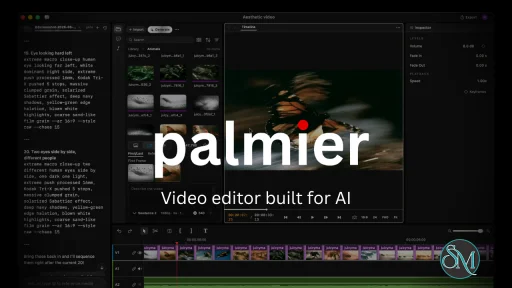
Palmier Pro is an AI-powered video editing platform that combines professional timeline editing with integrated AI generation tools. Instead of forcing creators to switch between AI generation websites and traditional video editors, Palmier Pro places AI image, video, and audio generation directly inside the editing workflow.

The biggest differentiator of Palmier Pro is its timeline-first approach. Users can generate AI content, edit footage, arrange clips, and export finished projects without constantly moving assets between different applications. The software supports both AI-generated media and traditional video assets within the same project.

Palmier Pro is currently available for macOS and integrates with several major AI models for media generation.

Download Palmier Pro v0.10.0 - Software Mirrors

Palmier Pro v0.10.0 for macOS

PalmierPro.dmg | 130.22 MB

Palmier Pro v0.10.0 Release Notes:

What's new

  • update gitignore
  • Merge pull request #141 from palmier-io/ui/comment-row-polish
  • Merge pull request #140 from palmier-io/localize/new-english-strings
  • [fix] Keep playhead when focusing a selected comment
  • [ui] Color status icons in comment status menus
  • [ui] Polish timeline comment rows
  • [fix] Translate new comment strings across locales
  • Merge branch 'main' of ssh://ssh.github.com:443/palmier-io/palmier-pro-macos into localize/new-english-strings
  • [fix] Correct incomplete localized error strings
  • Merge pull request #139 from palmier-io/docs/changelog-0.10.0
  • [feat] Translate new strings across locales
  • [docs] Update in-app 0.10.0 changelog
  • Merge pull request #136 from palmier-io/cursor/timeline-comment-bar
  • Merge pull request #138 from palmier-io/feat/gpt6-opus55-chat-models
  • [fix] Refuse stale title edits on timeline comments
  • [test] Drop timer-dependent highlight check from edit_speed MCP test
  • [cleanup] Remove the minimal reasoning effort
  • [ui] Simplify comment rows and make titles optional
  • [agent] Default Claude Code to Opus 5.5
  • [agent] Offer Opus 5.5 and GPT-6 Sol and Luna in chat
  • Merge pull request #137 from palmier-io/feat/smooth-slow-motion
  • [ci] Tolerate unavailable virtual frame processor
  • [fix] Match cache coverage to rendered frames
  • [fix] Preserve smooth slow-mo cache integrity
  • [cleanup] Remove redundant smooth slow-mo logic
  • [fix] Preserve playback when interpolation caches fail
  • [fix] Discard stale smooth slow-mo renders
  • [fix] Regenerate smooth slow-mo for quality changes
  • [perf] Bound frame interpolation memory
  • [perf] Streamline smooth slow-mo rendering
  • [feat] Cache smooth slow-mo derivatives internally
  • [feat] Add local smooth slow motion
  • [fix] Clear clip, gap, and range selection when adding a comment
  • [feat] Add a comment bar for timeline comments
  • Merge pull request #135 from palmier-io/feat/higgsfield-genjutsu
  • [localization] Add Genjutsu mode labels
  • [cleanup] Reuse prompt references for Genjutsu
  • [generation] Add Higgsfield Genjutsu modes
  • Merge pull request #134 from palmier-io/feat/point-speed-ramp
  • [fix] Preserve keyframe timing during ripple trims
  • [perf] Reuse resolved curves while dragging speed points
  • [fix] Preserve speed-curve timing and unify editing rules
  • [cleanup] Inline single-use speed helpers
  • [cleanup] Consolidate speed curve editing paths
  • [fix/perf] Harden and streamline speed curve previews
  • [fix] Preserve speed point IDs in Agent readback
  • [ui] Hide speed points below editing zoom
  • Merge pull request #133 from palmier-io/ui/fit-timeline-zoom
  • [fix] Restore timeline start when fitting
  • [ui] Clarify timeline speed ribbons
  • [ui] Add fit-to-timeline zoom preset
  • [agent] Add point-based speed editing
  • [docs] Add speed controls to keyboard shortcuts
  • [fix] Keep linked clips synchronized during speed ripple
  • [ui] Add interactive timeline speed ribbons
  • [ui] Improve speed point drag targeting
  • [cleanup] Group speed inspector components
  • [fix] Keep Shift-B speed points at the playhead
  • [feat] Edit speed points from the Rate control
  • [ui] Tune speed curve templates
  • [ui] Refine the ramp editor layout
  • [test] Cover speed curves and templates
  • [agent] Handle variable speed in tools and interchange
  • [ui] Add the inspector ramp editor
  • [feat] Map media features through speed curves
  • [feat] Render clips with speed curve timing
  • speed-related editor operations
  • core speed curve data model
  • Merge pull request #130 from palmier-io/ui/remove-toolbar-undo-redo
  • [fix] Avoid tool-mode update cycles
  • [cleanup] Simplify toolbar and inspector UI code
  • [fix] Isolate hand panning from timeline edits
  • [fix] Harden inspector and tool interactions
  • [ui] Bound the inspector panel width
  • [ui] Tighten and reorganize inspector controls
  • [ui] Refine the active panel indicator
  • [feat] Add hand tool for timeline navigation
  • [ui] Use marker blue in the toolbar
  • [ui] Consolidate playhead edit actions
  • [ui] Consolidate timeline tools in a menu
  • [ui] Remove undo and redo toolbar controls
  • Merge pull request #129 from palmier-io/fix/agent-stream-scroll
  • [fix] Keep the streaming transcript tail eager
  • [fix] Preserve transcript size anchoring
  • [fix] Prevent agent transcript layout stalls
  • Merge pull request #128 from palmier-io/agent-skill-writing
  • [fix] Allow older Claude versions to author skills
  • [agent] Let all harnesses author Palmier skills
  • Merge pull request #127 from palmier-io/feat/add-caption-range
  • [fix] Keep caption collisions inside selected range
  • [agent/ui] Limit captions to timeline ranges
  • Merge pull request #126 from palmier-io/feat/image-magic-mask
  • [fix] Use exact image matte frame duration
  • [feat] Add Magic Mask support for images
  • Merge pull request #124 from palmier-io/fix/agent-composer-resizing
  • Merge pull request #125 from palmier-io/fix/iphone-image-orientation
  • [fix] Keep sizing probe out of localization
  • [fix] Defer incomplete mention measurements
  • [fix] Preserve oriented image aspect ratios
  • [fix] Measure mention-aware composer height
  • [ui] Grow agent composer with draft
  • Merge pull request #123 from palmier-io/feature/audio-recording
  • Revert "[cleanup] Simplify live recording preview"
  • [cleanup] Simplify live recording preview
  • [cleanup] Simplify audio recording internals
  • [fix] Give recording exclusive playhead ownership
  • [fix] Harden audio recording lifecycle
  • [cleanup] Remove review-only audio recording document
  • [docs] Document audio recording architecture
  • [test] Cover timeline audio recording
  • [feat] Add timeline audio recording workflow
  • [feat] Add microphone capture infrastructure
  • Merge pull request #122 from palmier-io/fix/waveform-source-time
  • [cleanup] Keep waveform timing fix focused
  • [fix] Preserve waveform source timescale
  • [fix] Align trimmed waveforms with source time
  • Merge pull request #121 from palmier-io/ponytail-cursor-rule
  • [agent] Add Ponytail Cursor rule
  • Merge pull request #120 from palmier-io/fix/selected-clip-canvas-zoom
  • [fix] Scope canvas zoom to preview viewport
  • [fix] Keep canvas zoom active over selected clips
  • Merge pull request #119 from palmier-io/proactive-mcp-feedback
  • [agent] Restore proactive MCP feedback
  • Merge pull request #116 from palmier-io/fix/agent-transcript-refresh
  • Merge pull request #118 from palmier-io/refactor/preview-ownership
  • [cleanup] Keep composition cache helper with Timeline
  • [refactor] Keep preview overlays together
  • [refactor] Organize preview code by ownership
  • [fix] Keep agent transcript rendering lazy
  • Merge pull request #117 from palmier-io/feat/agent-model-pricing
  • [agent] Add generation cost dry runs
  • Merge pull request #115 from palmier-io/fix/audio-playback-metering
  • [fix] Refresh agent transcript as responses stream
  • [fix] Preserve meters on cached audio refresh
  • [fix] Restore metering after live audio edits
  • [fix] Prevent audio metering from stalling playback
  • [build] Publish v0.9.0 appcast

Key Features of Palmier Pro

AI Generation Inside the Timeline

Palmier Pro allows users to create AI-generated images, videos, and audio directly from the editing interface. This significantly reduces the friction commonly associated with AI-assisted video production.

Professional Editing Tools

The platform includes multi-track editing for video, audio, images, and text. Standard editing capabilities such as trimming, splitting, speed adjustments, opacity controls, and transformations are also available.

AI Agent Integration

One of the more unique features is support for AI agents through MCP integration. This allows compatible AI assistants to interact with projects and assist with content generation and editing workflows.

Export Flexibility

Projects can be exported in common video formats, and users can also export to professional editing environments such as Adobe Premiere Pro and DaVinci Resolve when additional post-production work is required.

Performance and User Experience

Palmier Pro delivers a modern interface that feels closer to a professional editor than a simple AI generation tool. The workflow is designed to keep creators focused on editing rather than juggling multiple services and downloads.

For content creators producing AI-assisted marketing videos, social media clips, product showcases, or experimental visual content, the integrated approach can save considerable time.

The software is less suitable for users who only need occasional AI-generated clips, as its strengths become more apparent in larger production workflows.

Pros

  • AI generation integrated directly into the editing timeline.

  • Supports both AI-generated and traditional media.

  • Multi-track professional editing capabilities.

  • Export options for Premiere Pro and DaVinci Resolve.

  • AI agent integration for advanced workflows.

  • Streamlined content creation process.

Cons

  • Currently focused on the macOS ecosystem.

  • Newer platform with a smaller ecosystem than established editors.

  • Some advanced creators may still require dedicated post-production software for complex projects.

Who Should Use Palmier Pro?

Palmier Pro is best suited for content creators, marketers, startup teams, social media managers, and video professionals who regularly incorporate AI-generated content into their workflow. It is particularly appealing to users who are tired of constantly moving files between AI generation platforms and traditional video editors.

Final Verdict

Palmier Pro successfully bridges the gap between AI media generation and professional video editing. By embedding AI capabilities directly into the timeline, it offers a workflow that feels more efficient than the traditional generate-download-import process used by many creators today.

While the platform is still relatively new, its integrated approach gives it a strong advantage for AI-first video production workflows.
Palmier Pro v0.10.0
Free
Software Informations:
Developer:

Operating System:
macOS
Date Added:
2026-09-23T17:03:32.693Z
Categories:

Post a Comment/Report Broken Link: