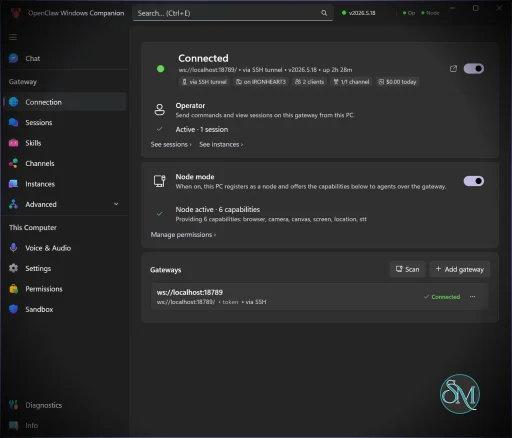
OpenClaw Windows Hub v2026.9.3

OpenClaw Windows Hub is a community-maintained resource centered around deploying and using OpenClaw on Windows systems.

OpenClaw itself is an open source, self-hosted AI agent framework capable of connecting to messaging platforms, automating tasks, managing files, interacting with APIs, and executing actions using large language models such as GPT, Claude, Gemini, or local models.

The Windows Hub ecosystem focuses on:

  • Installation guidance

  • Windows compatibility information

  • Skill libraries

  • Configuration tutorials

  • Troubleshooting resources

  • Community documentation

  • Deployment best practices

OpenClaw Windows Hub is a community-driven resource focused on helping Windows users install, configure, and manage the rapidly growing OpenClaw ecosystem. As OpenClaw continues to attract massive attention among AI enthusiasts, developers, and automation-focused users, Windows Hub aims to simplify the onboarding process for one of the most complex self-hosted AI agent platforms currently available.

Rather than being an AI agent itself, Windows Hub serves as an information and support portal that helps users navigate installation guides, skills, integrations, and deployment options for OpenClaw on Windows environments.

Download OpenClaw Windows Hub v2026.9.3 - Software Mirrors

OpenClawTray-2026.9.3-win-x64.zip | 152.15 MB

OpenClawTray-2026.9.3-win-arm64.zip | 144.25 MB

OpenClawCompanion-Setup-x64.exe | 120.81 MB

OpenClawCompanion-Setup-arm64.exe | 107.04 MB

OpenClaw Windows Hub v2026.9.3 Release Notes:

OpenClaw Windows Hub v2026.9.3

Downloads

  • Installer (x64): OpenClawCompanion-Setup-x64.exe - Intel/AMD 64-bit
  • Installer (ARM64): OpenClawCompanion-Setup-arm64.exe - Windows on ARM (Surface, etc.)
  • Portable x64: OpenClawTray-2026.9.3-win-x64.zip
  • Portable ARM64: OpenClawTray-2026.9.3-win-arm64.zip

Features

  • 🦞 System tray integration with gateway status
  • 🔄 Auto-updates from GitHub Releases
  • ✅ Code-signed with Azure Artifact Signing

Requirements

  • Windows 10 version 1903 or later
  • OpenClaw gateway running locally

Quick Start

  • Run the installer for your architecture
  • Launch from Start Menu or system tray
  • Right-click tray icon → Settings to configure

What's Changed

  • refactor(tray): move Permissions into shared-state MVVM ownership by @bkudiess in #1075
  • refactor(tray): extract Hub and tray presentation models by @bkudiess in #1082
  • refactor(tray): extract App-owned surface lifetimes by @bkudiess in #1085
  • refactor(tray): extract final App orchestration owners by @bkudiess in #1088
  • refactor(gateway): extract protocol core owners by @bkudiess in #1095
  • fix(mxc): tasklist no longer hangs past sandbox timeout by @shanselman in #1151
  • chore(deps): bump github/gh-aw-actions/setup-cli from 0.84.1 to 0.86.1 by @dependabot[bot] in #1142
  • fix: bind SSH credential handoffs to owned listeners by @shanselman in #1126
  • refactor(connection): extract domain coordinators by @bkudiess in #1101
  • refactor(chat): extract runtime state owners by @bkudiess in #1096
  • refactor(chat): extract composer ownership by @bkudiess in #1098
  • Bump Microsoft.ML.OnnxRuntime from 1.28.0 to 1.29.0 by @dependabot[bot] in #1170
  • Bump Microsoft.WindowsAppSDK from 2.3.1 to 2.4.0 by @dependabot[bot] in #1171
  • refactor(setup): split setup steps and own keepalive processes by @bkudiess in #1093
  • fix(tray): restore icon after Explorer restart by @shanselman in #1179
  • feat(connection): enforce gateway protocol compatibility by @bkudiess in #1127
  • feat(chat): render user and agent media in native chat by @calebeden in #1119
  • fix(release): sign all first-party payload binaries by @shanselman in #1182
  • fix: MCP server accepts malformed IPv6 loopback hosts by @joelagnel in #1180
  • refactor(chat): remove the retired FunctionalUI chat surface by @calebeden in #1110
  • feat: add managed local AI with llama-server by @joelagnel in #1178
  • fix(chat): preserve persisted tool activity details by @TheAngryPit in #1111
  • fix(setup): require ownership before WSL cleanup by @shanselman in #1229
  • Make telemetry test collectors thread-safe by @shanselman in #1226
  • fix: gateway controls preserve Linux PATH in WSL by @shanselman in #1227
  • build(deps): bump github/gh-aw-actions/setup-cli from 0.86.1 to 0.87.2 by @dependabot[bot] in #1209
  • fix(setup): avoid duplicate failure message by @RomneyDa in #1187
  • Stabilize accessibility navigation readiness by @shanselman in #1228
  • refactor(local-ai): clarify managed-model probe contract by @joelagnel in #1210
  • fix(setup): bind cleanup to live WSL registration by @shanselman in #1230
  • fix: prevent .NET 10 COM wrapper memory leak in production by @jacobtomlinson in #1215
  • fix: preserve .wslconfig encoding by @joelagnel in #1224
  • fix: keepalive process inspection can hang after PowerShell exits by @SebTardif in #1168
  • fix: preserve Core updates across restart timeouts by @shanselman in #1231
  • Add complete MiniMax TTS support by @karkarl in #1233
  • chore: use MXC SDK 0.8.0 by @shanselman in #1234
  • fix: Local AI fails to start after first setup by @TheAngryPit in #1208
  • fix: render Windows notifications as plain text by @joelagnel in #1223
  • fix(setup): block unsafe Local AI archive destinations by @vincentkoc in #1238
  • fix(setup): stop WSL inspection flake from dead-ending onboarding by @RomneyDa in #1235
  • fix(local-ai): bound default llama generation by @jacobtomlinson in #1241
  • chore(local-ai): bump llama.cpp runtime to b10655 by @larroy in #1252
  • fix(local-ai): prevent routing to an unverified managed model by @joelagnel in #1212
  • test(setup): prove archive link cleanup ordering by @vincentkoc in #1225
  • fix(local-ai): model setup unavailable after install by @shanselman in #1254
  • fix(chat): restore default reasoning after off by @shanselman in #1255
  • fix(setup): recover uninitialized WSL automatically by @karkarl in #1202
  • fix(chat): prevent stale attachment metadata writes by @shanselman in #1259
  • Fix Start menu activation for running tray app by @shanselman in #1262
  • Fix onboarding wizard Back desynchronization by @karkarl in #1205
  • fix(setup): gate Local AI on WSL readiness by @karkarl in #1203
  • test(connection): stabilize listener output waits by @shanselman in #1264
  • fix(chat): render Markdown tables by @shanselman in #1260
  • chore: automate safe repository triage by @shanselman in #1261
  • fix(local-ai): clarify unavailable Local AI setup states (clean replacement for #1204) by @shanselman in #1263
  • test: define schedulable Windows proof pools by @shanselman in #1257
  • Support upstream stable correction release versions by @karkarl in #1266
  • build(deps): bump github/gh-aw-actions/setup-cli from 0.87.2 to 0.87.9 by @dependabot[bot] in #1272
  • Add Ollama inference to the Windows node by @shanselman in #1269
  • docs: refresh Windows Crabbox guidance by @RomneyDa in #1283
  • Bump Microsoft.Windows.SDK.BuildTools from 10.0.28000.2526 to 10.0.28000.2705 by @dependabot[bot] in #1273
  • Fix camera/screen capture consent hang for unattended MCP callers by @shanselman in #1300
  • fix(test): stabilize hardware and UI integration tests by @karkarl in #1302
  • fix(local-ai): bound GPU admission by dedicated device memory by @joelagnel in #1253
  • fix(local-ai): recommend Qwen3.8 with measured context profiles by @joelagnel in #1281
  • style(setup-ui): simplify Local AI onboarding copy by @joelagnel in #1290
  • fix(release): decouple stable correction validation from upstream releases by @shanselman in #1303
  • fix(setup): prevent Local AI routing ambiguity after rerun by @joelagnel in #1282
  • docs: add OpenClaw global triage skill by @shanselman in #1308
  • ci: reduce superseded PR work by @shanselman in #1310
  • ci: add fail-closed docs and skill fast path by @shanselman in #1313
  • ci: add code impact fast paths by @shanselman in #1315
  • Avoid duplicate advanced CodeQL scans by @shanselman in #1318
  • feat: add interactive global triage dashboard by @karkarl in #1319
  • improve(ci): reduce core NuGet cache payload by @shanselman in #1320
  • ci: publish daily alpha releases by @RomneyDa in #1309
  • fix(local-ai): surface llama-server root cause on inference failure by @larroy in #1284
  • fix(audio): unify Piper extraction deadline by @shanselman in #1294
  • fix(setup): enforce one Tailscale probe deadline by @shanselman in #1296
  • fix(chat): keep flattened tool results with the correct tool by @shanselman in #1298
  • fix(pt-BR): repair Brazilian Portuguese localization (replaces #1265) by @shanselman in #1295
  • fix(chat): stop composer render feedback loop by @shanselman in #1326
  • fix(mxc): require safe BaseContainer for Windows node sandboxing by @shanselman in #1327
  • Make the winnode reference a discoverable agent skill by @RomneyDa in #1346
  • fix(setup): prompt to restart Windows after installing WSL by @shanselman in #1347
  • fix(setup): let uninstall recover from absent WSL distro by @shanselman in #1348
  • fix(setup): keep WSL diagnostics readable with deterministic UTF-8 by @shanselman in #1350
  • Bound WebSocket reconnect attempts by @shanselman in #1352
  • Avoid repeated WSL check before installation by @shanselman in #1356
  • fix(setup): securely bound CLI installer retries by @shanselman in #1297
  • Preserve normal setup command output drains by @shanselman in #1361
  • build(deps): bump github/gh-aw-actions/setup-cli from 0.87.9 to 0.88.4 by @dependabot[bot] in #1351
  • fix(setup): advance managed Node runtime to 24.19.0 by @RomneyDa in #1359
  • fix(build): Piper voice preview fails in local builds with "native library could not be loaded" by @Steven23456 in #1354
  • docs: improve LocalAi module documentation and agent coding rules by @larroy in #1329
  • build(deps): upgrade Microsoft.UI.Reactor to 0.1.0-preview.14 by @azchohfi in #1376
  • improve(setup): install latest stable Gateway from npm by @karkarl in #1312
  • fix(setup): complete npm latest Gateway landing by @shanselman in #1381
  • fix(setup): verify gateway listener service ownership by @shanselman in #1382
  • docs: document safe uninstall and dev cleanup by @shanselman in #1383
  • feat(shared): add safe Hugging Face cache primitives by @shanselman in #1385
  • fix(chat): make snapshot delivery race-free by @shanselman in #1386
  • feat(local-ai): add verified legacy model cache migration by @shanselman in #1388
  • fix(local-ai): keep routing safe across endpoint restarts by @shanselman in #1390
  • feat(local-ai): safely use the standard Hugging Face hub cache by @shanselman in #1397
  • feat(voice): add English (GB) Northern English Male Piper voice by @Steven23456 in #1353
  • fix(setup): allow Local AI setup on busy GPUs and current Gateway by @joelagnel in #1399
  • fix(update): suppress verified ordinary extended-stable notices by @karkarl in #1392
  • fix(local-ai): add non-destructive recovery by @shanselman in #1384
  • fix(mxc): bound termination and output drain cleanup by @shanselman in #1387
  • fix(chat): prevent bubble text truncation by @karkarl in #1400

New Contributors

  • @joelagnel made their first contribution in #1180
  • @jacobtomlinson made their first contribution in #1215
  • @SebTardif made their first contribution in #1168
  • @larroy made their first contribution in #1252
  • @Steven23456 made their first contribution in #1354
  • @azchohfi made their first contribution in #1376
Full Changelog: v2026.7.1...v2026.9.3

Key Features of OpenClaw Windows Hub

Windows-Focused Documentation

One of the biggest challenges for OpenClaw newcomers is deployment complexity. Windows Hub provides installation instructions specifically tailored for Windows users, often including guidance around WSL (Windows Subsystem for Linux), Docker, and local deployments.

OpenClaw Skill Discovery

The platform helps users discover skills and integrations that extend OpenClaw's capabilities across messaging services, productivity platforms, automation workflows, and external APIs.

Community Knowledge Base

Users can access troubleshooting information, deployment tips, and community-generated resources that address common setup issues.

AI Agent Learning Resources

The site acts as an educational hub for understanding how agentic AI differs from traditional chatbots and how OpenClaw's architecture functions.

User Experience

Windows Hub is considerably easier to navigate than OpenClaw itself.

The portal organizes information into practical categories and attempts to lower the barrier to entry for newcomers. Installation guides, FAQs, and walkthroughs are generally easier to follow than piecing together information from scattered community discussions.

However, the platform cannot fully eliminate the inherent complexity of OpenClaw.

Even with detailed guides, users still need to understand:

  • API keys

  • AI models

  • permissions

  • security implications

  • local infrastructure

  • agent configuration

For experienced developers, this is manageable. For beginners, the learning curve remains substantial.

Windows Compatibility

Windows remains a mixed experience for OpenClaw deployments.

Community feedback frequently recommends using WSL rather than native Windows environments for smoother operation and better compatibility with Linux-oriented tooling. Some users report successful Windows installations, while others encounter dependency and resource management challenges.

Windows Hub helps bridge some of these gaps by providing Windows-specific instructions and troubleshooting guidance.

Security Considerations

Security is one of the most important topics surrounding OpenClaw.

Because OpenClaw can access files, execute commands, interact with external services, and maintain persistent memory, users must be extremely cautious about permissions and skill installations. Multiple security researchers and industry publications have highlighted risks involving malicious skills, credential exposure, prompt injection attacks, and excessive system access.

Windows Hub provides useful guidance, but users should still:

  • Review permissions carefully

  • Install skills only from trusted sources

  • Use strong authentication

  • Keep deployments updated

  • Consider isolated environments for testing

Community Reception

Community sentiment around OpenClaw is highly polarized.

Supporters view it as one of the most exciting developments in personal AI automation, capable of handling real-world tasks rather than simply generating text. Critics point to setup complexity, maintenance overhead, security concerns, and unrealistic expectations created by viral demonstrations.

Windows Hub helps newcomers cut through some of this confusion by aggregating resources and practical guidance.

Pros

  • Helpful onboarding resource for Windows users

  • Centralized OpenClaw documentation

  • Simplifies installation guidance

  • Useful troubleshooting information

  • Community-driven knowledge base

  • Supports learning and experimentation

Cons

  • Cannot eliminate OpenClaw's underlying complexity

  • Documentation quality may vary by contributor

  • Security considerations remain significant

  • Beginners may still find deployment challenging

  • Some OpenClaw features work better in Linux environments

Who Should Use OpenClaw Windows Hub?

OpenClaw Windows Hub is best suited for:

  • Windows users interested in OpenClaw

  • AI automation enthusiasts

  • Developers exploring agentic AI

  • Self-hosting communities

  • Advanced productivity users

  • Experimenters building AI workflows

Users seeking a simple chatbot experience will likely find OpenClaw and its surrounding ecosystem unnecessarily complex.

OpenClaw Windows Hub serves an important role within the rapidly expanding OpenClaw ecosystem by making deployment and learning resources more accessible to Windows users. While it cannot solve every challenge associated with running a powerful self-hosted AI agent, it significantly reduces the friction involved in getting started. For users willing to invest time in learning agentic AI workflows, Windows Hub is a valuable companion resource.
OpenClaw Windows Hub v2026.9.3
Free
Software Informations:
Developer:

Operating System:
Windows
Date Added:
2026-09-13T01:01:25.930Z
Categories:

Post a Comment/Report Broken Link: