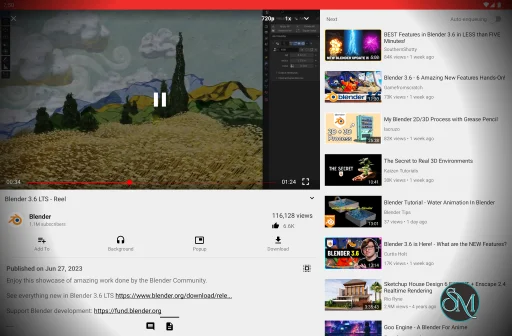
NewPipe is a free and open-source Android application for watching and listening to content from YouTube and other supported media services. It provides a lightweight alternative to official client applications and does not require Google Play Services or an account to browse supported services.
The application can play video at resolutions up to 4K, provide background audio playback, download media, manage subscriptions and playlists, and play content through a floating popup player.
Features
NewPipe supports several video and audio services, including YouTube, YouTube Music, PeerTube, Bandcamp, SoundCloud, and media.ccc.de. YouTube is currently the best-supported service according to the project.
Key features include:
Video playback up to 4K
Background audio playback
Popup player
Live stream support
Subtitle and closed-caption support
Video and audio search
Channel search
Playlist search
Channel subscriptions without an account
Subscription notifications
Channel groups
Local playlists
Watch history
Video and audio downloads
Subtitle downloads
Queue management
Kodi integration
Comments
Related-video controls
Support for age-restricted content
Multiple audio and subtitle options
NewPipe's subscription system is local rather than tied to an online account. This allows users to subscribe to channels without signing into YouTube.
The application also avoids proprietary libraries such as Google Play Services. This makes it suitable for Android devices and custom ROMs that do not include Google's services.
Download NewPipe v0.29.1 - Software Mirrors |
|---|
NewPipe v0.29.1 for Android |
NewPipe v0.29.1 Source Code |
NewPipe v0.29.1 Release Notes:This is a hotfix release that fixes media.ccc.de live streams. Happy hacking! |
Performance and Compatibility
NewPipe is designed as a lightweight Android streaming client. It retrieves information through official APIs where available and uses website parsing or internal APIs when an official service API is unavailable or unsuitable.
One important limitation is that services such as YouTube can change their website and internal interfaces. Because NewPipe depends on extracting information from these services, changes can temporarily break individual features. The project's release history shows fixes for YouTube playback, channel parsing, downloads, playlists, and other service-specific issues.
NewPipe is currently distributed outside Google Play. The project recommends its own F-Droid repository for most users, while APKs are also available through GitHub Releases. The project specifically warns that publishing NewPipe or its forks on Google Play violates Google's terms.
The project describes the application as being in beta, so occasional bugs can occur.
System Requirements
NewPipe is designed for Android devices.
The current release line requires Android 6.0 or newer. Android 5 support was dropped in a recent release.
No Google account or Google Play Services installation is required.
NewPipe can therefore run on compatible Android devices without Google's proprietary mobile services.
Pros and Cons
Pros
Free and open source
Lightweight
No Google Play Services required
No account required for normal use
YouTube and YouTube Music support
PeerTube support
Bandcamp support
SoundCloud support
Background playback
Popup player
Video and audio downloads
Subtitle downloads
Local subscriptions
Local playlists
4K playback
Live streams
Channel groups
Privacy-focused design
GPL-3.0 licensed
Cons
Android only
Not available through Google Play
Service changes can temporarily break features
YouTube is dependent on website parsing and internal APIs
Project is still described as beta
Some supported services have less functionality than YouTube
No official account synchronization with YouTube
How to Install
The NewPipe project recommends adding its custom repository to F-Droid and installing the application from there. Users can also download the APK directly from the project's GitHub Releases page.
For the F-Droid method:
Add the official NewPipe repository to F-Droid.
Search for NewPipe.
Install the application.
Allow the requested permissions.
Open NewPipe and configure your subscriptions and playback preferences.
Alternatively, download the appropriate APK from GitHub Releases and install it manually. The project recommends comparing the APK signing key when using this method.
Subscriptions and other local data can also be backed up and restored through NewPipe's settings.
Final Verdict
NewPipe remains a focused alternative to official Android media applications, particularly for users who want background playback, downloads, local subscriptions, and playback without Google Play Services.
Its privacy-oriented architecture is one of its defining characteristics. The application does not require an account for normal use, does not depend on proprietary Google libraries, and keeps subscriptions and other local functionality on the device.
The main limitation is its dependence on external services. YouTube and other platforms can change their interfaces or access mechanisms, which can temporarily affect playback or other features. The project's active development and regular fixes help address these compatibility problems.
For Android users looking for a lightweight, open-source media client with background playback, downloads, subscriptions, and support for multiple services, NewPipe provides a comprehensive set of features without requiring Google Play Services.
Developer:
Team NewPipe.
Operating System:
Android
Date Added:
2026-09-27T16:41:51.000Z
Categories:
Post a Comment/Report Broken Link: