Navidrome v0.64.0

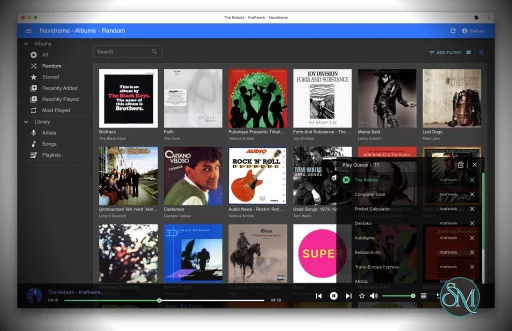
Navidrome is an open source music server that turns your personal music collection into a private streaming service. It provides a modern web interface for browsing and playing your library while also supporting a large ecosystem of compatible mobile and desktop applications through the Subsonic and OpenSubsonic APIs.

For anyone who has a large collection of FLAC, MP3, or other audio files and wants to access that music from anywhere, Navidrome is one of the strongest self-hosted options available.

Navidrome is designed around a simple idea: your music library stays on your own server, while you access it through a browser or compatible music player.

It is lightweight enough to run on modest hardware, including Raspberry Pi-class devices, while also being capable of handling extremely large collections. The project says it has been tested with libraries approaching 900,000 songs.

Installation is available for Linux, macOS, and Windows, with official Docker images and Raspberry Pi binaries also provided.

Key Features of Navidrome

Personal Music Streaming

Navidrome gives your local music collection the convenience of a streaming service. You can browse artists, albums, songs, playlists, favorites, ratings, and other metadata through the web interface.

The system automatically monitors your music directory and detects new files and metadata changes, so maintaining the library is largely hands-off.

Excellent Large Library Support

One of Navidrome's biggest strengths is its ability to handle large collections without requiring a powerful server.

The project is designed to have very low resource usage while still supporting very large music libraries. This makes it a particularly good fit for home servers, NAS systems, VPS instances, and small computers.

Subsonic and OpenSubsonic Compatibility

Navidrome is compatible with the Subsonic ecosystem, which is one of its most important advantages.

Instead of being limited to the built-in web player, you can choose from a wide range of third-party clients for Android, iOS, Windows, macOS, Linux, Android Auto, Android TV, CarPlay, and other platforms.

This gives users considerable freedom to choose the interface and playback experience they prefer.

Multi-User Support

Multiple users can share the same Navidrome installation while maintaining separate play counts, playlists, favorites, ratings, and other personal information.

Recent versions also support multiple music libraries with user-specific access controls. This is useful when one server contains separate collections such as personal music, family music, and audiobooks.

On-the-Fly Transcoding

Navidrome can transcode audio while streaming, allowing users to reduce bitrate or convert formats when necessary.

This is especially useful when listening over mobile networks or when a particular client does not support the original audio format. Opus encoding is also supported.

Playlists and Ratings

The application includes playlists, favorites, bookmarks, star ratings, and queue management.

Audiobook listeners can also use bookmarks to continue from a previous position, making Navidrome useful beyond conventional music collections.

Lyrics and Metadata

Navidrome can display lyrics from embedded tags and external files. It also integrates with services such as Last.fm and ListenBrainz for additional metadata and scrobbling.

Recent releases have significantly expanded lyrics support, including synchronized sidecar lyrics and karaoke-style timing through newer OpenSubsonic extensions.

Plugins

Navidrome's plugin system has become increasingly capable. Plugins can extend the server with additional metadata sources, integrations, and other functionality.

The plugin architecture uses a WebAssembly-based sandbox and supports plugins written in languages including Go, Rust, Python, and JavaScript.

Smart Playlists

Smart playlists allow music collections to be organized dynamically using rules rather than manually maintaining every playlist.

This is particularly useful for large libraries where users want automatically generated collections based on ratings, artists, genres, play counts, or other attributes.

Download Navidrome v0.64.0 - Software Mirrors

Navidrome v0.64.0 for Windows

navidrome_0.64.0_windows_amd64_installer.msi | 125.38 MB

navidrome_0.64.0_windows_amd64.zip | 23.32 MB

navidrome_0.64.0_windows_386_installer.msi | 96.44 MB

navidrome_0.64.0_windows_386.zip | 22.46 MB

Navidrome v0.64.0 for macOS

navidrome_0.64.0_darwin_arm64.tar.gz | 22.19 MB

navidrome_0.64.0_darwin_amd64.tar.gz | 23.68 MB

Navidrome v0.64.0 for Linux

navidrome_0.64.0_linux_riscv64.tar.gz | 22.2 MB

navidrome_0.64.0_linux_riscv64.rpm | 22.09 MB

navidrome_0.64.0_linux_riscv64.deb | 22.18 MB

navidrome_0.64.0_linux_armv7.tar.gz | 22.01 MB

navidrome_0.64.0_linux_armv7.rpm | 21.88 MB

navidrome_0.64.0_linux_armv7.deb | 22 MB

navidrome_0.64.0_linux_armv6.tar.gz | 22.07 MB

navidrome_0.64.0_linux_armv6.rpm | 21.94 MB

navidrome_0.64.0_linux_armv6.deb | 22.07 MB

navidrome_0.64.0_linux_armv5.tar.gz | 22.1 MB

navidrome_0.64.0_linux_armv5.rpm | 21.97 MB

navidrome_0.64.0_linux_armv5.deb | 22.09 MB

navidrome_0.64.0_linux_arm64.tar.gz | 22.05 MB

navidrome_0.64.0_linux_arm64.rpm | 21.91 MB

navidrome_0.64.0_linux_arm64.deb | 22.04 MB

navidrome_0.64.0_linux_amd64.tar.gz | 23.52 MB

navidrome_0.64.0_linux_amd64.rpm | 23.42 MB

navidrome_0.64.0_linux_amd64.deb | 23.5 MB

navidrome_0.64.0_linux_386.tar.gz | 22.38 MB

navidrome_0.64.0_linux_386.rpm | 22.28 MB

navidrome_0.64.0_linux_386.deb | 22.37 MB

Others Download related to Navidrome v0.64.0

navidrome_checksums.txt | 2.45 kB

Navidrome v0.64.0 Source Code

Navidrome v0.64.0 Source code (zip)

Navidrome v0.64.0 Source code (tar.gz)

Navidrome v0.64.0 Release Notes:

This release brings an experimental Jellyfin Music API, so Jellyfin-compatible music clients like Finamp and Jellify can now connect to Navidrome. Artwork got a new background pipeline with blurred low-quality placeholders and a diagnostic CLI. Under the hood, all IDs move to a uniform canonical 128-bit format, genre and artist filtering is now index-backed, and playlist import on large libraries is dramatically faster. There is also natural sort order, playlist favourites, Refresh Metadata actions, new Catppuccin themes, and many fixes across scanning, transcoding and scrobbling.

⚠️ Breaking Changes / Migration Notes

  • All internal IDs are re-encoded to a single canonical 128-bit base62 format. The migration touches every table, so back up your database before upgrading. Clients that cache item IDs (for example, offline downloads) may need to re-sync. (#5824)
  • Plugin authors: Extism's built-in HTTP is disabled. Calls through pdk.NewHTTPRequest (Go), http::request (Rust) or the equivalent in other PDKs now fail with HTTP request ... is not allowed. Plugins must use the host HTTP service instead: host.HTTPSend (Go) or nd_pdk::host::http::send (Rust). Also, plugin HTTP and WebSocket connections to private or loopback addresses are now blocked for named hosts; to reach a LAN service, list its IP or CIDR in the manifest's requiredHosts, or use a bare "*". (1a8463f7d, 276d767ce)
  • Shares are always owned by the user who creates them. Admins can no longer create shares on behalf of another user via userId. (1a8463f7d)
  • Configuration durations are now validated. Negative values are rejected at startup. (#6002)
  • Navidrome now warns about unrecognized options in the config file, so typos no longer fail silently. (#5870)

Security

This release fixes several reported vulnerabilities. We thank the security researchers who responsibly disclosed them.
  • Fix SQL injection via the artist role sort and filter parameters in the Native API by validating the role against the known list. (4168377b6, GHSA-hm54-32q6-3rcr, reported and fixed by @Sudo-Ivan)
  • Fix share-ownership spoofing (IDOR) that let a client-supplied userId on share creation expose other users' private libraries, and fix a plugin HTTP client SSRF guard bypass via DNS names and redirects by disabling Extism's built-in HTTP and checking the resolved IP at dial time. (1a8463f7d, GHSA-82gh-4ggp-gfg5, reported by @gigioneggiando)
  • Fix memory exhaustion via a negative size parameter on getCoverArt and share images, which bypassed the artwork size clamp, by rejecting negative and oversized dimensions before decoding. (#5847, GHSA-f22h-6qxh-rqq2, reported by @arpitjain099)
  • Enforce track membership on public share streams so a share can only stream the tracks it contains. (#5769 by @deluan)
  • Validate every resource ID in a share, load share metadata as the owner, cap login request bodies, create the log file with mode 0600, and stop logging the Last.fm auth token. (#6098 by @deluan)
  • Confine plugin filesystem mounts to their root and reject plugin IDs that are unusable as directory names. (#5881, #5886 by @deluan)
Note: Several of the advisories linked above are still in draft on GitHub at the time of writing. Their links will become publicly accessible once the advisories are published. The fixes themselves are already included in this release.

Configuration Changes

  • New: Jellyfin.Enabled | Enable the experimental Jellyfin Music API. (#5730) | false
  • New: Jellyfin.ServerName | Server name advertised to Jellyfin clients. (#5730) | Navidrome
  • New: Jellyfin.ExposedPublicUsers | Comma-separated usernames advertised on the unauthenticated public users endpoint. (#5730) | ""
  • New: Jellyfin.MaxConcurrentStreams | Bounds how many Jellyfin collection responses can stream at once. (#5783) | max(2, MaxOpenConns/2)
  • New: EnableNaturalSorting | Sort names and titles naturally (e.g. "Track 2" before "Track 10"). (#6015) | false
  • New: MaxImageSize | Cap on the size of artwork images Navidrome will decode. (#5931) | 20MB
  • New: EnableScheduledDBAnalyze | Periodically run a full ANALYZE to keep query planner statistics fresh. (#5740) | true
For a complete list of all configuration options, see the Configuration Options documentation.

Jellyfin API (Experimental)

  • Add an experimental Jellyfin Music API, enabling Jellyfin-compatible music clients to connect to Navidrome. Enable it with Jellyfin.Enabled = true. (#5730 by @deluan)
  • Supports library browsing, search, favorites and ratings, playlists, lyrics, Instant Mix (album, playlist and genre sources), ReplayGain normalization, and filtering by year and record label. (#5791, #5948, #5815, #5817 by @deluan, #5809 by @kgarner7)
  • Jellyfin clients get sonic similarity features (similar tracks, sonic path) when a sonic similarity plugin is installed, backed by the same engine already exposed over the Subsonic API. (#5782 by @deluan)
  • Jellyfin tokens never expire, are scoped to the Jellyfin API, and are revoked when the user changes their password. (#6013 by @deluan)

Artwork

  • New artwork pipeline: artwork resolves in the background and pages show a blurred Low Quality Image Placeholder until the real image arrives. External providers are rate-limited and guarded by a circuit breaker, and missing artwork is rechecked slowly instead of on every request. (#5847 by @deluan)
  • Make the artwork image size cap configurable. (#5931 by @deluan)
  • Fix artist folder being promoted to album folder. (#5856 by @kgarner7)
  • Fix Deezer picking the wrong artist among same-name matches, and treat an exhausted Deezer quota as a throttle instead of a missing artist. (#5808, #6068 by @deluan)

UI

  • Add Refresh Metadata action to album and artist pages and context menus. (#6036, #6078 by @deluan)
  • Add playlist favourites: heart button, list filter, and a sidebar favourites-only toggle. (#5805 by @deluan)
  • Add Catppuccin Mocha and FrappĂ© themes, and update Macchiato to match the official palette. (#5835 by @cmyksoda)
  • Add Artists, Songs, Playlists and Radio to the Default View options. (#5754, #5801 by @deluan)
  • Add Share and Download actions to the Artist detail page. (#5944 by @deluan)
  • Show translation completion percentage in the language selector. (#5979 by @deluan)
  • Remember the "items per page" selection across sessions. (#5819 by @deluan)
  • Give visual feedback when downloading from a share. (#5865 by @deluan)
  • Fix each page's scroll position not being restored when navigating back. (#5892 by @deluan)
  • Fix playback starting when closing the disc cover lightbox. (#5901 by @deluan)
  • Fix playlist not reloading after rating or loving a track. (#6009 by @polybjorn)
  • Fix the album grid resizing in Safari when top menus open. (#6125 by @york9675)
  • Fix the album grid hover overlay corners in the Nautiline theme. (#6115 by @deluan)
  • Fix the Last.fm link not always showing on the artist details page. (b0e1943d8 by @deluan)

Playlists & Smart Playlists

  • Add album-level fields for sorting and filtering in smart playlists. (#5899 by @deluan)
  • Add per-playlist refreshDelay for stable daily or weekly smart playlists. (#5790 by @deluan)
  • Store playlist stars and ratings per user. (#5749 by @deluan)
  • Make playlist import much faster on large libraries. (#6055 by @deluan)
  • Fix track edits being allowed on synced playlists via some APIs. (#5984 by @deluan)
  • Fix smart playlist song count being lost on re-import. (#5908 by @deluan)
  • Fix deleting many tracks from a playlist at once failing. (#5977 by @deluan)
  • Fix the changed timestamp not being updated when renaming a smart playlist. (#6082 by @deluan)

Scanner

  • Add optional natural sort order for names and titles. (#6015 by @deluan)
  • Fix album tags being sorted alphabetically instead of keeping the order from the files. (#5872 by @deluan)
  • Fix file creation time not being read on Linux. (#6046 by @deluan)

Subsonic API

  • Implement the OpenSubsonic topSongsByArtistId extension. (#5853 by @kgarner7)
  • Fix createShare ignoring DefaultDownloadableShare. (#6121 by @deluan)
  • Fix double brackets when appending subtitle or version to titles. (#5832 by @deluan)

Transcoding & Streaming

  • Fix sources already in the player's forced format being re-encoded, and make piped FLAC transcodes seekable. (#6105 by @deluan)
  • Fix truncated transcoded streams being delivered as complete. (#6035 by @deluan)
  • Fix bit depth being reported for lossy transcode targets. (#5768 by @deluan)

Scrobbling

  • Use exponential backoff for scrobble retries during provider outages, and honor a provider's request to back off. (#5818, #6028 by @deluan)
  • Fix out-of-order playback reports being rejected. (#5793 by @deluan)

Plugins

  • Surface the valid agent names in logs and the Plugins UI. (#5910 by @deluan)
  • Fix plugin agents not being loaded in CLI commands. (#5959 by @deluan)
  • Fix public URLs built by plugins pointing at localhost instead of the caller's address. (#6059 by @deluan)

CLI

  • Add an artwork command group (explain, refresh, cancel) for diagnosing and re-driving artwork resolution. (#5957 by @deluan)
  • Add missing list and missing fix subcommands to deal with files that moved. (#5928 by @zerovox)
  • Add doctor and search rebuild commands to detect and recover from search index corruption. (#6069 by @deluan)
  • Fix restore wiping the database when the backup file does not exist. (#6085 by @Huang-404-Q)
  • Fix selective scan --target rejecting absolute paths. (#5947 by @deluan)
  • Fix pls -p writing playlist output to stderr instead of stdout. (#5996 by @deluan)

Server

  • Make genre and artist filtering much faster across all APIs by using indexed join tables. (#5940, #5930 by @deluan)
  • Report the app store or hosting platform via ND_PLATFORM in insights. (#5956 by @deluan)
  • Send the Navidrome User-Agent in all outgoing requests. (#6020 by @mintsoft)
  • Fix getScanStatus reporting count=0 for scans not started through the API, fix the folder watcher hanging when it cannot start, and fix startup failing when MusicFolder contains a single quote. (#6098 by @deluan)

Database

  • Periodically run a full ANALYZE to keep query planner statistics trustworthy. (#5740 by @deluan)

Packaging & Build

  • Windows MSI: remember install properties across upgrades. (#5333 by @mintsoft)
  • Fix a missing hyphen in the OpenRC script that caused crashes on startup. (#5906 by @alinxviso)
  • Fix a typo in the --prometheus.enabled description. (#5878 by @0mp)

Translations

  • Update German, Greek, Finnish, Galician, Polish, Portuguese (BR), Thai, Ukrainian and Chinese (Traditional) translations from POEditor. (#5833, #6128 by @deluan)

New Contributors

Full Changelog: v0.63.2...v0.64.0

Helping out

This release is only possible thanks to the support of some awesome people! Want to be one of them? You can sponsor, pay me a Ko-fi, or contribute with code.

Where to go next?


Performance and User Experience

Navidrome has an impressive balance between performance and usability. The server is lightweight enough for inexpensive hardware but still provides a polished web interface based on React and Material UI.

The interface focuses heavily on music discovery, with artwork, metadata, ratings, playlists, and search all integrated into the same experience.

Performance has also continued to improve as the project has grown. Recent releases have made significant improvements to large-library synchronization, with the 0.63 release addressing deep pagination performance for clients synchronizing very large libraries.

The availability of third-party clients is another major advantage. If you do not like the default web interface, there are numerous alternative players designed specifically for Navidrome and the wider OpenSubsonic ecosystem.

Pros

  • Free and open source.

  • Extremely low resource usage.

  • Handles very large music libraries.

  • Modern responsive web interface.

  • Excellent Subsonic and OpenSubsonic compatibility.

  • Large selection of third-party clients.

  • Multi-user support.

  • Multiple music libraries.

  • On-the-fly transcoding.

  • Lyrics and scrobbling support.

  • Smart playlists.

  • Plugin system.

  • Docker support.

  • Works well on Raspberry Pi and other low-powered hardware.

  • Active development.

Cons

  • Primarily focused on music rather than general media.

  • Does not provide video functionality.

  • Library organization relies heavily on metadata rather than traditional folder browsing.

  • Some advanced features depend on compatible third-party clients.

  • Initial setup may require some server and networking knowledge.

Who Should Use Navidrome?

Navidrome is an excellent choice for music collectors, homelab users, developers, audiophiles, and anyone who wants to replace a commercial music streaming service with their own library.

It is especially attractive if you already have a large collection of legally obtained music and want to access it remotely without uploading everything to a third-party cloud service.

It also works particularly well for households because multiple users can have separate preferences, playlists, and access to different libraries.

Final Verdict

Navidrome is one of the best self-hosted music servers available today. It combines low resource usage with excellent performance, a polished web interface, broad client compatibility, transcoding, multi-user support, and an increasingly powerful plugin ecosystem.

Its compatibility with the Subsonic and OpenSubsonic ecosystem is perhaps its biggest strength. You are not locked into one application, and the growing selection of clients means you can build a listening experience around the devices and interfaces you already prefer.

For anyone looking to turn a personal music collection into a private Spotify-style service, Navidrome is an easy recommendation.
Navidrome v0.64.0
Free
Software Informations:
Developer:

Operating System:
Windows / macOS / Linux
Date Added:
2026-09-13T15:03:58.230Z
Categories:

Post a Comment/Report Broken Link: