Multica v0.6.0

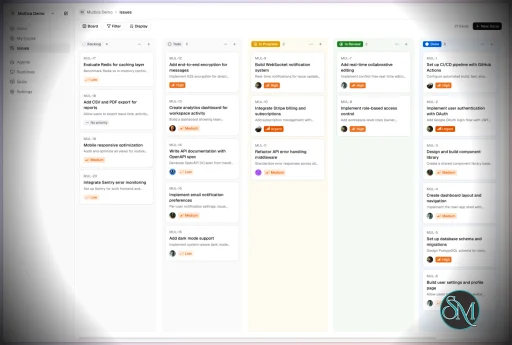
Multica is an open-source platform designed to manage and orchestrate AI agents within development workflows. Instead of running a single AI assistant, it allows multiple agents to collaborate, execute tasks, and share knowledge across projects.

It essentially acts like a control center where:

  • AI agents are assigned tasks

  • Progress is tracked in real time

  • Outputs and skills are reused across workflows

Multica currently supports Claude Code, Codex, OpenClaw, and OpenCode out of the box. The daemon auto-detects whichever CLIs you have installed. Since it’s open source, you can also add your own backends.

Download Multica v0.6.0 - Software Mirrors

Multica v0.6.0 for Windows

multica_windows_arm64.zip | 6.35 MB

multica_windows_amd64.zip | 7.14 MB

multica-desktop-0.6.0-windows-x64.exe | 169.18 MB

multica-desktop-0.6.0-windows-arm64.exe | 170.44 MB

multica-cli-0.6.0-windows-arm64.zip | 6.35 MB

multica-cli-0.6.0-windows-amd64.zip | 7.14 MB

Multica v0.6.0 for macOS

multica_darwin_arm64.tar.gz | 6.49 MB

multica_darwin_amd64.tar.gz | 7.05 MB

multica-desktop-0.6.0-mac-arm64.zip | 210.69 MB

multica-desktop-0.6.0-mac-arm64.dmg | 220.51 MB

multica-cli-0.6.0-darwin-arm64.tar.gz | 6.49 MB

multica-cli-0.6.0-darwin-amd64.tar.gz | 7.05 MB

Multica v0.6.0 for Linux

multica_linux_arm64.tar.gz | 6.23 MB

multica_linux_amd64.tar.gz | 6.91 MB

multica-desktop-0.6.0-linux-x86_64.rpm | 137.12 MB

multica-desktop-0.6.0-linux-x86_64.AppImage | 226.75 MB

multica-desktop-0.6.0-linux-arm64.deb | 154.38 MB

multica-desktop-0.6.0-linux-arm64.AppImage | 226.21 MB

multica-desktop-0.6.0-linux-amd64.deb | 160.52 MB

multica-desktop-0.6.0-linux-aarch64.rpm | 131.28 MB

multica-cli-0.6.0-linux-arm64.tar.gz | 6.23 MB

multica-cli-0.6.0-linux-amd64.tar.gz | 6.91 MB

Others Download related to Multica v0.6.0

checksums.txt | 1.15 kB

Multica v0.6.0 Source Code

Multica v0.6.0 Source code (zip)

Multica v0.6.0 Source code (tar.gz)

Multica v0.6.0 Release Notes:

Changelog

  • dbfc014bdd0f0052e732bf4ac63a18084ebef924 MUL-7610: fix(autopilot): avoid loading task history during webhook recovery (#8710)
  • 7dac88a6a8c5b2e28b3b57d83142722163b24cd1 MUL-7649: issue deliverables and dynamic blocks — sidebar section, overview grid, viewer info panel, html/mermaid block frame (#8779)
  • 6dc6a0b9a2db36ac31995c7a98ec2d36a1c9f188 MUL-7650: attachment viewer — CSV tables, JSON/YAML tree, numbered code, HTML viewports, every kind in a new tab (#8868)
  • 5ed09342af2ef09b823ac090549320badfadb436 MUL-7680: issue wakeup v2 — conditions, runaway protection, check-ins and visibility (#8807)
  • 07059303f4f1dff16f1f16fd61a3930ef6af1d1c MUL-7682 feat(issues): give every reply a tick on the thread rail (#8809)
  • 815fe37b1faabe41af30f5d7823659c1d3e92521 MUL-7685: fix(agents): paginate task history and aggregate duration (#8804)
  • 005462ec22fc2fbde70619110a3e89f19756193c MUL-7705 docs(channels): correct comments main's own later changes made false (#8833)
  • fa5d470ae40a082d952b50e843287906566785a6 MUL-7706 feat(wecom): every notice reads the language of whoever will read it (#8831)
  • 4e2afed72013bac2683f9d76bec156cfd3901d41 MUL-7710 fix(channel): refuse an inbound turn from a member who may not run the agent (#8838)
  • 692dd019acbefe199a2461a6a9710c6f91da4c52 MUL-7713: docs(troubleshooting): explain macOS TCC re-prompt after CLI upgrade (#8843)
  • 57fabfc0789b162399afb5b48a3dcfe65e01184e MUL-7724 feat(desktop): left-align window toolbar as Back / Forward / sidebar toggle (#8859)
  • fc4a61570063c69ee94b7f636e3ae58f295a4944 MUL-7726: let the workspace choose the status merged PRs move an issue to (#8862)
  • 104bf7be357091ba26d674df1cb68ee1725b5293 MUL-7732: regroup settings by scope and consolidate scattered pages (#8874)
  • 4f2fdc0b152fc6317f930c982f50a217c4323dc7 MUL-7733: more room around dynamic blocks, actions on hover (#8867)
  • 9c6622787d56c19327e4c85ec934bdffc3c8ec59 MUL-7735: docs(readme): fix stale facts, sync the Chinese README, retake the hero screenshot (#8869)
  • 344ffaf1becd165b123bdc3634d2db7edaf5549e MUL-7737: feat(views): address bar for HTML attachment previews (#8873)
  • e8a16d334f3e13cd54ee3475a1dad467998260e4 MUL-7753: one verdict per PR in the issue sidebar (#8884)
  • 3d2592a9a2e4286f4a6549b01da8ba06d1f88f4b MUL-7754: feat: local search index for web and desktop (#8891)
  • 4054d57802c1719839a180d3d27d3e07dae43a46 MUL-7755: feat(issues): configurable side peek in every issue view (#8886)
  • 13094caf7a5f3ac8d7266cb60aba458996d2b5a9 MUL-7758: lay an issue's runs out in time (#8890)
  • 0a51a6cc433a926548f40ad6b01275468874cdaa MUL-7759: copy image from the desktop attachment viewer (#8888)
  • f76cde8e609ec65a8ab627d0696d591c379fe0c8 MUL-7766: feat(editor): fit Mermaid previews to show the whole diagram, with inline zoom (#8898)
  • 400791262f185caa37d3222028b3c35951c7b870 build(views): upgrade Tiptap to 3.31.3, fixing select-all + delete (MUL-7725) (#8860)
  • ea94c7cd5bbce9c8e1f28c5fa049c47ee7651d02 docs(changelog): add v0.6.0 release entry (2026-09-28) (MUL-7777) (#8909)
  • ba9f6392429bc91ab51e7ffa98a67a58a07305e8 docs(mobile): correct the app icon comment after #7453 (#8844)
  • 12f8f3f31111564e5e1b9aac3f7f916e8bba4039 feat(agent): list Claude Opus 5.5 and GPT-6 Sol/Luna in the fallback catalogs (#8840)
  • 3125bd2ea266733eb3f110c4ad37f01d90eb3beb feat(comments): show every attached image at full size (MUL-7736) (#8870)
  • 1c908ea52c19f193d301ca9460fc1d7d100a1b3d feat(issues): state a failed or cancelled run once in the thread (MUL-7692) (#8813)
  • 570f8f82a17185152f8e7420c7760bf5edaa5d59 feat(projects): show descriptions in repository pickers (MUL-7575) (#8668)
  • e2f4a22030171d296e5dc134349241b7786258cd feat: steer a running agent from the normal composer, per recipient (MUL-7631) (#8760)
  • 138134d34104c16b1a5b57a7a00757296415c6c8 fix(agent): pass Hermes custom args before the acp subcommand (MUL-7748) (#8882)
  • 82847e275175ea082d1a4cf492d3f2c116504fca fix(chat): keep tool rows rendering when MCP input fields are objects (MUL-7708) (#8883)
  • 1aa815a73880e2ea0045fcab032c961bb21a860c fix(daemon): stop validating saved model settings against fallback catalogs (#8811)
  • 79b9327837707c1c6d362ff1e666f26b11dd9d96 fix(issue): bind update attachments safely (#8588) (#8766)
  • bb40537c59fe9ed8420b89e21dbac54065cb0d5b fix(issues): keep the run spinner turning after a steer moves it (MUL-7729) (#8871)
  • 6328e8183409fad986b598ba2330beab3bbeb3db fix(mobile): avoid seeding incomplete project lists (#8854)
  • 04cdd4857d98669dc6211c735b8c46ceb2a4d99a fix(notifications): ignore malformed member mention IDs (#8876)
  • bd7308742c3c47406803d9f206556e6c168df1f2 fix(plugins): avoid hook tool name collisions (#8856)
  • cf2b84708dc621c3af6e36e80d79d9dc26b4e085 fix(release): replace assets on same-tag reruns (MUL-7683) (#8812)
  • f1560daff3809efcf1e5bd7a5439fd341eb1ebee fix(search): fold/unfold all comments on identifier URLs (#8842)
  • 64b06b3de840b205cb37c3017e447a616a97822e fix(telegram): attach the file a reply quotes (#8828)
  • 54987006b5ce0c017ba5f24d500157c29a228f60 fix(views): keep the PR row diff whole and spin the running-checks icon (MUL-7767) (#8900)
  • e427ed7dfbc15f11efa9edf37087e140e4098c81 fix(views): keep the Save as view name while the host re-renders (MUL-7756) (#8885)
  • decd602a57e71789039f63cabe08fc5b04396703 fix(views): stack wakeup condition hints under their labels (MUL-7769) (#8899)
  • 32a396fd520bdbdec2d6cd95b5742da946003ca9 fix(views): stop dialog scroll lock from re-rendering Mermaid diagrams (MUL-7760) (#8889)
  • 92649de29c33eb6701dfbc627a69a7b69922957e fix(wakeup): scope test scheduler passes to their own workspaces (#8901)
  • 7551ff1ddccd3d3a7c515fe7e179ce401300ef2a fix(wecom): answer an unreadable message once per message, not once per delivery (#8836)


Key Features

1. AI Agents as Teammates

Multica treats AI agents like real contributors. You can assign tasks, monitor progress, and manage their work similar to human developers.


2. Multi-Agent Orchestration

Instead of relying on a single AI model, Multica coordinates multiple agents working together on complex tasks, improving efficiency and scalability.


3. Skill Reuse and Compounding

One of its most innovative features is skill accumulation. Agents can reuse previously learned solutions, reducing redundancy and improving performance over time.


4. Real-Time Workflow Tracking

You get a unified dashboard where you can:

  • Track task progress

  • Monitor agent activity

  • Identify blockers and results

This makes it suitable for structured development environments.


5. CLI and Web Interface

Multica provides both:

  • A command-line interface for developers

  • A web UI for managing workflows and agents

It supports local and cloud-based environments, offering flexibility in deployment.


6. Open Source and Flexible

Being open source, Multica allows:

  • Full customization

  • Self-hosting

  • Integration with different AI models and tools

This makes it appealing for teams that want control over their AI infrastructure.


Performance and Use Cases

Multica is designed for advanced workflows rather than casual use. It performs best in environments where multiple AI agents are needed to collaborate.

Typical use cases include:

  • AI-assisted software development

  • Automation pipelines

  • Multi-step research and analysis

  • DevOps and engineering workflows

Its ability to coordinate agents makes it especially useful for complex tasks that go beyond simple prompts.

Quick Install

curl -fsSL https://raw.githubusercontent.com/multica-ai/multica/main/scripts/install.sh | bash

Installs the Multica CLI on macOS and Linux. Works with Homebrew or downloads the binary directly.

Windows (PowerShell):

irm https://raw.githubusercontent.com/multica-ai/multica/main/scripts/install.ps1 | iex

Then configure, authenticate, and start the daemon in one command:

multica setup          # Connect to Multica Cloud, log in, start daemon

Self-hosting? Add --with-server to deploy a full Multica server on your machine:

curl -fsSL https://raw.githubusercontent.com/multica-ai/multica/main/scripts/install.sh | bash -s -- --with-server
multica setup self-host

Requires Docker. See the Self-Hosting Guide for details.


Getting Started

1. Set up and start the daemon

multica setup           # Configure, authenticate, and start the daemon

The daemon runs in the background and auto-detects agent CLIs (claude, codex, openclaw, opencode) on your PATH.

2. Verify your runtime

Open your workspace in the Multica web app. Navigate to Settings → Runtimes — you should see your machine listed as an active Runtime.

What is a Runtime? A Runtime is a compute environment that can execute agent tasks. It can be your local machine (via the daemon) or a cloud instance. Each runtime reports which agent CLIs are available, so Multica knows where to route work.

3. Create an agent

Go to Settings → Agents and click New Agent. Pick the runtime you just connected and choose a provider (Claude Code, Codex, OpenClaw, or OpenCode). Give your agent a name — this is how it will appear on the board, in comments, and in assignments.

4. Assign your first task

Create an issue from the board (or via multica issue create), then assign it to your new agent. The agent will automatically pick up the task, execute it on your runtime, and report progress — just like a human teammate.


User Experience

The concept behind Multica is powerful, but it comes with complexity.

  • Requires understanding of AI agents and workflows

  • Setup may involve configuring runtimes and integrations

  • More suited for developers than beginners

However, once configured, it provides a highly structured and scalable system.


Pros and Cons

Pros

  • Open source and highly customizable

  • Supports multi-agent collaboration

  • Reusable skill system improves efficiency

  • Real-time workflow tracking

  • Flexible deployment options

Cons

  • Still early-stage and evolving

  • Setup complexity is high

  • Requires technical knowledge

  • Not suitable for simple AI tasks


Who Should Use Multica

Multica is ideal for:

  • Developers working with AI agents

  • Teams building automated workflows

  • Companies experimenting with agent-based systems

  • Advanced users exploring AI orchestration

It is not designed for casual users who just need a simple chatbot.


Final Verdict

Multica represents the next step in AI tooling, moving from single assistants to collaborative AI systems. While still evolving, it introduces a powerful concept that could shape how teams use AI in development.

Multica is a promising platform for advanced users who want to build scalable, multi-agent AI workflows with full control and flexibility.

If you are exploring multi-agent AI systems or building automated development workflows, Multica is an emerging tool worth paying attention to. It introduces a new way to treat AI agents not just as tools, but as collaborative team members working alongside developers.
Multica v0.6.0
Free
Software Informations:
Developer:

Operating System:
Windows / macOS / Linux
Date Added:
2026-09-28T11:03:37.126Z
Categories:

Post a Comment/Report Broken Link: