Multica v0.5.0

Multica is an open-source platform designed to manage and orchestrate AI agents within development workflows. Instead of running a single AI assistant, it allows multiple agents to collaborate, execute tasks, and share knowledge across projects.

It essentially acts like a control center where:

  • AI agents are assigned tasks

  • Progress is tracked in real time

  • Outputs and skills are reused across workflows

Multica currently supports Claude Code, Codex, OpenClaw, and OpenCode out of the box. The daemon auto-detects whichever CLIs you have installed. Since it’s open source, you can also add your own backends.

Download Multica v0.5.0 - Software Mirrors

Multica v0.5.0 for Windows

multica_windows_arm64.zip | 6.26 MB

multica_windows_amd64.zip | 7.04 MB

multica-desktop-0.5.0-windows-x64.exe | 168.56 MB

multica-desktop-0.5.0-windows-arm64.exe | 169.83 MB

multica-cli-0.5.0-windows-arm64.zip | 6.26 MB

multica-cli-0.5.0-windows-amd64.zip | 7.04 MB

Multica v0.5.0 for macOS

multica_darwin_arm64.tar.gz | 6.41 MB

multica_darwin_amd64.tar.gz | 6.96 MB

multica-desktop-0.5.0-mac-x64.zip | 219.1 MB

multica-desktop-0.5.0-mac-x64.dmg | 228.94 MB

multica-desktop-0.5.0-mac-arm64.zip | 209.98 MB

multica-desktop-0.5.0-mac-arm64.dmg | 219.76 MB

multica-cli-0.5.0-darwin-arm64.tar.gz | 6.41 MB

multica-cli-0.5.0-darwin-amd64.tar.gz | 6.96 MB

Multica v0.5.0 for Linux

multica_linux_arm64.tar.gz | 6.15 MB

multica_linux_amd64.tar.gz | 6.83 MB

multica-desktop-0.5.0-linux-x86_64.rpm | 136.63 MB

multica-desktop-0.5.0-linux-x86_64.AppImage | 226 MB

multica-desktop-0.5.0-linux-arm64.deb | 153.74 MB

multica-desktop-0.5.0-linux-arm64.AppImage | 225.47 MB

multica-desktop-0.5.0-linux-amd64.deb | 159.84 MB

multica-desktop-0.5.0-linux-aarch64.rpm | 130.73 MB

multica-cli-0.5.0-linux-arm64.tar.gz | 6.15 MB

multica-cli-0.5.0-linux-amd64.tar.gz | 6.83 MB

Others Download related to Multica v0.5.0

checksums.txt | 1.15 kB

Multica v0.5.0 Source Code

Multica v0.5.0 Source code (zip)

Multica v0.5.0 Source code (tar.gz)

Multica v0.5.0 Release Notes:

Changelog

  • bf7e6e50e7322ace62c9c2a28fa322613d4961da MUL-5241 fix(agent): bound the hermes shutdown so an escaped pipe holder can't wedge a turn (#5878)
  • 91ad87186437230303d7a6862a16089656b4fdbe MUL-6648: feat(cli): add issue comment update command (#7507)
  • f9f5e3b81fc428729159212899d1ff8ba0f350be MUL-6734 fix(daemon): resolve Windows set-path overrides via LookPath (#7623)
  • 78a5f69ae1da5b194fe0146d174f507e23b8ff98 MUL-6813: fix: surface private runtime owner mismatch as explicit failure (#7805)
  • 7e817463174944bf87bf62caacc788934e77b6aa MUL-7019 fix(wecom): show the agent the message a sender quoted (#7980)
  • aa684997f1ec0a7d1db5cad4414837e72552f681 MUL-7024 fix(wecom): clear the previous bot's rows when an agent swaps bots (#7985)
  • 5336391978f99754836261aaf9a664fd466e68b6 MUL-7299: feat(issues): filter issues by the parent project's status (#8321)
  • a6472044c3d2755031c118b4122c38e86d603769 MUL-7300 fix(issues): preserve Quick Create original input (#8519)
  • 4d4cae7753f3765900c695d4a1c9b4134a28eb9e MUL-7312 LARI-10: Desktop PATH fix + CodeBuddy Claude-parity stream-json guards (#8340)
  • d3e0bae12bb948afd534441230d80ebe2a283566 MUL-7314 fix(wecom): pace outbound pushes at WeCom's published rate, retry one throttle, best effort past it (#8345)
  • 904693bed94f9bd0cd93908014114a9ebbead8e0 MUL-7336: feat(labels): add skill label CLI commands and skills list label filtering (#8368)
  • f39debf8d1a8658c8d1fcc343d0e02ef80cbc1d3 MUL-7344: skip the issue read and the comment scan when the server already answered them (#8377)
  • 96aa80ff9e779a337778ba1bc3067f0a1fb28514 MUL-7348: simplify redundant UI descriptions across product surfaces (#8393)
  • 2e728fc6dead61997010a833c5ff6236c4256cd4 MUL-7358 fix(agent): require OpenCode >= 1.1.54 so pre-fix builds cannot fill the host disk (#8510)
  • ee2793f03136aab49467bafe2d2320cd829ef7ee MUL-7372 fix(dingtalk): preserve quoted answer context and first-chunk attribution (#8412)
  • a843b44a48b4cb3d94c08e0c56ddef1fc1105257 MUL-7382 docs(agent): clarify token usage normalization contract (#8423)
  • 636f8896dd7fd8e71ce5141c97d9820257dd6b18 MUL-7396: fix(usage): preserve cost-only task accounting (#8441)
  • 9954baab868ca3ef3ecbc4e1f8a0ea3e09cc9061 MUL-7397: fix(qwen): accumulate fallback usage by message (#8443)
  • d7f8c3f2b6672b5203270dcb292f9de3954da6c5 MUL-7404: ci: scope validation and remove duplicate lifecycle runs (#8451)
  • b425073caeb207ecae5bc0bd0994d7dd61400397 MUL-7409 fix(runtime): stop steering stale-instance cleanup at the shared profile (#8483)
  • d18cec01c3b259e246ae4bbc7b09e4c1856deef0 MUL-7415 ci: retire the standalone Cursor lifecycle job (#8465)
  • 3fe16b8fcb5f9a50ce48702f7a6a58cb73b63c6c MUL-7422: paginate archived inbox and load it on demand (#8471)
  • b0d44c7cfa42e2f52678fd12fbeecc843e34e371 MUL-7433: index high-volume lookup paths (#8479)
  • 1fcdff78d068c0dbdbb12f6d1c0244c3269c0da4 MUL-7436 feat(auth): slide UI session expiry instead of forcing a re-login every 30 days (#8486)
  • f0c9146c4b4ecda01b455438b38fea656af84bfe MUL-7437: fix(api): classify disabled capabilities as non-retryable (#8487)
  • 7e4758ac1a94e9ff843696333364610bb8d4bbf7 MUL-7445 fix(qwen): exclude resumed history from run usage
  • 78922f759fd938446b8b0853f760ca189f729ed9 MUL-7447: fix(comments): explain @all member-only behavior (#8489)
  • 8006317f11e2e36d522af749c4998bb76dbbfdc8 MUL-7449: fix: distinguish cancelled child work from done in stage progress (#8495)
  • edcd38f9c4403918732fbbe95e2e6ceb142328ab MUL-7450 fix(settings): report revoked IM channels as disconnected (#8516)
  • 39ad969b0b14aa6538f3fc5c4bfc5f5131907b96 MUL-7456 fix(editor): open the mention picker at any token boundary, not only after a half-width space (#8502)
  • 985986e4fb07f44becdfe0309d08f8ffbb7881f6 MUL-7458 Fix incorrectly folded Copilot CLI replies (#8507)
  • 29987fdda5d413c2493bb171c5467b93e9205dab MUL-7461 test(execenv): clear MULTICA_TASK_CONFIG_ROOT so the suite is environment-independent (#8512)
  • 043821ab77e91f7a2b52b5d9eec11f1ff51e3a67 MUL-7465 fix(chat): stream Codex deltas end to end (#8536)
  • 7f8e4980abfdf69bb98ab7ad888ca2390b5b62e3 MUL-7467 fix(agent): fail silent Pi provider errors (#8535)
  • ff2933d67a6a38e4ac3c403c775a39bf48a8d6b3 MUL-7471 fix(daemon): durably replay terminal reports (#8533)
  • c3920bc0530ce6dea2c71c5c6d097102a9dc39d0 MUL-7481: chore(cli): fold comment update guidance into --help and drop the skill section (#8548)
  • d7009df8cc2260eccc6a69de3ace581c73b0dc37 Revert "MUL-7300 fix(issues): preserve Quick Create original input (#8519)" (#8546)
  • 2df765a3c8f39789c9fb76316378bcffc20d22d9 docs(changelog): add v0.5.0 release entry (2026-09-18) (MUL-7481) (#8543)
  • e829936f2606e14002bbbcf0a02ae5371413af43 docs(vision): include t in Multica acronym emphasis (#8478)
  • 5f52380439527dcb20b64329280da91efb5f8f8f feat(i18n): add French locale (#7141)
  • 0cb64a77aa12a3cccba30e40927f9f8a486b9d14 feat(ui-lab): add design system workbench (MUL-7425) (#8388)
  • d95c20aab2f82e4114bd664b32d36e0854184d32 feat: complete issue status category upgrade (MUL-7365 PR3) (#8466)
  • c923ace620b30694b0779187cf8443604e23d9a5 fix(agent): let omp (Oh-My-Pi) agents set a thinking level (MUL-7412) (#8464)
  • 726d489497fd23677a4e544887ce597415cf9e27 fix(agent): report Grok prompt budget stops as failures (#8481)
  • 594ff89edb12d17908f112e9cbe02fc6e7aea802 fix(autopilots): make an existing schedule editable again (MUL-7478) (#8538)
  • a6d2a5ca836523b8fe1c215114aec03dcb975f93 fix(chat): match default list width to inbox (#8537)
  • afedc6f76dd7f8de1e72cf01e4d7fac11aaf154e fix(cursor): preserve resumed sessions on connect timeouts (#8527)
  • 080b118f07c26c2b2e0c1279f09e2c4b7cad70c2 fix(daemon): isolate cached worktree Git identities (MUL-7423) (#8470)
  • 9e7e529b7fcba26ff4de10b089faa5a368b5a297 fix(editor): release keys from empty mention picker (#8517)
  • ad6b42f0930bf23cceeeb90d10f1d36f61fa97c9 fix(invitation): drop stale pending-invitation rows when an invite concludes elsewhere (MUL-7389)
  • 9663b4a87b5d1c22817b81bfe6ec00dc62e88cbf fix(issues): remove sidebar PR linking help (#8469)
  • 30831b70d3956b0bd67d42958eed9dea1c5319df fix(landing): include t in Multica acronym emphasis (#8477)
  • 2b42c8e3f0c0e39e8f67b3a62eaed8231f134a37 perf(server): slim daemon task status lookup (#8484)
  • d54300abaad7d46ecaaefcb2c99ffd63b1ba720f refactor(claim): compare only title and description (MUL-7344) (#8488)
  • 7112606aeff6c900b6b54699b6d9498b6135f681 test(cli): drain captured stdout while the command runs (#8531)
  • 83c04ceae0ae05493f40ec130993c9cf8cf68720 test(codex): pin first-delta visibility contract (MUL-7465) (#8539)
  • 5812134972d97b129c58ba1590f885345fa468d5 test(daemon): synchronize cold-cache refresh callers (#8485)


Key Features

1. AI Agents as Teammates

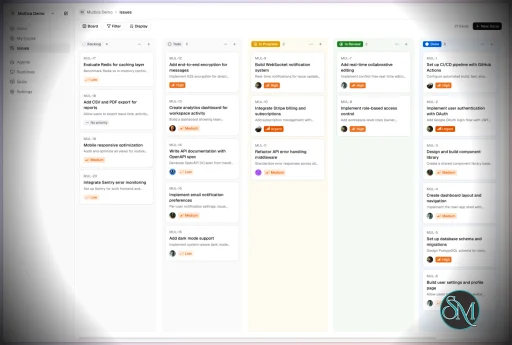
Multica treats AI agents like real contributors. You can assign tasks, monitor progress, and manage their work similar to human developers.


2. Multi-Agent Orchestration

Instead of relying on a single AI model, Multica coordinates multiple agents working together on complex tasks, improving efficiency and scalability.


3. Skill Reuse and Compounding

One of its most innovative features is skill accumulation. Agents can reuse previously learned solutions, reducing redundancy and improving performance over time.


4. Real-Time Workflow Tracking

You get a unified dashboard where you can:

  • Track task progress

  • Monitor agent activity

  • Identify blockers and results

This makes it suitable for structured development environments.


5. CLI and Web Interface

Multica provides both:

  • A command-line interface for developers

  • A web UI for managing workflows and agents

It supports local and cloud-based environments, offering flexibility in deployment.


6. Open Source and Flexible

Being open source, Multica allows:

  • Full customization

  • Self-hosting

  • Integration with different AI models and tools

This makes it appealing for teams that want control over their AI infrastructure.


Performance and Use Cases

Multica is designed for advanced workflows rather than casual use. It performs best in environments where multiple AI agents are needed to collaborate.

Typical use cases include:

  • AI-assisted software development

  • Automation pipelines

  • Multi-step research and analysis

  • DevOps and engineering workflows

Its ability to coordinate agents makes it especially useful for complex tasks that go beyond simple prompts.

Quick Install

curl -fsSL https://raw.githubusercontent.com/multica-ai/multica/main/scripts/install.sh | bash

Installs the Multica CLI on macOS and Linux. Works with Homebrew or downloads the binary directly.

Windows (PowerShell):

irm https://raw.githubusercontent.com/multica-ai/multica/main/scripts/install.ps1 | iex

Then configure, authenticate, and start the daemon in one command:

multica setup          # Connect to Multica Cloud, log in, start daemon

Self-hosting? Add --with-server to deploy a full Multica server on your machine:

curl -fsSL https://raw.githubusercontent.com/multica-ai/multica/main/scripts/install.sh | bash -s -- --with-server
multica setup self-host

Requires Docker. See the Self-Hosting Guide for details.


Getting Started

1. Set up and start the daemon

multica setup           # Configure, authenticate, and start the daemon

The daemon runs in the background and auto-detects agent CLIs (claude, codex, openclaw, opencode) on your PATH.

2. Verify your runtime

Open your workspace in the Multica web app. Navigate to Settings → Runtimes — you should see your machine listed as an active Runtime.

What is a Runtime? A Runtime is a compute environment that can execute agent tasks. It can be your local machine (via the daemon) or a cloud instance. Each runtime reports which agent CLIs are available, so Multica knows where to route work.

3. Create an agent

Go to Settings → Agents and click New Agent. Pick the runtime you just connected and choose a provider (Claude Code, Codex, OpenClaw, or OpenCode). Give your agent a name — this is how it will appear on the board, in comments, and in assignments.

4. Assign your first task

Create an issue from the board (or via multica issue create), then assign it to your new agent. The agent will automatically pick up the task, execute it on your runtime, and report progress — just like a human teammate.


User Experience

The concept behind Multica is powerful, but it comes with complexity.

  • Requires understanding of AI agents and workflows

  • Setup may involve configuring runtimes and integrations

  • More suited for developers than beginners

However, once configured, it provides a highly structured and scalable system.


Pros and Cons

Pros

  • Open source and highly customizable

  • Supports multi-agent collaboration

  • Reusable skill system improves efficiency

  • Real-time workflow tracking

  • Flexible deployment options

Cons

  • Still early-stage and evolving

  • Setup complexity is high

  • Requires technical knowledge

  • Not suitable for simple AI tasks


Who Should Use Multica

Multica is ideal for:

  • Developers working with AI agents

  • Teams building automated workflows

  • Companies experimenting with agent-based systems

  • Advanced users exploring AI orchestration

It is not designed for casual users who just need a simple chatbot.


Final Verdict

Multica represents the next step in AI tooling, moving from single assistants to collaborative AI systems. While still evolving, it introduces a powerful concept that could shape how teams use AI in development.

Multica is a promising platform for advanced users who want to build scalable, multi-agent AI workflows with full control and flexibility.

If you are exploring multi-agent AI systems or building automated development workflows, Multica is an emerging tool worth paying attention to. It introduces a new way to treat AI agents not just as tools, but as collaborative team members working alongside developers.
Multica v0.5.0
Free
Software Informations:
Developer:

Operating System:
Windows / macOS / Linux
Date Added:
2026-09-18T11:03:23.035Z
Categories:

Post a Comment/Report Broken Link: