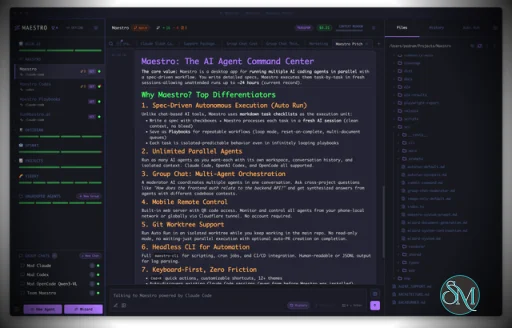
Maestro is a cross platform desktop application built to orchestrate multiple AI agents with isolated contexts. Each agent operates independently while still being managed under a unified command center. This allows users to execute complex workflows, parallel tasks, and long running processes efficiently.
The tool is open source and actively developed, targeting users who work with AI assisted development, research, automation, and experimentation.
Download Maestro v0.17.5 - AI Agent Command Center - Software Mirrors |
|---|
Maestro v0.17.5 - AI Agent Command Center for Windows |
Maestro v0.17.5 - AI Agent Command Center for macOSmaestro-0.17.5-x64-mac.zip | 219.46 MB maestro-0.17.5-x64-mac.dmg | 221.43 MB |
Maestro v0.17.5 - AI Agent Command Center for Linuxmaestro-0.17.5-x86_64.rpm | 129.05 MB maestro-0.17.5-x86_64.AppImage | 218.03 MB maestro-0.17.5-arm64.deb | 153.67 MB maestro-0.17.5-arm64.AppImage | 218.36 MB |
Maestro v0.17.5 - AI Agent Command Center Source CodeMaestro v0.17.5 - AI Agent Command Center Source code (zip) Maestro v0.17.5 - AI Agent Command Center Source code (tar.gz) |
Maestro v0.17.5 - AI Agent Command Center Release Notes:0.17.5 Highlights📝 Auto Run stops eating what you type. Saving a document, or an agent touching it while you edit, used to reload it from disk and quietly delete whatever you had typed since. Your unsaved edits now stay put (Maestro warns you when the file changed underneath you), the caret stays where you left it, oneCmd+Z undoes one burst of typing instead of half a sentence, and Revert throws away everything since your last save, not just some of it.
🚦 Human-in-the-loop gates let you through. Pressing Resume on a gate used to pause the run again on the same gate, forever. The button now reads "Done, Resume", records that you did the step, and moves on. A run parked on a gate or an error also stops its clock, so a gate you answered the next morning no longer counts the night as run time.
📬 Queued messages always go out. A queue could stall with the agent sitting idle and your messages waiting behind nothing until you restarted Maestro. An idle agent now works through its queue until it is empty, and Recover Session tells you whether your click sent the prompt or queued it, so it no longer takes seven clicks to learn that it worked.
🛟 Maestro opens even when something on disk is broken. A settings or sessions file cut off mid-write (a crash, a full disk, a cloud-sync folder) used to stop every launch; the damaged file is now set aside under a clearly named copy and Maestro starts. An agent whose project folder was deleted, renamed, or sits on an unplugged drive now refuses to start and names the missing folder, rather than crashing the app (on Windows, repeatedly) or quietly running somewhere else.
🪟 Windows SSH remotes explain themselves. A remote whose OpenSSH hands commands to PowerShell or cmd.exe can never run an agent, and it used to fail with a wall of errors that looked like a key or network problem. Test Connection now names the Windows shell and gives you the one command that points OpenSSH at Git Bash.
Also in 0.17.5
|
Key Features
Maestro allows users to run multiple AI agents in parallel while keeping their context, state, and execution separated. This enables large tasks to be broken down and handled simultaneously.
The Auto Run and Playbook system lets users define workflows that execute steps automatically. These workflows can loop, batch tasks, or run unattended, making them suitable for long or repetitive operations.
Maestro supports group chat coordination where multiple agents collaborate within a single task. The tool handles routing and coordination to produce unified results.
Remote monitoring and control features allow users to observe and manage agent activity even when away from the main workstation.
A built in command line interface enables headless execution and scripting, allowing Maestro to integrate into broader automation workflows.
Ease of Use
Maestro is designed for users with technical experience. While it is not a beginner focused tool, its interface is structured for efficiency, especially for users familiar with development tools and multitasking environments.
Once configured, workflows are repeatable and easy to manage.
Performance and Compatibility
Maestro runs on Windows, macOS, and Linux. Performance scales based on system resources and the number of agents running concurrently. The application remains responsive even during complex orchestration tasks when used on modern hardware.
Because Maestro coordinates agents rather than performing heavy computation itself, overall performance largely depends on external AI services and configurations.
Pros and Cons
Advantages include powerful multi agent orchestration, parallel execution, automation through playbooks, command line support, and open source flexibility.
Limitations include a learning curve for new users, reliance on external AI models for functionality, and a focus on advanced workflows rather than simple chat usage.
Final Verdict
Maestro is a capable and thoughtfully designed orchestration tool for managing AI agents at scale. Its focus on parallel workflows, automation, and centralized control makes it a strong choice for advanced users working with AI assisted tasks.
For those who need structured AI agent orchestration rather than simple interaction, Maestro delivers a reliable and efficient solution.
Maestro is an open source agent orchestration tool that provides a centralized desktop environment for managing and running multiple AI agents and workflows simultaneously. It is designed for developers and advanced users who need structured coordination, parallel execution, and automation across AI driven tasks.
Maestro focuses on improving productivity when working with multiple agents by offering orchestration, monitoring, and workflow control from a single interface.
Developer:
Pedram Amini
Operating System:
Windows / macOS / Linux
Date Added:
2026-09-26T05:04:04.838Z
Categories:
Post a Comment/Report Broken Link: