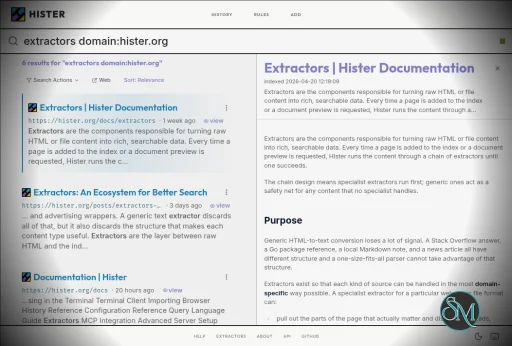
Hister is a free and open-source personal search engine that indexes the contents of web pages and local files so they can be searched later. It runs on infrastructure you control, provides a web interface and terminal search, and can also connect to AI assistants through MCP.
Features
Hister performs full-text indexing rather than searching only page titles and URLs. It can index pages visited through its Firefox and Chrome browser extensions and can also index local directories and imported browser history.
Its search system supports phrases, wildcards, field filters, negation, aliases, and result priorities. This provides more control than a basic keyword search when working with a large personal archive.
Hister also supports optional semantic search through a configurable embeddings endpoint. This allows searches based on meaning rather than exact words, although using a remote embeddings service means document text may be sent to that service.
The software can crawl websites recursively and import existing content. Recent releases have also added unified imports for browser history, local files, bookmarks, and archived content from services such as Linkwarden, Karakeep, and Shaarli.
Hister can be accessed through its web interface, terminal interface, TUI, command line, or an AI assistant using MCP. Multi-user support allows separate documents and search results to be maintained on a shared server.
Download Hister v0.20.0 - Software Mirrors |
|---|
Hister v0.20.0 for Windows |
Hister v0.20.0 for macOS |
Hister v0.20.0 for Linux |
Others Download related to Hister v0.20.0 |
Hister v0.20.0 Source Code |
Hister v0.20.0 Release Notes:New FeaturesBrowser Bookmark Importshister import browser bookmarks imports bookmarks from Firefox based browsers,
Chromium based browsers, and Ladybird. It supports automatic detection and
explicit --browser and --db options, applies the bookmarks label by default,
and uses persistent crawl jobs that can be interrupted and resumed.
The new hister import browser history command accepts the same named options.
The existing positional history command and older browser import jobs remain
supported.
Raindrop.io Importshister import raindrop imports bookmarks through the Raindrop.io API or from a
CSV export with --input. API imports preserve titles, dates, notes, highlights,
annotations, tags, favorites, and collection paths. Linked pages are downloaded
with the configured crawler, while bookmark details are retained if a page
cannot be retrieved. CSV input can also be read from standard input.
Continuous File Importshister import file --watch performs an initial scan and keeps remote file
snapshots updated as files change. It supports explicit files, recursive
directories, or configured directory rules, including labels and ownership.
Temporary server failures are retried while the command runs.
Watch mode handles file snapshots rather than restoring exports or archives.
Removing or renaming a source file leaves its previously imported snapshot in
the index.
Configuration and DiagnosticsThe newhister config commands create default configuration, report its path,
show effective settings with credentials redacted, and validate configuration
and extractor options. Inspection does not create runtime files.
hister doctor checks local configuration and extractor dependencies, then
verifies server connectivity, authentication, index compatibility, and server
extractor dependencies. It supports structured output and uses the new
GET /api/diagnostics endpoint, which requires an administrator in multiple
user mode.
Allow Rules and Guided Rule EditingThe newallow rule group restricts indexing to URLs matching at least one
allowed pattern. Skip rules still take precedence, and an empty allow list
preserves the existing behavior. The Rules page can now create patterns from
domains or exact URLs, optionally include subdomains, and validate and test
patterns before saving them.
Manual indexing from the browser extension and --ignore-rules on hister index
or import commands can override allow and skip rules. This choice is saved with
the document and survives reindexing. Sensitive content checks, robots rules,
and source selection filters still apply.
Structured Command Line OutputSearch, indexing summaries, crawl inspection, diagnostics, and file and service import summaries share text, JSON, JSONL, and CSV output formats. Search results stream as pages arrive and preserve selected field order in text and CSV. Indexing reports indexed, skipped, and failed counts and continues after individual URL failures.hister index --failed-urls PATH writes failed URLs to
a file that can be reused with --input.
Prometheus Monitoring and Unix SocketsSettingserver.metrics: true enables GET /metrics with search, indexing,
document count, storage, Go runtime, and process metrics. The endpoint follows
the configured base path and authentication settings and requires an
administrator in multiple user mode, including when public mode is enabled.
The server can listen on a Unix socket using a server.address such as
unix:/run/hister/hister.sock. An explicit public server.base_url is required
for clients connecting through a reverse proxy. The socket is removed on a
clean shutdown.
Enhancements
.json extension when omitted, and sensitive content
matches are easier to identify.
Bug Fixes
Backward Compatibility NotesThe following changes require attention when upgrading from v0.19.0:
2 when processing completes with item failures and
status 1 for errors that prevent completion. Update scripts that depend on
earlier output shapes or exit statuses.
hister create-config. The old command remains as a deprecated alias and
writes its notice to standard error. Configuration creation refuses to
overwrite an existing file.
disable_pkce: true in their provider configuration. Restart logins begun
before the upgrade; existing authenticated sessions remain valid. Custom
GitHub token endpoints and proxies must accept form POST requests.
|
Performance and Compatibility
Hister is written in Go and can run locally or on infrastructure controlled by the user. It supports SQLite and PostgreSQL as database backends, with PostgreSQL support added in version 0.12.0.
The application is designed for continuous personal indexing. Once the server is running, the browser extension can automatically send visited page content to the configured Hister server for indexing.
Hister does not require a cloud service or account for a local personal setup. The project states that it has no telemetry or mandatory cloud synchronization. Indexed documents and search indexes remain on the Hister server.
The current release series also includes features for public search deployments, documentation datasets, and additional import sources. Version 0.17.0 introduced a unified import interface and support for importing content from Linkwarden, Karakeep, and Shaarli.
System Requirements
Hister provides prebuilt binaries for supported platforms, including Windows, Linux, and macOS. The Windows version can be started directly from PowerShell using the hister.exe binary.
For normal use:
Windows, Linux, or macOS
Firefox or Chrome if browser history indexing is required
Storage for indexed documents and search indexes
A local or server environment where Hister can remain running
For building from source:
Go 1.26
npm
C compiler for CGO dependencies
Hardware requirements are not specified as a fixed minimum because resource usage depends on the amount of content being indexed and the selected database and search configuration.
Pros and Cons
Pros
Free and open source
Full-text personal search
Indexes web pages and local files
Firefox and Chrome integration
Browser history import
Website crawler
Powerful search operators
Optional semantic search
Web interface
Terminal and TUI access
MCP support for AI assistants
Multi-user support
No telemetry by default
No mandatory cloud service
Supports SQLite and PostgreSQL
Docker and Nix installation options
AGPLv3 licensed
Cons
Requires running and maintaining your own server
Initial indexing can consume significant storage and processing resources
Semantic search requires an embeddings endpoint
Browser integration requires an extension
More complex to configure than conventional desktop search tools
The AGPLv3 license may require consideration for organizations modifying and redistributing the software
How to Install
Download the Hister binary for your operating system from the project's releases. On Windows, rename the executable to hister.exe if necessary and start it from PowerShell with:
.\hister.exe listenOn Linux or macOS, make the binary executable and start it with:
chmod +x hister
./hister listen
Then open the local Hister web interface at http://127.0.0.1:4433 and install the Firefox or Chrome browser extension. After visiting pages with the extension enabled, their content can be indexed and searched through Hister.
Hister can also be installed using Homebrew, Docker, or Nix. Existing browser history, local directories, and files can be imported after installation.
Final Verdict
Hister is a useful personal search engine for users who want to build their own searchable archive of web pages and files. Its full-text indexing, browser integration, local deployment, advanced queries, semantic search option, and MCP support make it more than a simple browser history search tool.
The main tradeoff is that Hister is self-hosted software. Users need to keep the server running and manage the storage and indexing environment themselves. For users who want a private search index under their own control, that approach provides considerably more control over their data.
Developer:
Adam Tauber
Operating System:
Windows / macOS / Linux
Date Added:
2026-09-24T16:03:28.405Z
Categories:
Post a Comment/Report Broken Link: