GTweak is a portable Windows tweaking application designed to modify advanced system settings that are normally hidden behind Group Policy, Registry Editor, or PowerShell commands. It focuses heavily on debloating Windows, reducing telemetry, and optimizing performance.
The newer GTweak project available on GitHub and SourceForge is different from the older command line GTweak batch script from the early 2010s. The modern version includes a graphical interface and a broader set of optimization features.
GTweak is a Windows optimization and debloating utility aimed at users who want deeper control over privacy, performance, and system customization. It combines telemetry disabling, service management, UI tweaks, and app removal tools into a single portable package. While powerful, it also comes with significant risks if used carelessly.
Download GTweak 5.5.5 - Software Mirrors |
|---|
GTweak 5.5.5 Release Notes:
|
Key Features of GTweak
Windows Debloating
GTweak can remove or disable built in Windows components such as OneDrive, Edge, AI assistants, and preinstalled apps.Privacy and Telemetry Controls
The software includes options for disabling telemetry, tracking services, background data collection, and certain Microsoft integrations.Performance Optimization
Users can tweak power plans, disable unnecessary services, manage startup behavior, and apply various performance related changes.System Customization
GTweak allows modifications to taskbar appearance, themes, Explorer settings, and input behaviors.Portable Design
The tool does not require installation and can run directly as a standalone executable.
User Experience
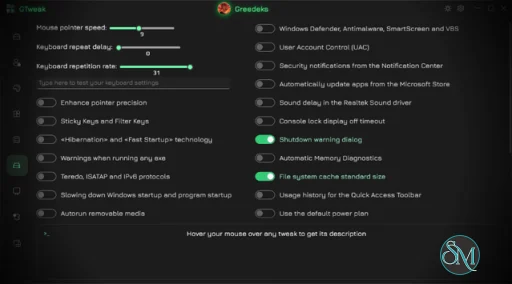
GTweak offers a modern interface compared to many older tweaking utilities, but the sheer number of options can overwhelm beginners. Most tweaks are presented as toggles, making advanced Windows modifications more accessible than manual registry editing.
However, transparency is not always ideal. Some reviewers noted that the application does not clearly explain every system change being made behind the scenes.
Safety and Risks
This is where GTweak becomes controversial.
Some security tools and Windows Defender versions have flagged GTweak due to its deep system modifications and included activation related functionality. COMPUTER BILD specifically warned against using it on production systems and noted that some included activation tools may not be legal.
Community discussions around tweaking utilities in general are also highly mixed. Many Reddit users describe aggressive tweaking tools as placebo at best and potentially harmful at worst, especially when they disable core Windows features or apply undocumented registry changes.
For experienced users who understand Windows internals and maintain backups, GTweak can still be useful. Beginners should be cautious and avoid applying large groups of tweaks blindly.
Performance and Compatibility
GTweak works on modern Windows versions and is lightweight in terms of resource usage. Since it mainly applies system level configuration changes, the app itself runs quickly.
Actual performance improvements vary significantly depending on the system. Users with clean modern Windows installations may see little measurable gain beyond reduced background activity.
Pros
Extensive Windows debloating and privacy controls
Portable and lightweight
Large collection of advanced tweaks
Modern graphical interface
Useful for experienced power users
Cons
Can trigger antivirus or Defender warnings
Some included features are controversial
Risk of system instability if misused
Limited transparency for certain tweaks
Beginners may damage system functionality accidentally
GTweak is best suited for advanced Windows users, enthusiasts, and testers who understand system tweaking, backups, and recovery procedures.
It is not recommended for casual users or mission critical systems unless every tweak is carefully reviewed beforehand.
GTweak offers a powerful collection of Windows optimization and debloating features in a portable package. For experienced users, it can provide useful control over privacy and system behavior. However, its aggressive nature, controversial features, and potential stability risks make it a tool that should be used carefully and selectively.
Post a Comment/Report Broken Link: